Help with Tayda UV print:
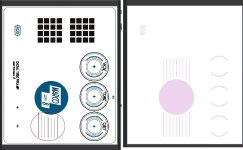
In the dashboard, it shows this message on my order: "There is wrong layering issue. You have put white layer on top of color layer, it should be white layer under color layer. Please fix it. If you have things in color layer that covering white layer and if you need to expose things in white layer, you can do it by cropping things in your color layer using pathfinder function in AI to expose white layer under it.""
The thing is, that set of lines that their image shows in the color layer doesn't exist in the pdf that I sent them (nor in the original AI file).
This is the same file that I have printed before.
So, the question:
I just press "Print as is"?
Any similar experiences?
The thing is, I don't want to lose the money for this batch, nor the time that has passed (this order dates from June 30)

In the dashboard, it shows this message on my order: "There is wrong layering issue. You have put white layer on top of color layer, it should be white layer under color layer. Please fix it. If you have things in color layer that covering white layer and if you need to expose things in white layer, you can do it by cropping things in your color layer using pathfinder function in AI to expose white layer under it.""
The thing is, that set of lines that their image shows in the color layer doesn't exist in the pdf that I sent them (nor in the original AI file).
This is the same file that I have printed before.
So, the question:
I just press "Print as is"?
Any similar experiences?
The thing is, I don't want to lose the money for this batch, nor the time that has passed (this order dates from June 30)