You are using an out of date browser. It may not display this or other websites correctly.
You should upgrade or use an alternative browser.
You should upgrade or use an alternative browser.
WIP - Amplifier Stage Designer (tool) - v0.3 (15.11.26)
- Thread starter Asdrael
- Start date


Asdrael
Well-known member
It’s when you think you are good enough to not check the bias range your network is providing and act like it’s normal when you blow a pair of KT77 because your effective bias range is 100-200% dissipation.What’s FS bias? Please enlight me!

Passinwind
Well-known member
That's what I said too, and the developer agrees. So full LTspice import is moving up the work queue priority list since he now has someone who will definitely use it. Some other NAM apps already have editable schematics for selected sims, which I guess is an OK start at least.Thing is, I doubt anyone is dabbling with tone stacks only. For a lot of us, it's all or nothing.
Again, excellent work on your part though, and I will get to it soon!

Asdrael
Well-known member
Yeah I can see the benefit of the LTSpice addition there. For my stuff, in the end, I decided against it - I hate it that muchThat's what I said too, and the developer agrees. So full LTspice import is moving up the work queue priority list since he now has someone who will definitely use it. Some other NAM apps already have editable schematics for selected sims, which I guess is an OK start at least.
Again, excellent work on your part though, and I will get to it soon!
 Plus I intend this app to basically replace LTSpic for general tube amp building.
Cheers for trying it out! If you want to let me know more in details where you struggled, feel free. Once I found my way of doing stuff, it's difficult to anticipate how else some stuff can be approached by other people. In a lot of instance, there are several ways to skin a cat, but the tone stacks can be complex. There are quite a few prewired examples, but if any are missing, I can add them in. Also don't forget you should be able to drag and drop components OR add them by typing them in the line OR do "Add component" for a new branch from virtually any node.So far, giving it a try, I like it. Some of the things like adding tone stack, etc. takes getting used to, but I eventually figured it out. Will keep working with it - I did a JCM800 mod that I put in my preamp v.1 a couple years back (I'm rebuilding it).
Passinwind
Well-known member
I totally get that. In my case I already have 15+ years of archived solid state Spice models (and plenty of tube ones too), so being able to just port those into Live NAM would be very useful. But for new white sheet tube designs for physical builds I'm definitely all in on using a better tool.Yeah I can see the benefit of the LTSpice addition there. For my stuff, in the end, I decided against it - I hate it that much

Asdrael
Well-known member
I just realized that I could simply push the html on github. So feel free to access it online too:
Design saves should be browser based.
Design saves should be browser based.
Passinwind
Well-known member
Just threw about 45 minutes at this, and it's looking very good so far! I'm still working out the basic building block placements, but I was able to simulate the preamp of my last build well enough to see good correlation to both my LTspice model and actual bench measurements. Thanks for adding the octal preamp tubes, it's great to see how the load lines move around with component changes. I would already totally use this tool for my next new design.
Asdrael
Well-known member
Glad to read you gave it a shot! And especially glad to read it matches LTSpice / real world data.Just threw about 45 minutes at this, and it's looking very good so far! I'm still working out the basic building block placements, but I was able to simulate the preamp of my last build well enough to see good correlation to both my LTspice model and actual bench measurements. Thanks for adding the octal preamp tubes, it's great to see how the load lines move around with component changes. I would already totally use this tool for my next new design.
I also gave it a good 30 min again today since I haven’t touched it in a week and noticed a few things that will get better soon - I was struggling with the implementation of a multichannel that jumps multiple channels at a time in parallel. Should come in a week or so.
Asdrael
Well-known member
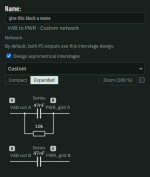
That was a design choice to avoid overcrowding - the “interstage” betweeen LTPI and power stage shows only one connection but applies it to both LTPI outputs (eg one 22nF displayed - should work electrically as if there was one on each end). It might not be written and probably isn’t instinctive so I will change it. Thanks.Oh, something I did notice: only one half of the LTPI seems to connect to the power supply in the schematic. You have to manually connect the 2nd out of the PI to the power stage and it doesn't look like the out 1 from the LTPI. Unless I bunged it up.
Asdrael
Well-known member
Should be clearer now in my dev version; all while enabling PPIMV.No, not a big deal. I just was confused because it looked missing and unconnected. Now that I know, I don't have to mess with it