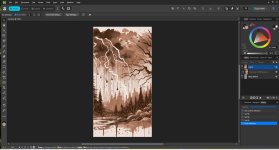
I'm very new to the Tayda UV printing service and would like to use it on my next pedal build. I've created a graphic using Affinity Designer and think it is correct but would like some feeback before I order the UV service. Is there anyone out there savvy enough with Affinity who could take a look at my attached file and tell me if it will work?

You are using an out of date browser. It may not display this or other websites correctly.
You should upgrade or use an alternative browser.
You should upgrade or use an alternative browser.
Affinity UV File
- Thread starter Steven711
- Start date

leadfoot
Well-known member
You can use this: https://github.com/drlholloway/tayda-uv-artwork-processor or https://forge.optictonelab.com/ to convert it to an acceptable tayda file.
I wrote the tayda UV artwork processor and another forum member, @chongmagic wrote a web version. I've used both and they work well.

And...
I wrote the tayda UV artwork processor and another forum member, @chongmagic wrote a web version. I've used both and they work well.
And...
Attachments

Last edited:
Thank you! I did manage to figure out the layers in Affinity. I have white, CMYK, Gloss and the dimensions in mm are correct. Following the Tayda UV site, I was able to export the Affinity file as a PDF. I believe that will work for their printing service?You can use this: https://github.com/drlholloway/tayda-uv-artwork-processor or https://forge.optictonelab.com/ to convert it to an acceptable tayda file.
I wrote the tayda UV artwork processor and another forum member, @chongmagic wrote a web version. I've used both and they work well.
View attachment 125119
And...
leadfoot
Well-known member
Yes, you can also use their pdfman service that lets you see what it is going to print.Thank you! I did manage to figure out the layers in Affinity. I have white, CMYK, Gloss and the dimensions in mm are correct. Following the Tayda UV site, I was able to export the Affinity file as a PDF. I believe that will work for their printing service?
Excellent!! Thank you for that tip! I’m pretty stoked to be moving on from crappy decals and mediocre looking pedals.Yes, you can also use their pdfman service that lets you see what it is going to print.
I did have one final question. When I add the UV printing service and drill template to my cart, do they somehow link that to my email and see the drill template and UV template and use those? I don’t really see where to add my drill template and UV file to my cart.Yes, you can also use their pdfman service that lets you see what it is going to print.
leadfoot
Well-known member
The new flow for UV printing from Tayda is to start at https://drill.taydakits.com/dashboard and design from there. It has a few straightforward steps.