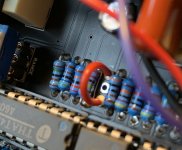
switched jack for muzzle

Hi,

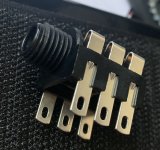
I have build a muzzle without the sidechain jack and put a jumper between hole 1 and hole 3. But it works poorly. It darkens the tone a little and it only works with the guirar signal and not in the loop or after od. It doesnt work with louder signals than the guitar signal. Ihave a few jacks laying around. Does this jack work as a switching jack för the muzzle? and if so, how do I connect it to the pcb?
cheers :)
 

Attachments

  • switchad jack.JPG
    switchad jack.JPG
    16.1 KB · Views: 15
  • IMG_9169 (1).jpg
    IMG_9169 (1).jpg
    749.3 KB · Views: 15
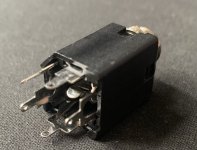
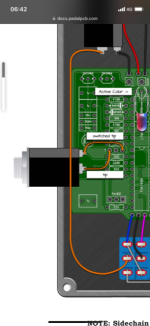
I also found this jack and it is in stereo as well with a thousand connections. Does it work for this build and how do I connect what lug to what connection on the pcb?
 

Attachments

  • 041E899B-ACAE-4BB6-85B1-9A3EA5B6A53A.jpeg
    041E899B-ACAE-4BB6-85B1-9A3EA5B6A53A.jpeg
    706 KB · Views: 3
There are a few threads on switching jacks.

Here's one, check post #10...

 
There are a few threads on switching jacks.

Here's one, check post #10...

Hi and thanks for the reply.
I can’t find any info on if a stereo switching jack is going to work. I know a mono one will work but I have these 2 at my disposal :)
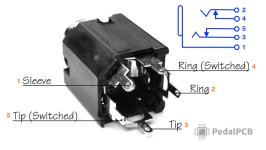
And I can’t understand that diagram of the stereo jack either :(
 
I don't know what else to tell you, Cybercow already pointed out the key in the lower right corner of the diagram he posted (which I've copied into the diagram below).
Right above that in Cybercow's diagram, it depicts the jack with pin numbers labelled.

The stereo SWITCHING jack will work (but not a regular stereo jack), you just use the relevant pins you need: tip 5, sleeve-switch 3, [EDIT] TIP 3, TIP-SW 5 and sleeve itself 1. Ignore the ring 2 and its associated switch pin 4. Here's PPCB's own WIKI diagram of the jack, to which I've amended the numbering.

1-4%22_Jack_Pinout Switched Stereo PedalPCB.jpeg

I have build a muzzle without the sidechain jack and put a jumper between hole 1 and hole 3.

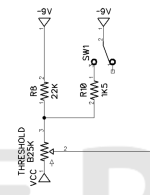
Are you referring to SW1?

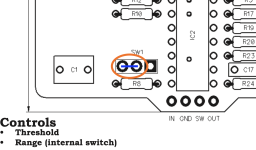
The following diagrams are from the Muzzle Classic build doc, but the same can be applied to the Muzzle SMD...

MUZZLE SW1.png

If you DON'T want R10 to be active, you don't have to do anything. No switch and no jumper required. You could even leave R10 off the board completely.
If you DO want R10 to be active, permanently, you would connect (jumper) SW1's pad 3 to pad 2.

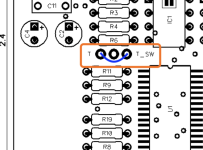
MUZZLE SW1 PCB.png

For the sake of versatility, I'd just put in the SPDT on-on toggle for SW1 in the build.


OK, re-read the OP and had a peek at the other Muzzle build doc (I've got the Classic) If you're referring to the
SMD VERSION
and you're referring to KEY1 and KEY2, then yes they are the outer two holes, the centre being ground and you've jumpered them correctly if going from one outer hole to the other — just make sure if you're using bare wire to jumper them that it doesn't touch the middle pad — better still, don't use bare wire.

MUZZLE SMD KEYS.png


Seems this isn't your first rodeo with this circuit.

If you're building it without the side-chain key input jack, then you don't need to use a switched jack at all.
Just wire it up like a normal pedal with in-jack tip to the bypass-switch IN and the out-jack wired to the bypass-switch OUT (For bypass, I don't know if you're using a 3PDT handwired, a 3PDT with a daughterboard, or some type of relay-based bypass — otherwise I'd be more specific on the wiring).

 
Last edited:
I don't know what else to tell you, Cybercow already pointed out the key in the lower right corner of the diagram he posted (which I've copied into the diagram below).
Right above that in Cybercow's diagram, it depicts the jack with pin numbers labelled.

The stereo SWITCHING jack will work (but not a regular stereo jack), you just use the relevant pins you need: tip 5, sleeve-switch 3, and sleeve itself 1. Ignore the ring 2 and its associated switch pin 4. Here's PPCB's own WIKI diagram of the jack, to which I've amended the numbering.

View attachment 34439


Are you referring to SW1?

The following diagrams are from the Muzzle Classic build doc, but the same can be applied to the Muzzle SMD...

View attachment 34434

If you DON'T want R10 to be active, you don't have to do anything. No switch and no jumper required. You could even leave R10 off the board completely.
If you DO want R10 to be active, permanently, you would connect (jumper) SW1's pad 3 to pad 2.

View attachment 34435

For the sake of versatility, I'd just put in the SPDT on-on toggle for SW1 in the build.


OK, re-read the OP and had a peek at the other Muzzle build doc (I've got the Classic) If you're referring to the
SMD VERSION
and you're referring to KEY1 and KEY2, then yes they are the outer two holes, the centre being ground and you've jumpered them correctly if going from one outer hole to the other — just make sure if you're using bare wire to jumper them that it doesn't touch the middle pad — better still, don't use bare wire.

View attachment 34437


Seems this isn't your first rodeo with this circuit.

If you're building it without the side-chain key input jack, then you don't need to use a switched jack at all.
Just wire it up like a normal pedal with in-jack tip to the bypass-switch IN and the out-jack wired to the bypass-switch OUT (For bypass, I don't know if you're using a 3PDT handwired, a 3PDT with a daughterboard, or some type of relay-based bypass — otherwise I'd be more specific on the wiring).
Hi and super thanks to the long and helpful reply.
The thing is it is already built using this last method you mentioned (no switching jack) but it works poorly. So I have to check what version I have when I get back from work. I think they all are classic.
But when you say “sleeve-switch and sleeve it self” do you mean what is labeled “switched tip” on the picture?
This is my third try and the first worked but the 2 last ones doesnt work well. I can post a gut pic later :)
Thanks
 

Attachments

  • DF597EF0-CDE6-48B9-85C6-343CC158D70A.png
    DF597EF0-CDE6-48B9-85C6-343CC158D70A.png
    544.9 KB · Views: 16
Sorry, I screwed up the numbering/nomenclature, I was thinking from the perspective of looking at the jack from the pins end, but I think Cybercow's diagram has it looking from the other end x-ray style... I don't know what the hell I was thinking. ANyWaY...I'll fix my post.
 
Sorry, I screwed up the numbering/nomenclature, I was thinking from the perspective of looking at the jack from the pins end, but I think Cybercow's diagram has it looking from the other end x-ray style... I don't know what the hell I was thinking. ANyWaY...I'll fix my post.

Ah ok :)
Thanks for clearing that up.
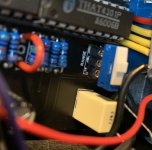
This is a gut picture of the tip/switched tip output on the pcb and the sw1 toggle. I actually don’t know which version this is if it’s the classic or smd. I ordered it as a guest (by mistake) a year ago so there is no order info nor sipping info about it and nothing on the pcb either.
Did I connect something wrong here? It works, it doesn’t work very well. It is super weak. Like on stronger signals it doesn’t clamp down at all.
 

Attachments

  • 808BBFA4-FC8A-4078-9F55-AA3A903518AA.jpeg
    808BBFA4-FC8A-4078-9F55-AA3A903518AA.jpeg
    653 KB · Views: 12
  • BAC2DBB6-EA52-4F64-8314-58A61AB7B24E.jpeg
    BAC2DBB6-EA52-4F64-8314-58A61AB7B24E.jpeg
    478.5 KB · Views: 11
Actually, I just tried it out as the first pedal in the chain and it works extremely well there. It rounds of the tone just a tad bit but its ok. But in the loop it doesn’t work well. The other muzzle I build ( a kit from musikding) works flawlessly in every use. With or without the keyjack and infeon of amp or in the loop.
So I suspect it is something with the way the jumper is wired.
 
You have the Classic version (THAT4301 is through-hole, not SMD). All looks good re jumper and SW1.


- If you suspect the jumper, reflow the solder on it, just heat it up with your iron and you can even add a pinch more solder on it.

- Make sure your ICs are seated well in their sockets.

- It's tedious, but double check the colour-bands on all your resistors and make sure they're what and where they're supposed to be.

 
You have the Classic version (THAT4301 is through-hole, not SMD). All looks good re jumper and SW1.


- If you suspect the jumper, reflow the solder on it, just heat it up with your iron and you can even add a pinch more solder on it.

- Make sure your ICs are seated well in their sockets.

- It's tedious, but double check the colour-bands on all your resistors and make sure they're what and where they're supposed to be.


Super thanks for all your help and that you took the time to respond :)
 
I don't know what else to tell you, Cybercow already pointed out the key in the lower right corner of the diagram he posted (which I've copied into the diagram below).
Right above that in Cybercow's diagram, it depicts the jack with pin numbers labelled.

The stereo SWITCHING jack will work (but not a regular stereo jack), you just use the relevant pins you need: tip 5, sleeve-switch 3, and sleeve itself 1. Ignore the ring 2 and its associated switch pin 4. Here's PPCB's own WIKI diagram of the jack, to which I've amended the numbering.

View attachment 34439


Are you referring to SW1?

The following diagrams are from the Muzzle Classic build doc, but the same can be applied to the Muzzle SMD...

View attachment 34434

If you DON'T want R10 to be active, you don't have to do anything. No switch and no jumper required. You could even leave R10 off the board completely.
If you DO want R10 to be active, permanently, you would connect (jumper) SW1's pad 3 to pad 2.

View attachment 34435

For the sake of versatility, I'd just put in the SPDT on-on toggle for SW1 in the build.


OK, re-read the OP and had a peek at the other Muzzle build doc (I've got the Classic) If you're referring to the
SMD VERSION
and you're referring to KEY1 and KEY2, then yes they are the outer two holes, the centre being ground and you've jumpered them correctly if going from one outer hole to the other — just make sure if you're using bare wire to jumper them that it doesn't touch the middle pad — better still, don't use bare wire.

View attachment 34437


Seems this isn't your first rodeo with this circuit.

If you're building it without the side-chain key input jack, then you don't need to use a switched jack at all.
Just wire it up like a normal pedal with in-jack tip to the bypass-switch IN and the out-jack wired to the bypass-switch OUT (For bypass, I don't know if you're using a 3PDT handwired, a 3PDT with a daughterboard, or some type of relay-based bypass — otherwise I'd be more specific on the wiring).
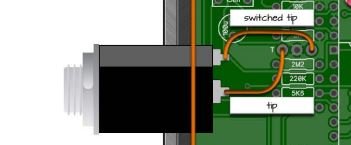
Thank you for this diagram, I've had a muzzle sitting in my trouble shoot pile for close to 10 months now. And it was all because i had Switched tip and tip backwards. Once again, browsing the forums on a bathroom break solves a problem.
 
Thank you for this diagram, I've had a muzzle sitting in my trouble shoot pile for close to 10 months now. And it was all because i had Switched-tip and tip backwards. Once again, browsing the forums on a bathroom break solves a problem.
Thanks for your post — it made me realise I must've edited my post without saving it.
I never fixed the body of text.

Thank goodness the PedalPCB is a reasonable forum and lets me edit old posts, unlike some other forums I'm on that give you 5 maybe 10 minutes to amend a post.

Apologies to all for my sloppiness.
 
Back
Top