
You are using an out of date browser. It may not display this or other websites correctly.
You should upgrade or use an alternative browser.
You should upgrade or use an alternative browser.
New SpinCAD Designer release with major usability improvements
- Thread starter Digital Larry
- Start date

Digital Larry
Well-known member
Were you running the simulator display? try turning that off and see what happens.
DL
DL
Digital Larry
Well-known member
It's when you go into the Simulator menu and click on "enable display", then you get the waveform on top when you run the simulator. In any case, I think that's resolved, just cramming some more features in here, will update in a bit.
Digital Larry
Well-known member
Here's version 1066, "Bayeux" Battle of Hastings and all that. Has a new feature "Scope Probe" under "Special" menu where the feedback loop used to live, under "Loop" well it's still there. When the scope probe is in the layout, optimization is disabled for simulation. It will still optimize if you save to SPN, Clipboard, or HEX.
Connect any pins to the scope probe then you can see them on the scope display. Really handy for looking at control signals.
Pin muting should work now. Have a startup check for Java 8.
Obviously I'm going at warp speed here and the automated testing really only covers file loading and simulation basics, so whatever problems you can come up with are quite helpful.
Thanks,
DL
Connect any pins to the scope probe then you can see them on the scope display. Really handy for looking at control signals.
Pin muting should work now. Have a startup check for Java 8.
Obviously I'm going at warp speed here and the automated testing really only covers file loading and simulation basics, so whatever problems you can come up with are quite helpful.
Thanks,
DL
Attachments

Cybercow
Well-known member
Ran thru a bunch of stuff and no more Control Panel issues. Everything else I touched seems to work fine too.
In the Simulator Options dialog box, it would be nice to see the "Enable Display" option read as "Enable Scope Display". I had no idea what "Display" was till I opened it.
More tomorrow when I'm not so tired. Thanks DL!
Oh yea . . . . .

In the Simulator Options dialog box, it would be nice to see the "Enable Display" option read as "Enable Scope Display". I had no idea what "Display" was till I opened it.
More tomorrow when I'm not so tired. Thanks DL!
Oh yea . . . . .

Last edited:
Digital Larry
Well-known member
Haha my boss just sent me a Slack message with this guy last week. I hadn't really known who he was prior.Ran thru a bunch of stuff and no more Control Panel issues. Everything else I touched seems to work fine too.
In the Simulator Options dialog box, it would be nice to see the "Enable Display" option read as "Enable Scope Display". I had no idea what "Display" was till I opened it.
More tomorrow when I'm not so tired. Thanks DL!
Oh yea . . . . .
View attachment 114329
This guy Claude I been hanging out with has been a great help. I asked him to make an SPCD(J now) file based on a verbal description and he actually did it. Is it worth $20-$100 a month (for Claude)? Probably not to me personally but as a software engineer (I now do this for a living in between making Mary Halvorson patches) I am flabbergasted by its capabilities. Stuff that had been sitting there for years due to lack of time, skill, and interest just blew away in the past two weeks.
I cleaned up a few more control panels (e.g. Smoother still has a problem in that last version I think). Due to the way SpinCAD evolved, some of the earliest blocks were hand written and inconsistent in implementation. Never mind that I learned Java in order to create SpinCAD and developed all sorts of bad habits.
I may spend another few weeks at it but I spent all Saturday in front of the computer which is not exactly how I want to spend my life!
Let me know if you find anything else!
DL
Last edited:
Digital Larry
Well-known member
I let Mary know that she's just gonna have to hold her horses for a bit.

 github.com
Here's yet another new release, with some rather cool new blocks.
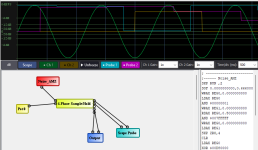
4-phase sample and hold puts out 4 separate S/H waveforms from a single input using a built in SIN LFO. The points where the S/H takes place are evenly spaced along the cycle. I haven't done much more than test it but I bet you can get some weird combinations of gain (tremolo) and filter or modulation effects with this. The last pin on the bottom is the sine wave out, I think I'll remove that. You can always use an "LFO Value" block if you want to use that somewhere else.

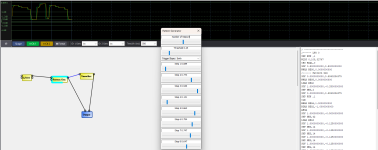
Next one is a 3-to-12 step pattern generator. This lends itself to ZVex "Seek Wah" type applications. If you connect a pot or signal to the 2nd pin (Range) it allows you to shorten the sequence. This one has a threshold as well as a setting for slope. If you're using either positive or negative slope only, then the triggering will be evenly spaced and follow the frequency of the input signal (e.g. sine). If you trigger on both, then by changing the threshold you can get asymmetrical swing type effects and the frequency will double.

I also added another metric ****-ton of automated testing, including adding each module and making sure its control panel will show up 3 times in a row.
I know these blocks take a lot of instructions but with a filter or two you might be able to get some wild sounds. I hope this one works well for everybody but let me know if there's some other issue.
Thanks,
DL
Release Bug fixes, new blocks - Scope, Pattern Generator, 4-phase S/H · HolyCityAudio/SpinCAD-Designer
SpinCAD Designer 0.99-1067 New Features 4-Phase Sample/Hold block — Enabled in Controls menu. Uses sine LFO zero-crossing detection to sample input at 4 phase points (0, 90, 180, 270 degrees), pro...
github.com
Here's yet another new release, with some rather cool new blocks.
- 4-Phase Sample/Hold block — Enabled in Controls menu. Uses sine LFO zero-crossing detection to sample input at 4 phase points (0, 90, 180, 270 degrees), producing 4 independent S/H outputs
- Pattern Generator — 8-step triggered sequencer with range control
- Scope Probe block — New block for simulator signal inspection
4-phase sample and hold puts out 4 separate S/H waveforms from a single input using a built in SIN LFO. The points where the S/H takes place are evenly spaced along the cycle. I haven't done much more than test it but I bet you can get some weird combinations of gain (tremolo) and filter or modulation effects with this. The last pin on the bottom is the sine wave out, I think I'll remove that. You can always use an "LFO Value" block if you want to use that somewhere else.
Next one is a 3-to-12 step pattern generator. This lends itself to ZVex "Seek Wah" type applications. If you connect a pot or signal to the 2nd pin (Range) it allows you to shorten the sequence. This one has a threshold as well as a setting for slope. If you're using either positive or negative slope only, then the triggering will be evenly spaced and follow the frequency of the input signal (e.g. sine). If you trigger on both, then by changing the threshold you can get asymmetrical swing type effects and the frequency will double.
I also added another metric ****-ton of automated testing, including adding each module and making sure its control panel will show up 3 times in a row.
I know these blocks take a lot of instructions but with a filter or two you might be able to get some wild sounds. I hope this one works well for everybody but let me know if there's some other issue.
Thanks,
DL
Digital Larry
Well-known member
OK, here's another release with some exciting new goodies in there.
I am trying to get access to my Gitbook site back, I don't know how it happened but when I log in I don't see anything. Once I do that it will speed up documenting stuff. In the meantime I am just dropping hints and hope you can find things. I am marking this a pre-release as I am interested in getting feedback on the Reverb Designer. Shimmer mode doesn't work to my ear so I'm still looking into that.
 github.com
Release Notes: SpinCAD Designer 0.99-1068
New Blocks
- Reverb Designer (Reverb Menu) — Algorithmic reverb with stereo I/O, input gain, pre-delay control pin, LFO modulation, and auto-detection of stereo output
- Gated CV (Dynamics menu) — Envelope-driven reverb time modulation for gated reverb effects - connect CV to Reverb Time input
- Arpeggiator (Pitch Menu) — Pattern generator combined with pitch shifter
- Adjustable Smoother (Control menu) — Pot-controlled smoothing speed
Improvements
- Optimizer hardened with SKP protection, shuttle-register generalization, and safety checks
- Ring FDN instruction count optimized; simulator display latency reduced
- Shimmer Verb updated
- Window persistence and UI improvements (LFO sliders, control panel positioning)
Bug Fixes
- Fix application icon (reverted to correct DSP logo)
Testing
- Optimizer simulation test added
- Tone burst test WAV for scope/audio latency testing
I am trying to get access to my Gitbook site back, I don't know how it happened but when I log in I don't see anything. Once I do that it will speed up documenting stuff. In the meantime I am just dropping hints and hope you can find things. I am marking this a pre-release as I am interested in getting feedback on the Reverb Designer. Shimmer mode doesn't work to my ear so I'm still looking into that.
Release 0.99-1068 · HolyCityAudio/SpinCAD-Designer
Release Notes: SpinCAD Designer 0.99-1068 New Blocks Reverb Designer — Algorithmic reverb with stereo I/O, input gain, pre-delay control pin, LFO modulation, and auto-detection of stereo output Ga...
github.com
Release Notes: SpinCAD Designer 0.99-1068
New Blocks
- Reverb Designer (Reverb Menu) — Algorithmic reverb with stereo I/O, input gain, pre-delay control pin, LFO modulation, and auto-detection of stereo output
- Gated CV (Dynamics menu) — Envelope-driven reverb time modulation for gated reverb effects - connect CV to Reverb Time input
- Arpeggiator (Pitch Menu) — Pattern generator combined with pitch shifter
- Adjustable Smoother (Control menu) — Pot-controlled smoothing speed
Improvements
- Optimizer hardened with SKP protection, shuttle-register generalization, and safety checks
- Ring FDN instruction count optimized; simulator display latency reduced
- Shimmer Verb updated
- Window persistence and UI improvements (LFO sliders, control panel positioning)
Bug Fixes
- Fix application icon (reverted to correct DSP logo)
Testing
- Optimizer simulation test added
- Tone burst test WAV for scope/audio latency testing
Digital Larry
Well-known member
Thanks for your enthusiasm and support. It's been fun checking out these amazing new tools but I'm fortunately running out of ideas and have to get off the $100/month Claude plan. I almost felt young again! I'll keep at it at a slower pace.DL - you're a wildman! Dig the new blocks and excited to take 'em for a Spin.
DL
Digital Larry
Well-known member
Sorry I didn't release anything yesterday but I'm rapidly outpacing my ability to test things adequately. I'm introducing automated testing but it requires a little cajoling to do the right thing sometimes, and it can't cover everything.
I've added a few more blocks and features and am having the AI generate documentation for everything, which is an immense time saver. It's actually able to simulate the Spin code to create accurate plots of e.g. how control blocks process signals. I'm burning through these tokens like no tomorrow but am going to throttle it back soon. I can stop any time y'know. I just don't want to!
Thanks a ton to those who donated to the cause... it means more than I can express.
DL

I've added a few more blocks and features and am having the AI generate documentation for everything, which is an immense time saver. It's actually able to simulate the Spin code to create accurate plots of e.g. how control blocks process signals. I'm burning through these tokens like no tomorrow but am going to throttle it back soon. I can stop any time y'know. I just don't want to!
Thanks a ton to those who donated to the cause... it means more than I can express.
DL

Digital Larry
Well-known member
Little update here... I managed to burn myself out a bit on this crazy AI thing, but it really has helped me to resolve some of those nagging aspects of SpinCAD Designer I was too lazy to deal with. So I'm taking a little break. One thing I had hoped to deal with while I was still high on fumes was the Gitbook documentation site, but I lost my login/access or whatever. It's so clever that you can't just tell it to reset your password, and their support hasn't gotten back to me yet (oh well, what do I want for free).
 github.com
However, I have still jammed whatever docs I do have into a branch at Github and once I get things a bit more cleaned up I'll merge that back to master and do a proper release with the new blocks, including:
New Blocks in SpinCAD Designer
Dynamics
Filters
Delay
Reverb
Pitch
Mixing
Control
Utility
SpinCAD-Designer/docs/README.md at vu-meter · HolyCityAudio/SpinCAD-Designer
SpinCAD Designer is an open source Java project which allows creation of patches for the Spin FV-1 audio DSP chip. - HolyCityAudio/SpinCAD-Designer
github.com
However, I have still jammed whatever docs I do have into a branch at Github and once I get things a bit more cleaned up I'll merge that back to master and do a proper release with the new blocks, including:
New Blocks in SpinCAD Designer
Dynamics
- Peak Compressor — Peak-detecting compressor with separate attack/release times, adjustable threshold, ratio, and makeup gain.
- RMS Compressor — RMS-based compressor averaging signal energy with separate attack/release, threshold, ratio, and makeup gain.
- Envelope Follower — Amplitude envelope detector with average, RMS, or peak modes, outputting smoothed control voltage for parameter modulation.
- Gated Reverb Control — Envelope-following control voltage generator that modulates reverb time based on signal activity for gated reverb effects.
Filters
- Comb Filter — Feedback comb filter with damping and adjustable feedback coefficient for resonant filtering effects.
- Resonator — Second-order bandpass resonator with frequency and resonance control inputs for selective frequency amplification.
Delay
- Long Delay — Extended delay with precise interleaved readout, optional anti-aliasing filters, and feedback control. Based on the 8-second delay found at the Spin forum, modified to go between 2 and 16 seconds with a built-in anti aliasing filter (but not very much, it's certainly grainy at longer times).
Reverb
- Ambience — Multi-tapped delay with allpass diffusion, tone filters, and exponential decay for early reflection ambience.
- Dattorro Plate Reverb — Plate reverb based on the Dattorro 1997 "Effect Design" paper with cross-coupled tank, modulated allpasses, and stereo output.
- Freeverb — Eight parallel comb filters with series allpass diffusion implementing the classic Freeverb algorithm.
- Parker Spring Reverb — Spring reverb emulation using 52-stage stretched allpass cascades for chirped echoes with accumulating dispersion. Not very good, I may remove it.
- Reverb Designer — Configurable reverb with selectable topology (two-loop, Dattorro, or ring FDN), shimmer mode, LFO modulation, and pre-delay.
- Spring Reverb — Spring reverb simulation using cross-coupled allpass diffusion networks with low-pass damping and optional chorus modulation.
Pitch
- Arpeggiator — Pitch-shifting arpeggiator that sequentially steps through semitone intervals on trigger using a ramp LFO.
Mixing
- Crossfade Adj — Adjustable crossfade between two audio inputs with configurable midpoint gain for linear or constant-power mixing.
Control
- Adj Change Detect — High-pass difference detector with adjustable coefficient and optional speed CV to detect parameter changes.
- Adj Smoother — Single-pole lowpass filter with adjustable cutoff and optional speed CV for smoothing control signals.
Utility
- VU Meter — Two-channel level meter for monitoring signal levels without processing audio.
Digital Larry
Well-known member
-67 for sure. The big thing in 68 that's likely to change is the reverb designer. You are welcome to use it but its function will change in subsequent builds. If you create something you want to save, export it as Spin ASM, then you'll at least have it. This is good advice in general as backwards compatibility is not that high on my list of essential features.Cool! Which of the latest releases is most stable - 67 or 68?
DL
A great tool to play with, I hope I'll understand it in a reasonable time, before I get too old-67 for sure. The big thing in 68 that's likely to change is the reverb designer. You are welcome to use it but its function will change in subsequent builds. If you create something you want to save, export it as Spin ASM, then you'll at least have it. This is good advice in general as backwards compatibility is not that high on my list of essential features.
DL

What I'm missing is a kind of a "Random Block" in "Control" which lets us put in a little randomness here an there.
Example :
Pitch shift is fixed after all Pots are adjusted, but putting in a little randomness to let the pitch jitter around the "fixed" values would (hopefully) sound more natural. Think of two guitar players playing the same notes at the same time. They will always have a little delay in between and they will always have a little pitch difference, but the delay and the pitch will change from note to note from time to time, there's no exactness in playing even the differences will never be the same. I hope my explanation was understandable !?
Best regards
Harry
Digital Larry
Well-known member
Hi Harry,A great tool to play with, I hope I'll understand it in a reasonable time, before I get too old
What I'm missing is a kind of a "Random Block" in "Control" which lets us put in a little randomness here an there.
Example :
Pitch shift is fixed after all Pots are adjusted, but putting in a little randomness to let the pitch jitter around the "fixed" values would (hopefully) sound more natural. Think of two guitar players playing the same notes at the same time. They will always have a little delay in between and they will always have a little pitch difference, but the delay and the pitch will change from note to note from time to time, there's no exactness in playing even the differences will never be the same. I hope my explanation was understandable !?
Best regards
Harry
Take a look at this and see if you can pull something together which does this. If not let me know and I'll try.
SpinCAD Designer doesn't have a dedicated "Random" block, but you can build exactly what you're describing by chaining a few existing blocks together. In SpinCAD, audio and control pins can be freely connected to each other, so you can route signals between domains.
Stepped Random Signal: Noise AMZ → Sample & Hold
1. Add the Noise AMZ block (found under "Wave Shaper"). This is a Galois LFSR pseudo-random noise generator. It outputs a continuous stream of random values. Set its "Output Level" control to taste, and use the "0 -> +1" or "-1 -> +1" range selector depending on whether you want unipolar or bipolar randomness.
2. Add a Sample & Hold block (found under Control). Connect the Noise AMZ output to the Control_In pin. The S/H block samples whatever is on its input at regular intervals set by its internal ramp LFO, then holds that value steady until the next sample. The Rate input controls how fast it samples -- connect a pot or another control signal here, or leave it unconnected and it uses the control panel rate. The result on the Sample_Hold output is a staircase of random values -- a new random level at each clock tick.
This gives you the "stepped random" signal: random voltages that jump to a new value periodically, just like a classic synth S&H circuit.
Smoothing with LPF and HPF
The stepped output will have sharp jumps between values. To make the randomness more organic:
- Route the S/H output through a low-pass filter (e.g., LPF_RDFX or the 1-pole LPF blocks). A low cutoff frequency will smooth out the sharp steps into gentle, wandering curves. This is perfect for slow pitch drift -- it turns the staircase into smooth undulations. The lower the cutoff, the slower and more gentle the wandering.
- Use a high-pass filter (e.g., HPF_RDFX) if you want to remove the DC/slow-drift component and keep only the faster fluctuations. This is useful if you don't want the random signal to wander too far from center -- it keeps pulling back toward zero.
- Combine both: HPF to remove very slow drift, then LPF to smooth the steps. This gives you a band of randomness -- not too slow, not too fast -- which is very natural-sounding for subtle pitch and timing variations.
[Note - Control Smoother block is an LPF with a rise time readout.]
Servo Flanger for Momentary Pitch Bends
The Servo Flanger block (under Delay) is a delay line with a servo-controlled read pointer. When you change the delay time via its Delay Time control input, the servo ramp chases the new position, and during the chase the pitch shifts momentarily (shorter delay = pitch up, longer delay = pitch down). Once the servo catches up, pitch returns to normal.
This is exactly the behavior of a tape machine speeding up or slowing down briefly:
- Connect your random S/H output (optionally smoothed by the LPF) to the Servo Flanger's "Delay Time" input. Each time the S/H steps to a new random value, the servo chases to the new delay position, creating a brief pitch bend. The Servo Gain slider controls how fast it tracks -- lower values = slower chase = longer, more noticeable pitch bends. Higher values = snappier tracking = subtler, quicker bends.
- The built-in Low_Pass control on the Servo Flanger also smooths the delayed output, which helps keep things musical.
Putting It All Together for Natural Pitch Variation
For the "two guitarists slightly detuned" effect the customer describes:
Noise AMZ → Sample & Hold → LPF (very low cutoff) → Servo Flanger "Delay Time" input
↑
Audio Input
↓
Audio Output
- S/H rate: Slow (a few Hz) -- new random target every fraction of a second
- LPF cutoff: Very low -- smooths the steps into gentle curves so pitch doesn't jump abruptly
- Servo Gain: Low (0.05-0.15) -- makes the pitch bend happen gradually
- Keep the modulation range small -- the customer wants subtle pitch jitter, not wild detuning
The result: the pitch gently wanders around the set value, never quite the same twice, mimicking the natural intonation variations of a human player.
============
I would recommend the use of the "Scope Probes" along with the Simulator display to visualize the AMZ Noise, Sample/Hold Output, etc. down the line.
Thx,
DL
Last edited:
Cybercow
Well-known member
Wow! The "Reverb Designer" is AWESOME!-67 for sure. The big thing in 68 that's likely to change is the reverb designer. You are welcome to use it but its function will change in subsequent builds. If you create something you want to save, export it as Spin ASM, then you'll at least have it. This is good advice in general as backwards compatibility is not that high on my list of essential features.
DL
Thanks ! I'll have a try next days.Hi Harry,
Take a look at this and see if you can pull something together which does this. If not let me know and I'll try.
SpinCAD Designer doesn't have a dedicated "Random" block, but you can build exactly what you're describing by chaining a few existing blocks together. In SpinCAD, audio and control pins can be freely connected to each other, so you can route signals between domains.
Stepped Random Signal: Noise AMZ → Sample & Hold
1. Add the Noise AMZ block (found under Utilities). This is a Galois LFSR pseudo-random noise generator. It outputs a continuous stream of random values. Set its "Output Level" control to taste, and use the "0 -> +1" or "-1 -> +1" range selector depending on whether you want unipolar or bipolar randomness.
2. Add a Sample & Hold block (found under Control). Connect the Noise AMZ output to the Control_In pin. The S/H block samples whatever is on its input at regular intervals set by its internal ramp LFO, then holds that value steady until the next sample. The Rate input controls how fast it samples -- connect a pot or another control signal here, or leave it unconnected and it uses the control panel rate. The result on the Sample_Hold output is a staircase of random values -- a new random level at each clock tick.
This gives you the "stepped random" signal: random voltages that jump to a new value periodically, just like a classic synth S&H circuit.
Smoothing with LPF and HPF
The stepped output will have sharp jumps between values. To make the randomness more organic:
- Route the S/H output through a low-pass filter (e.g., LPF_RDFX or the 1-pole LPF blocks). A low cutoff frequency will smooth out the sharp steps into gentle, wandering curves. This is perfect for slow pitch drift -- it turns the staircase into smooth undulations. The lower the cutoff, the slower and more gentle the wandering.
- Use a high-pass filter (e.g., HPF_RDFX) if you want to remove the DC/slow-drift component and keep only the faster fluctuations. This is useful if you don't want the random signal to wander too far from center -- it keeps pulling back toward zero.
- Combine both: HPF to remove very slow drift, then LPF to smooth the steps. This gives you a band of randomness -- not too slow, not too fast -- which is very natural-sounding for subtle pitch and timing variations.
[Note - Control Smoother block is an LPF with a rise time readout.]
Servo Flanger for Momentary Pitch Bends
The Servo Flanger block (under Delay) is a delay line with a servo-controlled read pointer. When you change the delay time via its Delay Time control input, the servo ramp chases the new position, and during the chase the pitch shifts momentarily (shorter delay = pitch up, longer delay = pitch down). Once the servo catches up, pitch returns to normal.
This is exactly the behavior of a tape machine speeding up or slowing down briefly:
- Connect your random S/H output (optionally smoothed by the LPF) to the Servo Flanger's "Delay Time" input. Each time the S/H steps to a new random value, the servo chases to the new delay position, creating a brief pitch bend. The Servo Gain slider controls how fast it tracks -- lower values = slower chase = longer, more noticeable pitch bends. Higher values = snappier tracking = subtler, quicker bends.
- The built-in Low_Pass control on the Servo Flanger also smooths the delayed output, which helps keep things musical.
Putting It All Together for Natural Pitch Variation
For the "two guitarists slightly detuned" effect the customer describes:
Noise AMZ → Sample & Hold → LPF (very low cutoff) → Servo Flanger "Delay Time" input
↑
Audio Input
↓
Audio Output
- S/H rate: Slow (a few Hz) -- new random target every fraction of a second
- LPF cutoff: Very low -- smooths the steps into gentle curves so pitch doesn't jump abruptly
- Servo Gain: Low (0.05-0.15) -- makes the pitch bend happen gradually
- Keep the modulation range small -- the customer wants subtle pitch jitter, not wild detuning
The result: the pitch gently wanders around the set value, never quite the same twice, mimicking the natural intonation variations of a human player.
============
I would recommend the use of the "Scope Probes" along with the Simulator display to visualize the AMZ Noise, Sample/Hold Output, etc. down the line.
Thx,
DL
Best regards
Digital Larry
Well-known member
Here's the next pre-release.
 github.com
While I have implemented extensive automated testing, which was not there at all prior to 3 weeks ago, stuff still gets through. Let me know if you find something off. Also, some things have change that would be considered "breaking changes" relative to prior releases. If you load an older patch and it acts weird, you can either go through all the control panels to see what's wrong or just start over.
This is probably the last release for awhile as I'm pretty spent and want to pursue other things for a bit.
Things I'm considering for SpinCAD's future include:
I'll consider requests for new blocks. I don't mind explaining stuff about SpinCAD. I do mind explaining stuff about Spin ASM, sorry if I get grouchy about it, but it's not my invention and there's plenty of resources already.
Release SpinCAD Designer 0.99-1069 · HolyCityAudio/SpinCAD-Designer
What's New New Feature VU Meter block — Two-channel VU meter with dockable display and three meter modes Bug Fixes Fixed broken negative pitch shift formula Fixed LPF4P/HPF2P to use control pane...
github.com
While I have implemented extensive automated testing, which was not there at all prior to 3 weeks ago, stuff still gets through. Let me know if you find something off. Also, some things have change that would be considered "breaking changes" relative to prior releases. If you load an older patch and it acts weird, you can either go through all the control panels to see what's wrong or just start over.
This is probably the last release for awhile as I'm pretty spent and want to pursue other things for a bit.
Things I'm considering for SpinCAD's future include:
- A delay block which fades to a new setting when the control changes rather than pitch bending.
- Implementing Don Stavely's trick to reduce latency on pitch shift blocks.
- Checking the Reverb Designer out more thoroughly and adding better support for Shimmer modes.
- Creating a new Gitbook site. Turns out the reason I can't access the old one is that I created it with a Github ID linked to my previous employer. In the meantime, the new blocks at least are documented at: https://github.com/HolyCityAudio/SpinCAD-Designer/blob/master/docs/README.md
I'll consider requests for new blocks. I don't mind explaining stuff about SpinCAD. I do mind explaining stuff about Spin ASM, sorry if I get grouchy about it, but it's not my invention and there's plenty of resources already.
New Blocks
- Crossfade Adj — Crossfade block with adjustable midpoint
- Peak Compressor — Peak-detecting compressor with Faust-style threshold clamping
- RMS Compressor — RMS-detecting compressor with Faust-style threshold clamping
- Comb Filter — Comb filter
- Resonator — Resonator filter
- Long Delay — Interleaved delay for extended delay times
- Ambience — Ambience reverb
- Freeverb — Freeverb algorithm reverb
- Plate Reverb — Dattorro plate reverb
- Spring Reverb — Spring reverb simulation
- Parker Spring Reverb — Parker spring reverb (experimental, may be removed)
- Pitch Four — Four-voice pitch shifter (previously hidden)
- Adj Change Detect — Adjustable change detector for control signals
- Envelope Follower — Envelope follower (replaces deprecated Envelope and Envelope II)
- Bassman '59 EQ — Rewritten with exact Yeh/Smith tone stack model
Block Changes
- Standardized Q/resonance across all filter blocks
- Updated all gain sliders to 0.1 dB resolution (mixer, delay, reverb, pitch)
Removed Blocks
- Envelope — Deprecated, replaced by Envelope Follower
- Envelope II — Deprecated, replaced by Envelope Follower
Menu Reorganization
- All menus alphabetically sorted
- Pots split out as its own menu (was under Control)
- Oscillators split out as its own menu (LFO/oscillator blocks moved from Control)
- Fixed Vee duplicate fields
- Added default pots on new patch
Last edited: