
Wrecking Ball Drill File for Tayda.

Tassieviking

Active member
Just a heads up for anyone ordering an enclosure from Tayda for a Wrecking Ball, you will need to order extra drill holes because only 40 holes are included in the normal drill service and the Wrecking Ball has 42 holes in the drill files.
I just deleted the 2 holes for the in / out jacks on my order since they are easy to drill after and it went through ok, I could not add another 2 holes to my order as I had already placed it before I found out.
Editing the Wrecking Ball drill files was really easy and drilling 2 holes will be easy enough when I get my enclosure.
Cheers
Mick

EDIT: Maybe Nathan can leave a comment with the drill file somehow ??
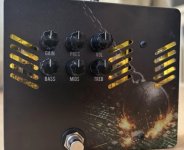
 
looking to get wrecking ball pedal enclosure cut like this a anybody have have the right file and and and know where I can get this done
 
looking to get wrecking ball pedal enclosure cut like this a anybody have have the right file and and and know where I can get this done
Tayda is where most people get them done, that's what the templates were designed for.

 
Is there any other easier way to do this,I keep getting the template made send it through Tayda and never goes through,I was just going to take it to a local machine shop but it won't let me save the template, I am getting bummed out just trying to make a enclosure that should be so easy
 
Is there any other easier way to do this,I keep getting the template made send it through Tayda and never goes through,I was just going to take it to a local machine shop but it won't let me save the template, I am getting bummed out just trying to make a enclosure that should be so easy
If you're taking it to a machine shop, you could always give them the drill template in the build doc. It's holes instead of slots, but I drew it that way because most people don't have a way to mill slots at home.
 
This is the best I can save the drill files as a PDF file, it is not a template but it should be enough for a machine shop to work with.
Just remove the ".TXT" from the end of the PDF file, you can't upload PDF's here so I just added .TXT to the end to upload them.
Cheers
Mick
 

Attachments

Is there any other easier way to do this,I keep getting the template made send it through Tayda and never goes through,I was just going to take it to a local machine shop but it won't let me save the template, I am getting bummed out just trying to make a enclosure that should be so easy
Did you add the extra holes required to get all the holes drilled ?
You need some extra holes for the whole drill file to go through I think.
I made a new drill file when I did it so it went through with the standard amount of holes that is allowed, I drilled the extra myself after.
 
Can you explain what doesn't go through means? What steps are you doing? I have done tons of artwork and drill templates on tayda from my phone and ipad and never had issues. Just trying to help figure out what the issue is.i just walked through it on my ipad to check and see if tayda was having issues and it worked fine. Also if you are using the new tayda create a box template system it will automatically recognize that it needs additional holes for the job.
 
Last edited:
Back
Top