
You can check out the project here: https://github.com/jimbattin/ComputerRoom
First, a big shoutout to @keyth72 for bringing CloudSeed over to the Terrarium and @optilude for the preset inspiration.
There are several forks of Cloudseed floating around, so what makes this one special?
How to get it
You can clone the repo and follow the instructions but probably the fastest way is to:
Grab the release from https://github.com/jimbattin/ComputerRoom/releases/tag/v1.0.0
And flash cloudseed.bin to your device
If you have chrome, you can try the stand-alone editor.html file. Otherwise you'll need to pull down the repo and run "make editor"
Plug your Terrarium into your computer via USB - allow the browser permission for Web MIDI and hit "Connect"
From there you can load the preset.toml file from the release or read it directly off the device you flashed
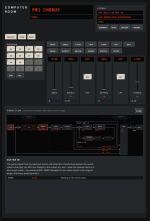
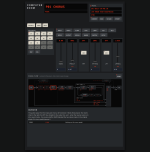
Editor:

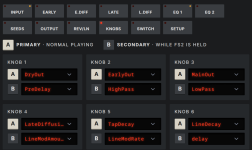
Knob and switch assignments:


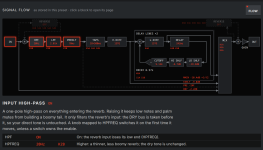
Signal Flow Diagram:

First, a big shoutout to @keyth72 for bringing CloudSeed over to the Terrarium and @optilude for the preset inspiration.
There are several forks of Cloudseed floating around, so what makes this one special?
- Works with a bone-stock Terrarium PCB
- Up to 16 recallable presets that can be saved on the pedal
- Save your settings to a preset by holding down the bypass foot switch for 5 seconds -- all knob and switch values are persisted
- This will capture both knob and switch values
- 10 by default - you can fill another 6 with the editor (or overwrite/replace/eliminate as you see fit)
- You can "revert" a preset back to factory by holding down both foot switches for 5 seconds
- Web-based editor to modify pedal presets
- Works off a human-readable presets.toml file
- All knob and switch functions can be assigned to one of 40+ parameters via the editor (for each preset)
- All knobs and switches can be assigned secondary functions (accessed while holding down the 2nd footswitch)
- Connects to the seed via Web MIDI over USB (Chrome should work)
- Signal flow diagram that shows you where the parameters are being applied
- "Bloom" effect that reverses the envelope of tap gains (they get louder rather than quieter). Somewhat subtle but really shines on longer tail reverbs
- Reverse Window: You can feed up to 2000ms of reversed audio into the reverb engine (and also apply it as a reverse delay directly to the output)
- Some improvements mitigating the 1khz whine
How to get it
You can clone the repo and follow the instructions but probably the fastest way is to:
Grab the release from https://github.com/jimbattin/ComputerRoom/releases/tag/v1.0.0
And flash cloudseed.bin to your device
If you have chrome, you can try the stand-alone editor.html file. Otherwise you'll need to pull down the repo and run "make editor"
Plug your Terrarium into your computer via USB - allow the browser permission for Web MIDI and hit "Connect"
From there you can load the preset.toml file from the release or read it directly off the device you flashed
Editor:
Knob and switch assignments:
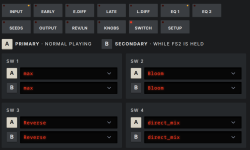
Signal Flow Diagram:
Attachments
Last edited: