Lining up drill templates in Affinity Designer [Affinity Newb]

Ctrl4Smilerz

Well-known member
I’m having trouble getting the EffectsLayout Lilliput drill template to line up in Affinity Designer. I’m using the Coppolo Affinity template but the Lilliput drill template at 100% is slightly bigger than the design area. Is there a way to get them to line up automatically? TIA
 
Last edited:
I'll take a look. I created these templates based on PedalPCB drill patterns so they may not work with EffectsLayouts stuff, but I'll take a look and confirm for you.
 
As suspected, it's not going to line up automatically with any of the templates that I've created because the drill pattern is different.

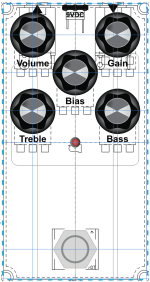
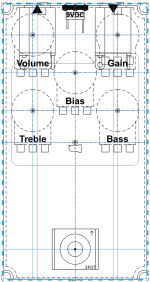
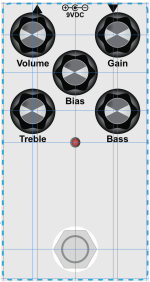
I've created a template for you though, it should be accurate as I have not scaled anything from the EffectsLayout's pdf, but I cannot guarantee it will be. I've adjusted placement of the 18mm knob outlines for you as well as the drill/hole/hardware and template guides.

The actual template file is below called EffectsLayouts Lilliput 5 Knob 125b Template Reference. Once you download it, just remove the .jpg from the filename and it should open in Affinity Designer 2 for you. If that doesn't work for whatever reason, send me a private message and I'll find another way to get it over to you.

Edit: Just go ahead and send me a private message so we can figure out another way to get this file to you. I cannot upload the file to PedalPCB's forum because of the filename.

I hope this helps!

1770918709990.png 1770918745800.png 1770918781257.png
 
As suspected, it's not going to line up automatically with any of the templates that I've created because the drill pattern is different.

I've created a template for you though, it should be accurate as I have not scaled anything from the EffectsLayout's pdf, but I cannot guarantee it will be. I've adjusted placement of the 18mm knob outlines for you as well as the drill/hole/hardware and template guides.

The actual template file is below called EffectsLayouts Lilliput 5 Knob 125b Template Reference. Once you download it, just remove the .jpg from the filename and it should open in Affinity Designer 2 for you. If that doesn't work for whatever reason, send me a private message and I'll find another way to get it over to you.

Edit: Just go ahead and send me a private message so we can figure out another way to get this file to you. I cannot upload the file to PedalPCB's forum because of the filename.

I hope this helps!

View attachment 111016View attachment 111017View attachment 111018

File received and looks like it lines up perfectly will the drill template. Thanks!
 
Back
Top