joulupukki
Active member
I spent the weekend experimenting with a couple of ideas that could be done if you add a microSD card into Q-Tune. With an SD Card (formatted as FAT32) inserted into Q-Tune, you hold down the footswitch button while you plug it into your computer with a USB-C data cable and then it mounts as a USB drive.
What I've built (not yet released and still testing) is:
You just copy JPEG images sized to either 240x320 (portrait) or 320x240 (landscape) into the /standby/ directory. There'll be a new SD Card Image option in Settings > Display > Standby Screen where you can select your images to be shown on the standby screen. If you have multiple images in your /standby/ directory, you can press and hold the footswitch to advance to the next image in the list.
Set Lists
You copy a plain text file (.txt) into the /setlists/ directory for every set list you want available. The name of the set list is the file name. Q-Tune will automatically resize the font based on how many lines you have in the file. To advance to a different set list (if you have multiple), press and hold the footswitch in standby mode.
Here are a few examples:

(I found that cool Death Star image here: https://www.deviantart.com/rocklou/art/Star-Wars-Death-Star-Wallpaper-649222725)
Any early feedback or tweaks before we release these new features?
What I've built (not yet released and still testing) is:
- Standby Image Support
- Set List Support
You just copy JPEG images sized to either 240x320 (portrait) or 320x240 (landscape) into the /standby/ directory. There'll be a new SD Card Image option in Settings > Display > Standby Screen where you can select your images to be shown on the standby screen. If you have multiple images in your /standby/ directory, you can press and hold the footswitch to advance to the next image in the list.
Set Lists
You copy a plain text file (.txt) into the /setlists/ directory for every set list you want available. The name of the set list is the file name. Q-Tune will automatically resize the font based on how many lines you have in the file. To advance to a different set list (if you have multiple), press and hold the footswitch in standby mode.
Here are a few examples:
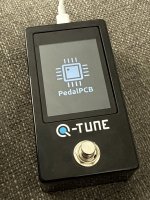
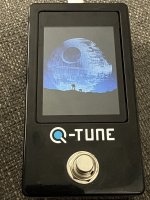
(I found that cool Death Star image here: https://www.deviantart.com/rocklou/art/Star-Wars-Death-Star-Wallpaper-649222725)
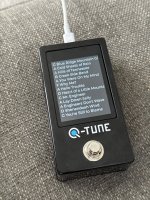
Any early feedback or tweaks before we release these new features?