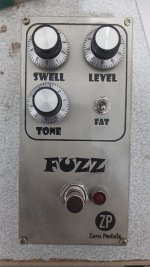
What's your opinion about printing pedal graphics using toner transfer?

funky.monkey

New member
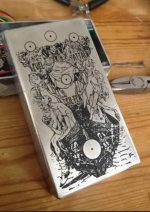
16464.jpg

What's your opinion about printing pedal graphics using toner transfer method?
Print graphics using iron and printed paper.

(this picture isn't mine I downloaded it from diy guitar effects website)

 
A lot of people use toner transfer to make a resist for etching.

I guess you’re talking about just using the toner as a finished graphic itself? Seems fine, if you like the way it looks 🤷‍♀️
I’d definitely put some kind of clear coat (might have to experiment a bit to see what works) over it. Otherwise I see it flaking off pretty quickly with use/handling.
 
Sealing it without melting/dissolving it is the kicker.
Also, getting a clean transfer isn't 100% guaranteed. It's without a doubt the hardest part of etching enclosures.
 
A lot of people use toner transfer to make a resist for etching.

I guess you’re talking about just using the toner as a finished graphic itself? Seems fine, if you like the way it looks 🤷‍♀️
I’d definitely put some kind of clear coat (might have to experiment a bit to see what works) over it. Otherwise I see it flaking off pretty quickly with use/handling.
Yeah, i want to use toners as main graphics.
I tried printing some small logos in the morning, and the results shocked me🫪
1- Mirror the graphics in the pc
2- Print them on a coated paper
3- Transfer them to the aluminum with iron(like pcb method)
4- Wash the printed surface using water
5- Remove the paper slowly from the aluminum
6- Remove the small pieces of paper with a pin
7- Spraying clear coat on the surface
8- enjoying the result 😍👊

I will share the result when I complete my pedal🤘
 
Sealing it without melting/dissolving it is the kicker.
Also, getting a clean transfer isn't 100% guaranteed. It's without a doubt the hardest part of etching enclosures.
I don't want to etching the aluminum.
I want the toners as the graphics.
I think clear coat will protect the toners from dirts and sharp things
 
What's your opinion about printing pedal graphics using toner transfer method?
it's the method i settled on for both of my builds so far.
i wanted the full experience of doing the whole thing on my first ones... but i'm probably going to just use the tayda service going forward for new ones.. i haven't made up my mind on that one.. but the ones other people have gotten from them look nice..

here's the ones i did.. i used a bw laserjet with avery 4.50x2.333 matte clear labels though.. it's a transparent sticker, not an iron on. the size just fits on a 125b like the stumble box without overhang.
then i clearcoated over it 2x to seal the sticker
(i cut the sticker down for the transcendence boost, that is in a 1590b2)
 

Attachments

  • IMG_3022.jpg
    IMG_3022.jpg
    312 KB · Views: 3
  • IMG_3028.jpg
    IMG_3028.jpg
    297.1 KB · Views: 3
Last edited:
it's the method i settled on for both of my builds so far.
i wanted the full experience of doing the whole thing on my first ones... but i'm probably going to just use the tayda service going forward for new ones.. i haven't made up my mind on that one.. but the ones other people have gotten from them look nice..

here's the ones i did.. i used a bw laserjet with avery 4.50x2.333 matte clear labels though.. it's a transparent sticker, not an iron on. the size just fits on a 125b like the stumble box without overhang.
then i clearcoated over it 2x to seal the sticker
(i cut the sticker down for the transcendence boost, that is in a 1590b2)
They look so good 😍🍻
I tried one on a pedal, I posted it on the website so you can check it out.
How did you print them on colorful enclosures?
Is it possible to print colorful titles with toner transfer method?
 

Attachments

  • IMG_20261005_153322_247.jpg
    IMG_20261005_153322_247.jpg
    259.4 KB · Views: 1
They look so good 😍🍻
I tried one on a pedal, I posted it on the website so you can check it out.
How did you print them on colorful enclosures?
Thank you! here's the process i used:
I bought boxes that were already powdercoated in a light color so i wouldn't have to primer them.
the 125b was white, and the 1590b2 was light gray initially, which will work fine as long as it's not too dark a gray.
the holes get drilled first. just have to be careful to not mar the powdercoat.
then i shot the color i wanted, i used duplicolor engine paint because it's cheap and dries to somewhat of a gloss and the yellow and white were what i wanted.
i let that dry for 24h. then the sticker goes on, and the holes get reopened on the sticker. so the hole edges get sealed too.
then it gets 2 coats of the basic tier duplicolor clear gloss laquer to prevent the printing from wearing off.

if you use the matte transparency it makes it easier to get a consistent final finish that doesn't look like you slapped a sticker on.
Is it possible to print colorful titles with toner transfer method?

i'd imagine you'd be able to do a full color print if you had a color printer and kept the box white (because paper is also white and a printer assumes that by default); also, this method doesn't actually require a laser printer, it's just that's what i have.. you can do it with just an inkjet, because it's getting a laquer clearcoat at the end either way
 
من جعبه‌هایی را خریدم که از قبل با رنگ پودری روشن پوشش داده شده بودند تا مجبور نباشم آنها را آستر بزنم.
جعبه ۱۲۵b سفید بود و جعبه ۱۵۹۰b2 در ابتدا خاکستری روشن بود که تا زمانی که خیلی تیره نباشد، خوب کار می‌کند.
ابتدا سوراخ‌ها ایجاد می‌شوند. فقط باید مراقب باشید که به پوشش پودری آسیب نرسانید.
سپس رنگی را که می‌خواستم زدم، از رنگ موتور دوپلی‌کالر استفاده کردم چون ارزان است و تا حدودی براق می‌شود و زرد و سفید همان چیزی بود که می‌خواستم.
اجازه دادم ۲۴ ساعت خشک شود. سپس برچسب را نصب کردم و سوراخ‌ها دوباره روی برچسب باز شدند. بنابراین لبه‌های سوراخ نیز آب‌بندی می‌شوند.
سپس دو لایه لاک براق شفاف دوپلی‌کالر سطح پایه روی آن زده می‌شود تا از ساییدگی چاپ جلوگیری شود.

اگر از رنگ شفاف مات استفاده کنید، رسیدن به یک پوشش نهایی ثابت که به نظر نمی‌رسد برچسب زده‌اید، آسان‌تر می‌شود
How did you print the graphics?
I didn't get it Wright 🤔
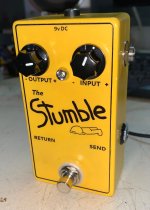
 
i'd imagine you'd be able to do a full color print if you had a color printer and kept the box white (because paper is also white and a printer assumes that by default); also, this method doesn't actually require a laser printer, it's just that's what i have.. you can do it with just an inkjet, because it's getting a laquer clearcoat at the end either way
I'll test the color print and share it with you🤘
 
How did you print the graphics?
I didn't get it Wright 🤔
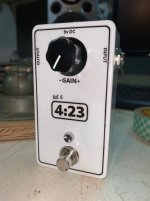
i made the graphics in gimp. i started in gimp with a canvas that is 4.5x2.333 inches, and made the graphics to that format.
then i used the online avery template service to make a prntable pdf using that sized graphic and printed it out
the template was t00-eh2 for the 4.5x2.333 stickers iirc
just make sure to turn snap to edge off and center the graphic in it's template slot with the align tool in the online template thing or it'll be a pain
 
Back
Top