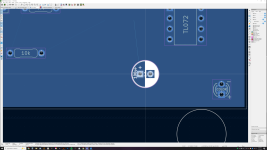
Rats nest connecting to what exactly?

nshane

Member
What am I not seeing?

Working on a PCB layout. Decided I didn't the placement of components so I deleted them all and hit F8 to refresh them and start over. There's something I can't see in there that the rats nest is trying to show me. I did cleanup tracks and vias, remove unused pads, and repair board trying to figure out what would make this stop happening. When I add a track it follows the rats nest to nothing.

Untitled-1.png
 
I've seen that sometimes. It looks like it's supposed to be connected to VREF.
I assume VREF is on the top layer somewhere?
If VREF is a filled zone, it's possible that your VREF zone is orphaned.
e.g. your cap is connected to VREF zone but the VREF zone has been
disconnected by a trace or something. Your 10K resistor might be in a similar state.
I wonder if that rats nest is actually pointing at part of VREF that's not disconnected.

One tip for rats nest, I've enabled curved rats nest lines, and made them a bit wider.
I can't remember where that is in the settings. But the curved lines make it easier
for me to spot, sometimes the straight lines get lost against traces or graphics.
 
I've seen that sometimes. It looks like it's supposed to be connected to VREF.
I assume VREF is on the top layer somewhere?
If VREF is a filled zone, it's possible that your VREF zone is orphaned.
e.g. your cap is connected to VREF zone but the VREF zone has been
disconnected by a trace or something. Your 10K resistor might be in a similar state.
I wonder if that rats nest is actually pointing at part of VREF that's not disconnected.

One tip for rats nest, I've enabled curved rats nest lines, and made them a bit wider.
I can't remember where that is in the settings. But the curved lines make it easier
for me to spot, sometimes the straight lines get lost against traces or graphics.
Filled zones are ground.

I'm going to dig around and find that line weight setting for rats nests. This 5k screen makes things hard to see.

I've had a lot of issues with KiCAD on this computer. Disappearing footprint/symbol libraries, projects where components go missing from PCBs. I might just do a full uninstall/reinstall.
 
Found it. On the project manager window:
Preferences > PCB Editor > Editing Options
✅Show ratsnest of curved lines
Ratsnets line thickness is right below that.
 
Back
Top