ReverendoRyan
New member
Hey Guys, it's been a while!
I was wondering if I could get a fresh set of eyes on the problem I'm encountering.?
Building an Aion Aurum (boss OD-2). I've always has sound going through, but the drive knob does absolutely nothing. Mind you this is a with with a few (5) SMD's, and though i thought i did a good job, not a lot of experience so my mind immediately went to that. Now, at this point, the drive knob does nothing, but the sound is overdriven, just no adjustment possible.
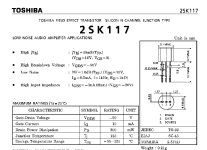
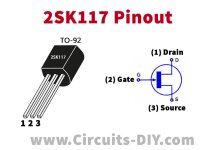
The 2SK209's are intended to replace the original's 2SK117, which I managed to source. Popped out the SMD's, plugged those in. Now I have the drive knob that still doesn't work, and the sound is no longer overdrived.
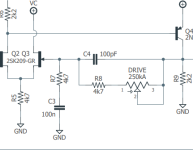
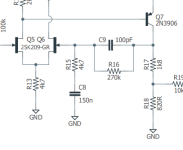
I probed the circut, and without surprise, I'm getting input, it follows the circuit, once it passes the drive potentiometer I'm getting driven signal that seems to be affected by the drive knob (I test with an EHX RTG to keep hands free), but between Q5 and Q6 the signal drops and is just clean.
Before I keep going and risk miffing it up, I thought I'd tap into the collective intelligence. Anybody see something that jumps out?
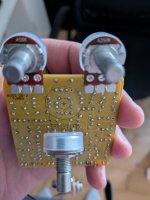
Here's the board wired up :

As you can see, Q6 gave my a bit of trouble yanking out the smd, the discoloration is burnt flux, I checked continuity on the pad with my multimeter, we're all good.
Other side of the board :
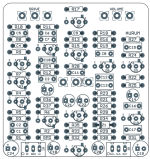
Here's the layout :

And the schematic :

Now i've checked all the pinouts for the transistors, the values for the resistors etc from the beginning up to around the area causing problems. Anybody see something I've missed?
Thanks for your help!
Ryan
I was wondering if I could get a fresh set of eyes on the problem I'm encountering.?
Building an Aion Aurum (boss OD-2). I've always has sound going through, but the drive knob does absolutely nothing. Mind you this is a with with a few (5) SMD's, and though i thought i did a good job, not a lot of experience so my mind immediately went to that. Now, at this point, the drive knob does nothing, but the sound is overdriven, just no adjustment possible.
The 2SK209's are intended to replace the original's 2SK117, which I managed to source. Popped out the SMD's, plugged those in. Now I have the drive knob that still doesn't work, and the sound is no longer overdrived.
I probed the circut, and without surprise, I'm getting input, it follows the circuit, once it passes the drive potentiometer I'm getting driven signal that seems to be affected by the drive knob (I test with an EHX RTG to keep hands free), but between Q5 and Q6 the signal drops and is just clean.
Before I keep going and risk miffing it up, I thought I'd tap into the collective intelligence. Anybody see something that jumps out?
Here's the board wired up :
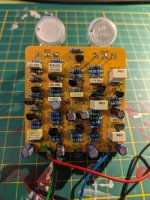
As you can see, Q6 gave my a bit of trouble yanking out the smd, the discoloration is burnt flux, I checked continuity on the pad with my multimeter, we're all good.
Other side of the board :
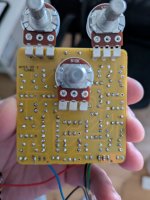
Here's the layout :
And the schematic :
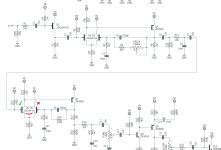
Now i've checked all the pinouts for the transistors, the values for the resistors etc from the beginning up to around the area causing problems. Anybody see something I've missed?
Thanks for your help!
Ryan
Last edited: