The 2026 revised film free decal tutorial

That turned out great for a first time. The more you do it the more consistent it becomes.
I'm realizing that I have overbaked mine. I did more enclosures today and the clear film basically just melted onto the enclosure. I followed the instructions in the paper which is too hot for too long apparently. I just noted your rec for 10minutes at the lowest setting, so that's what I'll try next.
 
Hi, thanks for the detailed tutorial. I am having issues with getting my images to print to the exact sizes I need them, which is due to (I suspect) my printing settings rather than anything else. I use a cheap Brother printer and while the quality isn't great, its the sizes of the images that are causing me bigger issues. There's obviously tons and tons of forum posts, YouTube videos, and other resources that try to help with printing issues but I've had no luck so far, and figured it would be easier to ask a pedal builder directly as that's the type of graphics I'm trying to print specifically lol.

So, could you share some insight into the printing settings you use for your graphics? Even if it's a different printer, that's fine as I'm sure it would be helpful either way. The settings or process used in Affinity Designer 2 would also be helpful, as I will look to set up my graphics in that software to test later.

Cheers.

 
Hi, thanks for the detailed tutorial. I am having issues with getting my images to print to the exact sizes I need them, which is due to (I suspect) my printing settings rather than anything else. I use a cheap Brother printer and while the quality isn't great, its the sizes of the images that are causing me bigger issues. There's obviously tons and tons of forum posts, YouTube videos, and other resources that try to help with printing issues but I've had no luck so far, and figured it would be easier to ask a pedal builder directly as that's the type of graphics I'm trying to print specifically lol.

So, could you share some insight into the printing settings you use for your graphics? Even if it's a different printer, that's fine as I'm sure it would be helpful either way. The settings or process used in Affinity Designer 2 would also be helpful, as I will look to set up my graphics in that software to test later.

Cheers.
I used these templates:


I create a new document and then copy the template of the enclosure size I want into a new document in Affinity, print them on regular paper and cut them out to just lay on the enclosure to test for fitment. I'm using a border as well to help with alignment so I shrink the dark outline by just a little and round the corners. once it's verified to be the right size I use the transfer paper in the first post here.

I found that making sure that "scale" is selected in print settings and manually putting in 100% just so that I'm certain of it.

hope something in this is a little helpful at least.
 
I used these templates:


I create a new document and then copy the template of the enclosure size I want into a new document in Affinity, print them on regular paper and cut them out to just lay on the enclosure to test for fitment. I'm using a border as well to help with alignment so I shrink the dark outline by just a little and round the corners. once it's verified to be the right size I use the transfer paper in the first post here.

I found that making sure that "scale" is selected in print settings and manually putting in 100% just so that I'm certain of it.

hope something in this is a little helpful at least.
Appreciate the help man, thanks.

I've gotten the designs to print at the correct sizes needed, but the quality is still poor (the images are 300dpi and high enough resolution.) I think it's just a shitty printer honestly.
 
I use 225F for the drying stage. Just putting a number to it since the “lowest” setting is probably not consistent across ovens.
True, I haven't checked but I'm pretty sure it's somewhere around 225-250F. I have an old ass toaster oven with a rotary dial that's not very accurate. The actual temp dial is 250F and there is just a low setting so it's somewhere around there. I agree that the range you mention is ideal and anything more or longer will probably yield unsatisfactory results.
 
Appreciate the help man, thanks.

I've gotten the designs to print at the correct sizes needed, but the quality is still poor (the images are 300dpi and high enough resolution.) I think it's just a shitty printer honestly.
yeah, if you aren't able to change the resolution in the printer settings, unlikely that anything other than a new printer will help.
 
True, I haven't checked but I'm pretty sure it's somewhere around 225-250F. I have an old ass toaster oven with a rotary dial that's not very accurate. The actual temp dial is 250F and there is just a low setting so it's somewhere around there. I agree that the range you mention is ideal and anything more or longer will probably yield unsatisfactory results.
I keep having issues with the border on my prints coming up. I think it may be that I’m not applying enough glue but I’ve also considered that I may need to thicken the border itself. How thick is the border that you use?
 
I keep having issues with the border on my prints coming up. I think it may be that I’m not applying enough glue but I’ve also considered that I may need to thicken the border itself. How thick is the border that you use?
My experience with the edges coming up is from cutting the film too close to the print. try leaving 2-3mm extra around your print and also not hanging off the face of the enclosure
 
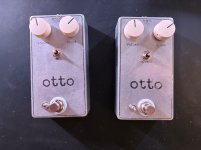
These are pretty good examples of what is happening. As you can see, I lost some border but also random text as well. The edges of the film do hang over the edge of the enclosure so perhaps i should cut those a bit smaller but i wanted to give space for the border. But the lost internal text makes me think I’m not using enough glue.
 

Attachments

  • IMG_1218.jpeg
    IMG_1218.jpeg
    615.1 KB · Views: 8
These are pretty good examples of what is happening. As you can see, I lost some border but also random text as well. The edges of the film do hang over the edge of the enclosure so perhaps i should cut those a bit smaller but i wanted to give space for the border. But the lost internal text makes me think I’m not using enough glue.
This could be a number of things. First, don't give up because you definitely are doing something right so far. You want to make sure that the trimmed decal isn't hanging over the edge. You want it laying flat on the surface. Make sure you have enough glue. Also, on raw enclosures, any voids, scratches and unleveled spots on the surface can easily create air pockets that can result in adhesion issues. Keep going, you're really close.
 
Back
Top