BINAURA STEREO FV-1 PATCHES

Good to know. What about the level, scope monitoring, any opinion on their accuracy?

Until I finish the binaura build I don't have a way of testing the stereo patches, since I assume stereo patches will not work with my mono fv-1 builds. And outputting the stereo files to a mono signal will not provide an accurate representation.
NOTE: all FV-1 stereo patches will work on mono FV-1 builds. They should represent the "sound effects", just without the stereo aspect.

As for the level & scope monitoring accuracy, I don't know. I do have SpinCAD Designer running on my MacBooks, but I not tested/used those features of the SpinCAD Designer - yet.
 
@Cybercow, I was hoping to check out the patches you have linked in the first post of this thread, but for some reason they all forward to Disney.com (I kind you not!). Can you send me the files or maybe fix the links? I just ordered the Binaura board and wanted to give them a try.

Thanks.
 
@Cybercow, I was hoping to check out the patches you have linked in the first post of this thread, but for some reason they all forward to Disney.com (I kind you not!). Can you send me the files or maybe fix the links? I just ordered the Binaura board and wanted to give them a try.

Thanks.
Link works fine for me. You might have a redirect virus— I’ve heard of a pretty prevalent one that goes to a convincing fraudulent Disney+ login/trial page to phish for login credentials and/or cc information
 
@Cybercow, I was hoping to check out the patches you have linked in the first post of this thread, but for some reason they all forward to Disney.com (I kind you not!). Can you send me the files or maybe fix the links? I just ordered the Binaura board and wanted to give them a try.

Thanks.
There's nothing wrong with the links. Perhaps your browser is set to apply all links with "https" instead just "http". Try copying the link itself and remove the "s" from the "https" portion. It's a direct download link, so there's no page to see. Clicking the links should just download the files.
 
Hello

What do you use to burn your EEPROM chips?

I did this years ago using an Arduino UNO board and a Vero board from Madbean pedals. I still have this setup, but I do not remember the steps to convert the file to be burned using the Arduino.

I am guessing the easiest way to burn the SpinASM file to a EEPROM chip is directly through the SpinASM program?

Any help is very much appreciated

Thanks
Rob
 
I was able to get my EEPROM programmed using my Arduino, but it only is able to load one program. It is a INO file from a project on DIYSTOMPBOXES, Tonewood amp. The author wrote the INO so one could copy and paste into Arduino and easily burn to a EEPROM. But this was for just the one program and when I switch between the (8) different modes it plays the same Shimmer program. It works great, but would be gtear to be able to load different programs in the (8) different slots. Below is link to the project, and on the last entry there is a link to his download.

 
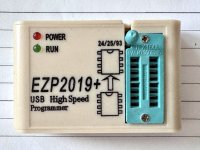
OMG! So sorry. I only use the EZP2019 for pulling data from EEPROMs. I've never actually used it for pushing data to an EEPROM. It still may work tho - I just don't know. I don't know where my head was when I responded initially.

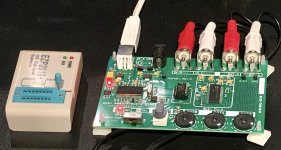
To push data to an FV-1 EEPROM I've been using the SpinASM Assembler with my Spin Semiconductor FV-1 Development Board.

Spin_FV-1_Dev_Brd.jpg
 
Back
Top