keyth72
Well-known member
Wanted to share about this method of making faceplates for pedals. I got the idea from Synthux Academy's youtube channel, they use pcb's for artwork/faceplates on their modular synths. Ghost Note Audio also uses these kinds of faceplates on their digital pedals. In looking around at different options (from the US) I came across OshPark's afterdark boards, and I think they look really cool when used for artwork.

The Afterdark boards swap the usual semi transparent yellowish FR4 for solid black, and have a clear solder mask, which has the effect of making a gold/brown color when covering a copper layer. You essentially get 4 colors to design artwork with, bright gold, muted brown/gold, black, and white silkscreen (not used here). These boards cost about $30 for the minimum of 3, and took about 3 week for manufacturing and shipping. That is pricy, but turned out to be cheaper than the same design from a China based company after shipping/tariffs. Plus the afterdark color scheme isn't something I've seen anywhere else.
Using KiCad, you can lay out your board shape with holes for potentiometers and switches, or stylistic cutouts. You essentially have 4 colors to work with:
Bright gold plated copper (exposed):
Add any artwork or labels as a copper layer, and also duplicate those objects and put them in the soldermask layer. The soldermask layer is a "negative" so any labels/artwork in the soldermask layer will not be covered in soldermask, leaving the gold plated copper exposed. (I used this for the main name label and all knob/switch labels).
Brown/gold, copper covered in soldermask:
Add any artwork or labels as a copper layer. These copper shapes will be covered in clear soldermask, resulting in a brownish gold color (I used this for the name shadows and the small shapes graphic in the middle of the faceplate)
Silkscreen will be white (I didn't use silkscreen on these boards)
Everything else will be black FR4 covered in clear soldermask (black background color).
Other ideas would be to use a reverse color scheme, all gold or brown background with black labeling/artwork or white silkscreen. You can also import or create vector graphics and use Kicad's built in Image Converter tool to create some really complex artwork (I've done this for non-pedal related art projects). You could also use Oshpark's normal purple pcbs to make interesting color schemes.

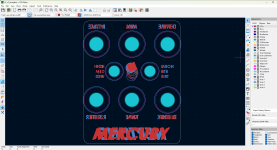
All 3 boards have the Mercury/Neptune artwork on front and back respectively. What you see in Kicad is the front in red, and the back (reversed) in blue. You can't see it, but the labels also have a duplicated label in the soldermask layer, allowing the gold plated copper to be exposed. For the Mercury/Neptune font, I use another label in the copper layer that is slightly offset, allowing for a "shadow" of brown (copper covered with clear soldermask):

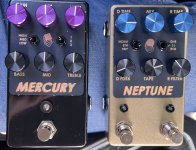
The Afterdark boards swap the usual semi transparent yellowish FR4 for solid black, and have a clear solder mask, which has the effect of making a gold/brown color when covering a copper layer. You essentially get 4 colors to design artwork with, bright gold, muted brown/gold, black, and white silkscreen (not used here). These boards cost about $30 for the minimum of 3, and took about 3 week for manufacturing and shipping. That is pricy, but turned out to be cheaper than the same design from a China based company after shipping/tariffs. Plus the afterdark color scheme isn't something I've seen anywhere else.
Using KiCad, you can lay out your board shape with holes for potentiometers and switches, or stylistic cutouts. You essentially have 4 colors to work with:
Bright gold plated copper (exposed):
Add any artwork or labels as a copper layer, and also duplicate those objects and put them in the soldermask layer. The soldermask layer is a "negative" so any labels/artwork in the soldermask layer will not be covered in soldermask, leaving the gold plated copper exposed. (I used this for the main name label and all knob/switch labels).
Brown/gold, copper covered in soldermask:
Add any artwork or labels as a copper layer. These copper shapes will be covered in clear soldermask, resulting in a brownish gold color (I used this for the name shadows and the small shapes graphic in the middle of the faceplate)
Silkscreen will be white (I didn't use silkscreen on these boards)
Everything else will be black FR4 covered in clear soldermask (black background color).
Other ideas would be to use a reverse color scheme, all gold or brown background with black labeling/artwork or white silkscreen. You can also import or create vector graphics and use Kicad's built in Image Converter tool to create some really complex artwork (I've done this for non-pedal related art projects). You could also use Oshpark's normal purple pcbs to make interesting color schemes.
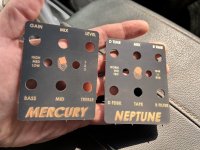
All 3 boards have the Mercury/Neptune artwork on front and back respectively. What you see in Kicad is the front in red, and the back (reversed) in blue. You can't see it, but the labels also have a duplicated label in the soldermask layer, allowing the gold plated copper to be exposed. For the Mercury/Neptune font, I use another label in the copper layer that is slightly offset, allowing for a "shadow" of brown (copper covered with clear soldermask):