
In search of Stereo Reverbs and Delays to fill 2 Binaura EEPROMS.

Frustratingly I am continuing to see the incompatibility message. I’m fairly certain I have followed the instructions correctly. I’m attaching photos of the files as they are saved and the beginning and end of the copy and pasted code. Let me know if I’m missing something…
You have to change them to SPCDJ files, not .txt files. SpinCAD is looking for a file whose extension is SPCD or SPCDJ.

DL
 
How do you do that?
Step 1) Copy just the code in its entirety and paste it into a fresh/empty TEXT file.
Step 2) Then save that text file as a .TXT file.
Step 3) Rename the extension of that .TXT file so it ends in ".SPCDJ". (If you cannot see the extension portion of your files, you need to make a change to your File Explorer in Windows or Finder in Mac to expose all file extensions.)
Step 4) With the file properly named with the .SPCDJ extension, it can now be found and opened with SpinCAD 99.1070

If you need more help with exposing/showing/editing filename extensions, just Google "How to show and edit filename extensions Windows" or "How to show and edit filename extensions Mac".

This dance is necessary only because the forum doesn't allow just any file extension to be shared/attached.
 
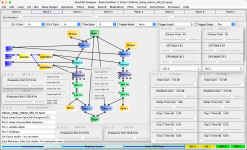
@BrainGutz - Meanwhile, here is a modified screenshot of a stereo oil can delay that shows all the important details of each block in the patch. I found this on @Digital Larry's site a while back and worked it up into a stereo version. I've modified some of the Chorus and Three Tap details to a stereo effect instead of just a dual mono oil can delay. We'll likely need to futz with the values of the two "Scale Offset" blocks to get a better "wobble". As it is the "wobble frequency" (Pot0) starts off at full value and diminishes as Pot0 is turned up, because of how "Scale Offset 1" is setup. Other than that, this stereo oil can delay should work for you once you set it up. DL may have some other suggestions too.

Still, mastering the process of copying/saving the code to a text file and changing the extension is a lot less work.

OilCan_Delay_Stereo_MD_01_All.png
 
Last edited:
Frustratingly I am continuing to see the incompatibility message. I’m fairly certain I have followed the instructions correctly. I’m attaching photos of the files as they are saved and the beginning and end of the copy and pasted code. Let me know if I’m missing something…
Those two files still have the ".TXT" file extension. They have to be renamed in the Finder (Mac) or File Explorer (Windows) so each file ends with ".SPCDJ" - not ".SPCDJ.TXT".
 
Back
Top