peccary
Well-known member
Hey folks,
I am about at the end of my rope with Inkscape and am looking for alternatives. I continue to have the issue where multiple objects in the design don't print and it's driving me absolutely batty. I will spend a few hours making something and getting it perfect and then a few days later when I am ready to actually do the work I go to print it and half the image isn't there and I spend another hour smashing my head in to the monitor and missing my window for actually putting the artwork on the pedal.
I found a work-around online which requires copying a bitmap image and putting it in a new layer and while that allows me to print everything it also degrades the image a crazy amount. I'm just sick of it and would like something that works and actually prints what I have on the screen.
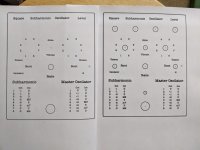
In the meantime, if anyone knows of a fix, here is an example of what I am talking about. The one on the left was printed in HQ as I normally would and you can see it's missing almost all of the drill markings. The one on the right is "fixed" has everything, but you can see even in this bad photo that the quality is awful.
Any advice is appreciated, thank you!
I am about at the end of my rope with Inkscape and am looking for alternatives. I continue to have the issue where multiple objects in the design don't print and it's driving me absolutely batty. I will spend a few hours making something and getting it perfect and then a few days later when I am ready to actually do the work I go to print it and half the image isn't there and I spend another hour smashing my head in to the monitor and missing my window for actually putting the artwork on the pedal.
I found a work-around online which requires copying a bitmap image and putting it in a new layer and while that allows me to print everything it also degrades the image a crazy amount. I'm just sick of it and would like something that works and actually prints what I have on the screen.
In the meantime, if anyone knows of a fix, here is an example of what I am talking about. The one on the left was printed in HQ as I normally would and you can see it's missing almost all of the drill markings. The one on the right is "fixed" has everything, but you can see even in this bad photo that the quality is awful.
Any advice is appreciated, thank you!