
You are using an out of date browser. It may not display this or other websites correctly.
You should upgrade or use an alternative browser.
You should upgrade or use an alternative browser.
Join the challenge - design a pcb
- Thread starter temol
- Start date

steviejr92
Authorized Vendor
Thank you so much i think ive burned my brain out for the day haha So i realized what you mean about the Libraries their packages are not the same as the components we use so i downloaded a library that would contain our components still not all are there but for now it works fine. Man theres alot of consideration to take in when laying it out. I think i made good progress tomorrow im going to start the layout from scratch but this time following your tips. Hopefully this comes out better than the rats nest i hadBravo!
Couple things to consider and remember. This applies to design in general.
- Don't go crazy with trace width. Eagle's default width of 16mil is ok. 10mil for toner transfer may be problematic sometimes. Especialy with aggresive etchant sollution. 10mil is ok for a fab house.
- Keep an eye on separation between traces. Don't go below 16-20mil.
- Make sure that the solder pads of the components you are using are not too small. It's possible to enlarge them by modifying component package (library). They're often designed for a fab house fabrication, automated drilling. It's easier to damage a small solder pad while drilling, soldering, desoldering.
- Check the board and schematic for errors. For the schematic - look for the unconnected pins, overlaping connections.
For the board - run design rules check before making the board. Check the resutls for any clerance warnings, overlaping traces.
- Lay out the critical elements first - supply and in/out pads, potentiometers, switches,
- Draw outline of the enclosure or find a library that contains drawings of the enclosures/switches/jacks. There's one available for Eagle (on a Madban Forum).
- Do not hesitate to use jumpers instead running 10 inch long trace just to go around the IC or any other components.
- Keep separation between in/out pads and traces, especially on high gain circuits.
- Don't put tall components under a jack space.
- You can always install the LED off the board and take positive supply directly from the DC jack.
- Compare components you're goig to use with a footprints on the pcb. For transistors - check the pinout.

EDIT: Using jumper wire for this single sided board might be 100 percent necessary. Its really hard not overlapping your traces!
steviejr92
Authorized Vendor
Oof I think voting should be the way to go. But you can’t vote yourself! Then again I really like the jury thing leaves it up to the contest holders!
steviejr92
Authorized Vendor
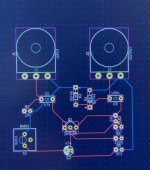
That looks incredibly good! Way better than the rats nest I had then again the circuit I chose might be to big for it to be single sided!Oof, much respect to those that can route these huge boards. I spent my lunch hour using KiCad for the first time and came up with this POS. Haha, time to take some tutorials!
View attachment 37916

KR Sound
Well-known member
I’m 100% sure it can be sooo much better. But didn’t even put in the foot switch yet. I cheated and put all the grounds on the backThat looks incredibly good! Way better than the rats nest I had then again the circuit I chose might be to big for it to be single sided!

KR Sound
Well-known member
Haha. It’s my artistic interpretation.I suspect that vertically mounted resistors are not required here. The board is huge, like a landing field

Just messing around and seeing how the program works. Looks pretty powerful for free software!
steviejr92
Authorized Vendor
Idk if This is your first time doing this but isn’t it fun?! I’m gonna have to utilize some jumpers on the back if I’m to make the circuit I have going on work!I’m 100% sure it can be sooo much better. But didn’t even put in the foot switch yet. I cheated and put all the grounds on the back
KR Sound
Well-known member
Absolutely my first time even opening the program. It does look fun- like a puzzle to solve!Idk if This is your first time doing this but isn’t it fun?! I’m gonna have to utilize some jumpers on the back if I’m to make the circuit I have going on work!

Feral Feline
Well-known member
FTR:
I'm dead set against the more common circuits:Rats, YATs, JAMs, FFaces...
Simple doesn't mean it has to be the usual same-ol-same-ol boring done-to-death circuits.
I'm hoping for a circuit that is:
Simple — a given, as many of us are newbs to circuit layout
Fun — subjective, yes.
and/or
Useful — equally subjective.
I'm dead set against the more common circuits:
Simple doesn't mean it has to be the usual same-ol-same-ol boring done-to-death circuits.
I'm hoping for a circuit that is:
Simple — a given, as many of us are newbs to circuit layout
Fun — subjective, yes.
and/or
Useful — equally subjective.

temol
Well-known member
I totally agree.FTR:
I'm dead set against the more common circuits:Rats,YATs,JAMs,FFaces...
Simple doesn't mean it has to be the usual same-ol-same-ol boring done-to-death circuits.

finebyfine
Well-known member
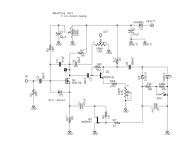
I'm gonna cosign @Feral Feline 's suggestion for the Bearhug Compressor

- Low parts count (around 30?)
- No components too hard to find
- Can be made to fit a pre-drilled Tayda 3 Knob for Pedal PCB
- Low parts count (around 30?)
- No components too hard to find
- Can be made to fit a pre-drilled Tayda 3 Knob for Pedal PCB
Last edited:

Chuck D. Bones
Circuit Wizard
Using a MOSFET as the first stage is gonna make it noisy.
finebyfine
Well-known member
Er... we're not allowed to know the circuit until Friday
 ️️️️ one of the better cryptic news posts on here
Chuck D. Bones
Circuit Wizard
Ha ha ha ha, my bad. It's not going to be the Folk Fuzz this time around.
Feral Feline
Well-known member
It's nearly 2am, Friday, I'm champing at the bit — Which circuit?
Chuck D. Bones
Circuit Wizard
Patience, Grasshopper, patience.
I have consulted Eno's Oblique Strategies. The recommendation is:
Breathe more deeply
I have consulted Eno's Oblique Strategies. The recommendation is:
Breathe more deeply