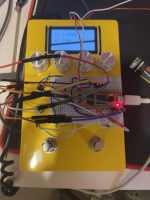
I checked back through some family Christmas list emails and saw I requested and received a Daisy Seed Rev4 for Christmas 2020.
I should not have waited 5+ years, this has been great.
I kept putting off the Daisy because I was busy working with the FV-1, and I plan to continue using it when it makes sense. Reasons include:
-slightly lower cost (although you have to consider the EEPROM chip)
-smaller space (although you have to consider the EEPROM chip & some peripheral components that you don't need with the Daisy. Plus the Daisy can be a bridge with components under it like in the Terrarium)
-all the algorithms I have that would take time to re-write in c++.
-nostalgia
But, the Daisy is pretty incredible. I even recommend this build for someone who is not planning to write code. The reason is, there are a lot of great patches with the .bin freely available. The Electrosmith Web Programmer online tool allows you to flash a .bin file to your seed without touching the code environment.
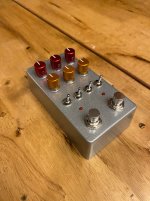
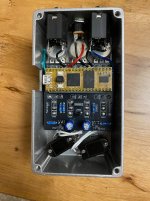
For the build, I did remove C7, because when using my headphone amp (with no cab-sim), I noticed the Terrarium was cutting some of the ultra-high end when comparing without cabsim. This will not be an issue if you're using a guitar amp or cabsim, or if you have a buffer before the Terrarium.
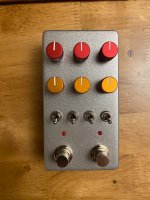
Here are some really great projects that I've flashed the .bin for. It's worth building the Terrarium just to access any one of these:
-GuitarML Seed : The looper with reverse mode is really fun. This thing is a whole pedalboard in a box.
-GuitarML CloudSeed : Great job porting a computer plugin over to Daisy and getting it working. Great reverb sounds.
-Steve Schulteis Octave : Way better than the FV-1 octave algorithms (FV-1 uses simple overlap-add style).
I'm also working on writing my own daisy code, similar to how I do the FV-1. I'm definitely using some of the GuitarML projects source code and Sonic Explorer Rhythmic delay to learn from, but also trying to branch out. I'm getting used to using the freely available DaisySP classes, which are quite powerful once you know how to initialize and call them. Getting setup in Visual Studio Code environment, following the instructions on the Daisy site, and learning to execute the build tasks was quite an endeavor for me. But it's all pretty smooth now.
So far, I have written a delay effect with modulation, filtering, quarter/dotted-8th, tap-tempo, and reverb. I will be happy to share the code for this if anyone is interested. Maybe I'll try to learn how to post on GitHub, and then link that on a separate post here as well.
I also modified the Funbox Mars code to work with the Terrarium. (I removed the Delay function for now, since I didn't have enough toggle positions, and I wanted to focus on the modeling). This was a stretch for me but I got it working, and I was even able to write in the .wav data (truncated to 400 samples) from one of my York IRs into the ir_data file, and that seemed to work also. I need to spend more time comparing it with the same IR loaded on the Iridium, but I think it was in the ballpark.
I should not have waited 5+ years, this has been great.
I kept putting off the Daisy because I was busy working with the FV-1, and I plan to continue using it when it makes sense. Reasons include:
-slightly lower cost (although you have to consider the EEPROM chip)
-smaller space (although you have to consider the EEPROM chip & some peripheral components that you don't need with the Daisy. Plus the Daisy can be a bridge with components under it like in the Terrarium)
-all the algorithms I have that would take time to re-write in c++.
-nostalgia
But, the Daisy is pretty incredible. I even recommend this build for someone who is not planning to write code. The reason is, there are a lot of great patches with the .bin freely available. The Electrosmith Web Programmer online tool allows you to flash a .bin file to your seed without touching the code environment.
For the build, I did remove C7, because when using my headphone amp (with no cab-sim), I noticed the Terrarium was cutting some of the ultra-high end when comparing without cabsim. This will not be an issue if you're using a guitar amp or cabsim, or if you have a buffer before the Terrarium.
Here are some really great projects that I've flashed the .bin for. It's worth building the Terrarium just to access any one of these:
-GuitarML Seed : The looper with reverse mode is really fun. This thing is a whole pedalboard in a box.
-GuitarML CloudSeed : Great job porting a computer plugin over to Daisy and getting it working. Great reverb sounds.
-Steve Schulteis Octave : Way better than the FV-1 octave algorithms (FV-1 uses simple overlap-add style).
I'm also working on writing my own daisy code, similar to how I do the FV-1. I'm definitely using some of the GuitarML projects source code and Sonic Explorer Rhythmic delay to learn from, but also trying to branch out. I'm getting used to using the freely available DaisySP classes, which are quite powerful once you know how to initialize and call them. Getting setup in Visual Studio Code environment, following the instructions on the Daisy site, and learning to execute the build tasks was quite an endeavor for me. But it's all pretty smooth now.
So far, I have written a delay effect with modulation, filtering, quarter/dotted-8th, tap-tempo, and reverb. I will be happy to share the code for this if anyone is interested. Maybe I'll try to learn how to post on GitHub, and then link that on a separate post here as well.
I also modified the Funbox Mars code to work with the Terrarium. (I removed the Delay function for now, since I didn't have enough toggle positions, and I wanted to focus on the modeling). This was a stretch for me but I got it working, and I was even able to write in the .wav data (truncated to 400 samples) from one of my York IRs into the ir_data file, and that seemed to work also. I need to spend more time comparing it with the same IR loaded on the Iridium, but I think it was in the ballpark.