balazs.bencs
Active member
Let me start with saying that I know this following topic might be touching some nerves, but I feel the whole AI development thing is becoming more and more useful and that’s where my project started.
Lately I was thinking about getting a Daisy Seed and start messing with projects.
I am a 40yo backend developer from Hungary and we started using a lot of AI in development which I started to like it in the last 3-4 months, when I have complete freedom I am 3-4 times faster than normal - even with brutal code reviews. A lot of people say it is dangerous to trust it, but lately I feel that I want to hate it, but our code reviews have only minor things and I started using more and I am starting to see the value.
One day on my way home I thought that hey I should be able to generate plugdata projects with AI, it should be fun to try it out. I generated a bunch of crap that did not work and I did not like. It was a total failure.
Since I just had a baby, I have zero extra time to learn DSP even with the libdaisy library, but I thought that Claude Code might be good here even after the plugdata failure. I did not know if anything comes out will work, but I wanted to try at least so here we go..
I really like the Strymon pedals with multiple delay options and modulation (timeline and mobius) so I thought I will try to get some of the features of those on the Daisy.
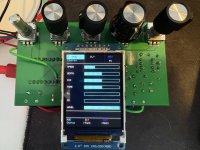
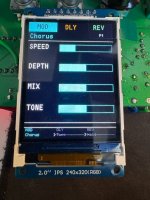
I generated two projects with Claude to mimic these two pedals and I had a lot of success. I asked it to use encoders instead of regular pots, so the Terrarium project will not be able to run this project but my plan is to design a Terrarium inspired PCB design with encoders and display and have more capability.
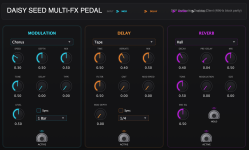
I am still waiting for my Daisy Seed to arrive so I had no option to try the code on actual hardware, so I asked Claude to generate a VST plugin with Juce so that I can test the code and set parameters and make changes if needed. The plan worked, the VST plugin works and is using the same code that will run on the Daisy.
Most of the delays are actually good sounding so I have high hopes.
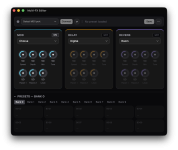
After this delay code worked fine, I copied the project and gave claude the strymon mobius manual in html format and told him to delete all delays and make effects the same way what is described in the manual. I created a big plan with Opus and Sonnet coded the whole thing. That plugin works too, I will post it soon after some code review.
Git: https://github.com/balazsbencs/daisy-delay-pedal
I have CI build set up, so you can download the Daisy firmware file as well as the macos compatible VST3 file.
Since I am so new to this, I thought I’ll post it here and encourage people to contribute, I feel this might be a cool project, even if it is fully vibe coded.
I am planning to breadboard the shit out of it when my Daisy arrives, and perfect things to make it actually usable.
Lately I was thinking about getting a Daisy Seed and start messing with projects.
I am a 40yo backend developer from Hungary and we started using a lot of AI in development which I started to like it in the last 3-4 months, when I have complete freedom I am 3-4 times faster than normal - even with brutal code reviews. A lot of people say it is dangerous to trust it, but lately I feel that I want to hate it, but our code reviews have only minor things and I started using more and I am starting to see the value.
One day on my way home I thought that hey I should be able to generate plugdata projects with AI, it should be fun to try it out. I generated a bunch of crap that did not work and I did not like. It was a total failure.
Since I just had a baby, I have zero extra time to learn DSP even with the libdaisy library, but I thought that Claude Code might be good here even after the plugdata failure. I did not know if anything comes out will work, but I wanted to try at least so here we go..
I really like the Strymon pedals with multiple delay options and modulation (timeline and mobius) so I thought I will try to get some of the features of those on the Daisy.
I generated two projects with Claude to mimic these two pedals and I had a lot of success. I asked it to use encoders instead of regular pots, so the Terrarium project will not be able to run this project but my plan is to design a Terrarium inspired PCB design with encoders and display and have more capability.
I am still waiting for my Daisy Seed to arrive so I had no option to try the code on actual hardware, so I asked Claude to generate a VST plugin with Juce so that I can test the code and set parameters and make changes if needed. The plan worked, the VST plugin works and is using the same code that will run on the Daisy.
Most of the delays are actually good sounding so I have high hopes.
After this delay code worked fine, I copied the project and gave claude the strymon mobius manual in html format and told him to delete all delays and make effects the same way what is described in the manual. I created a big plan with Opus and Sonnet coded the whole thing. That plugin works too, I will post it soon after some code review.
Git: https://github.com/balazsbencs/daisy-delay-pedal
I have CI build set up, so you can download the Daisy firmware file as well as the macos compatible VST3 file.
Since I am so new to this, I thought I’ll post it here and encourage people to contribute, I feel this might be a cool project, even if it is fully vibe coded.
I am planning to breadboard the shit out of it when my Daisy arrives, and perfect things to make it actually usable.