
RhPf Electronics
Well-known member
I am in Switzerland and discovered https://www.stickeryeti.ch/ch_en/ this year. No way back from that quality. No idea how shipping works to the US and others but I highly recommend.


Can confirm this as wellI've ordered transfers from all three companies I listed above and all three mirror the design for you during printing, you don't need to mirror it for ordering.

Ninja have been great to me so far, ordering is pretty easy making your own gang sheet is simple.Yo, I'm DTF for DTF UV printer stickers! Saw this thread and just ordered a few decals from Ninja. Going to see if this is a good alternative. Thanks for this thread.

Looks fabulous, nicely done dudeI just received and put on a bunch of UV DTF stickers from Ninja Transfers and am thrilled with the quality. I just posted about it on the “Your Workbench” thread.
Post in thread 'What’s on *YOUR* workbench?'
https://forum.pedalpcb.com/threads/what’s-on-your-workbench.13146/post-364323

Looks great. I've been testing out Ninja as well and am liking the results. It's a pretty good and cheap alternative to direct UV printing. Did you upload SVG files?I just received and put on a bunch of UV DTF stickers from Ninja Transfers and am thrilled with the quality. I just posted about it on the “Your Workbench” thread.
Post in thread 'What’s on *YOUR* workbench?'
https://forum.pedalpcb.com/threads/what’s-on-your-workbench.13146/post-364323
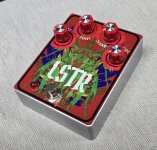
I did not use vector files, I uploaded .PNGs and created a gang sheet on their web site. I have not ordered individual stickers from themLooks great. I've been testing out Ninja as well and am liking the results. It's a pretty good and cheap alternative to direct UV printing. Did you upload SVG files?
I've been trying to upload the SVG but are not coming out correctly, so I've been uploading the PDF versions. It's probably better with SVG so that's a work in process there.
*Edit - Sorry to completely derail the OG thread.
That's pretty much what I was seeing except mine was much smaller.I did not use vector files, I uploaded .PNGs and created a gang sheet on their web site. I have not ordered individual stickers from them
But since you brought up SVGs....
I plan to have some face plates made also and contacted Spencer at Amplify Fun. His instructions say (IIRC) something about preferring Vector artwork. I'm a complete novice at this stuff, and I assumed that this meant .SVG format. I created an SVG to send to him for review and it came out 3X the size it was supposed to. I use Affinity Designer and tried a number of things to get an SVG export to scale correctly but couldn't get it to work. (Something to do with pixels/inch, but I don't know/remember it well enough to explain it). After some more Googling and consultation with CoPilot AI, I think PDF is the right approach. If I understand it correctly, the PDF still contains the vector information.
Brave man with the full coverage, I don’t trust my skills for something that bigI did not use vector files, I uploaded .PNGs and created a gang sheet on their web site. I have not ordered individual stickers from them
But since you brought up SVGs....
I plan to have some face plates made also and contacted Spencer at Amplify Fun. His instructions say (IIRC) something about preferring Vector artwork. I'm a complete novice at this stuff, and I assumed that this meant .SVG format. I created an SVG to send to him for review and it came out 3X the size it was supposed to. I use Affinity Designer and tried a number of things to get an SVG export to scale correctly but couldn't get it to work. (Something to do with pixels/inch, but I don't know/remember it well enough to explain it). After some more Googling and consultation with CoPilot AI, I think PDF is the right approach. If I understand it correctly, the PDF still contains the vector information.
I use the ‘hinge’ method and use the squeegee to gently push the decal down. It’s not perfect by any stretch, but not too bad.Brave man with the full coverage, I don’t trust my skills for something that big

Eagle DTF is the place close to me, but I've also used Sumo Transfers and Ninja Transfers before with good results.
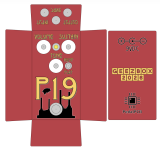
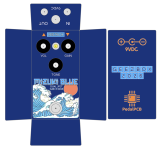
Looking forward to see how those come out@vigilante398 - Thanks very much for the recommendation of Eagle DTF Printing, I gave them a shot on my recent stompbox DTF sticker order. I just received them and they look wonderful. I submitted my design files as SVG's, and the stickers came out very crisp and clean. I haven't applied them yet, but here are a couple sample designs and the stickers are very true to them.
View attachment 111275
View attachment 111276