Cobalt Drive LED Not Working (but pedal does!)

greypilgrim76

New member
Hi All,

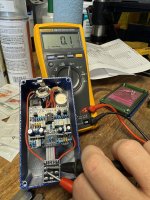
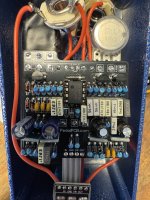
I've been on a run of knocking out several PedalPCB pedals lately, and they've all been working fine on the first try, but my streak was stopped last night when I tested my Cobalt Drive pedal. It sounds fine, but the LED doesn't light up when the effect is on. I've checked the LED using my multimeter and it lights up just fine, and applying a different LED to the contacts when the pedal's on also just results in the different LED not lighting up. Continuity is fine between R100 and cathode, and my soldering seems pretty tight, so I'm at a loss.

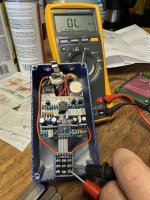
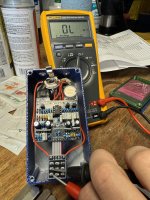
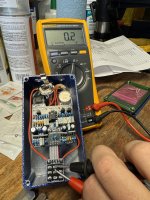
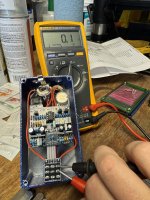
The only thing that seems odd to me is that, even with the pedal uplugged, one of the switch tests that should show OL when testing the switch by itself shows up with a reading. Problem is, I don't know enough about switch wiring to know if it should still be OL when wired into the pedal. So, if that's not normal, I could remove the switch and wire in a new one. If that reading's not a problem, though, I'd love some suggestions on what the issue might be.

(EDIT: I'm using the "-2w "C" mod" found in this link. Hence the missing diodes.)

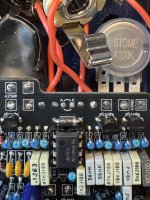
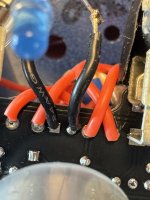
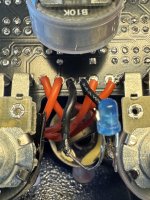
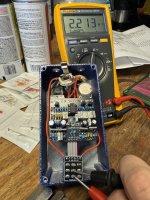
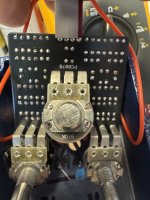
I'll attach pics below to give you a sense of how things look!
IMG_8453.jpeg IMG_8454.jpeg IMG_8455.jpeg IMG_8456.jpeg IMG_8457.jpeg IMG_8458.jpeg IMG_8459.jpeg IMG_8460.jpeg IMG_8461.jpeg IMG_8462.jpeg IMG_8463.jpeg
(
 
Last edited:
I cannot be sure from the pictures, but I wonder if you have the LED connected in the opposite direction.
I just double-checked, and the multimeter lights the LED up when I touch the red probe to the anode pad and the black probe to the cathode pad. Reversing the probes results in no light, so it looks like the anode and cathode are connected to the correct PCB pads. It's a head-scratcher.
 
I just double-checked, and the multimeter lights the LED up when I touch the red probe to the anode pad and the black probe to the cathode pad. Reversing the probes results in no light, so it looks like the anode and cathode are connected to the correct PCB pads. It's a head-scratcher.
Just to be clear, the anode pad is square and the cathode is a standard soldering pad. Check voltage at the anode pad with the black probe to a ground source other than the cathode pad (should be +9VDC). If this checks, then check the resistance between the cathode pad and the same common ground point. With the effect switch engaged, it should read around 4K7. If NOT okay, check the continuity from the cathode pad to R100, then the other leg of R100 to the stomp switch lug #4 (center, towards the PCB). If all that has continuity, check lug #5 (center) for continuity to ground. If all that checks out, try another LED.
 
Just to be clear, the anode pad is square and the cathode is a standard soldering pad. Check voltage at the anode pad with the black probe to a ground source other than the cathode pad (should be +9VDC). If this checks, then check the resistance between the cathode pad and the same common ground point. With the effect switch engaged, it should read around 4K7. If NOT okay, check the continuity from the cathode pad to R100, then the other leg of R100 to the stomp switch lug #4 (center, towards the PCB). If all that has continuity, check lug #5 (center) for continuity to ground. If all that checks out, try another LED.
That's helpful! One thing I was struggling with was seeing (based on the schematic) the current path through the 3PDT. When I get a chance, I'll work through this troubleshooting workflow and check back in. Thanks again!
 
Just to be clear, the anode pad is square and the cathode is a standard soldering pad. Check voltage at the anode pad with the black probe to a ground source other than the cathode pad (should be +9VDC). If this checks, then check the resistance between the cathode pad and the same common ground point. With the effect switch engaged, it should read around 4K7. If NOT okay, check the continuity from the cathode pad to R100, then the other leg of R100 to the stomp switch lug #4 (center, towards the PCB). If all that has continuity, check lug #5 (center) for continuity to ground. If all that checks out, try another LED.
Okay, an update: when I checked voltage at the anode pad with the black probe to ground, it only showed a voltage of .003-.001. Same with checking the cathode pad to ground. (So, no 9v or 4K7 reading.) Since those readings weren't right, I checked continuity from cathode pad to R100 and got continuity. I also got continuity from the other side of R100 to switch lug 4, as well as lug 5 to ground. After that, I tried another LED and still got no light in either switch position.

(One minor note: on this PCB, the anode is round and the cathode is square, like the left image in this link. I checked the new LED both ways, just to make sure it wasn't some sort of A-K labeling issue, but no light either way.)

Happy to check something else, but not sure what it would be.
 
Quick follow-up: in looking at the pedal schematic, it seems like the LED indicator circuit is pretty simple: 9v to anode, out the cathode to the limiting resistor, from there to the footswitch, and then to ground. So, if I've got continuity from the cathode through the resistor to the switch and out to ground, would the fix here be as simple as wiring the anode to the 9v pad, or would that be, in the words of Egon Spengler, extraordinarily bad? :)

(While I'd prefer that the PCB work as intended, given the fact that the pedal itself is working, I'm fine with a workaround like this if it solves the problem.)
 
Quick follow-up: in looking at the pedal schematic, it seems like the LED indicator circuit is pretty simple: 9v to anode, out the cathode to the limiting resistor, from there to the footswitch, and then to ground. So, if I've got continuity from the cathode through the resistor to the switch and out to ground, would the fix here be as simple as wiring the anode to the 9v pad, or would that be, in the words of Egon Spengler, extraordinarily bad? :)

(While I'd prefer that the PCB work as intended, given the fact that the pedal itself is working, I'm fine with a workaround like this if it solves the problem.)

Yes. If the effect is working, that means it is getting 9V feed from the DC jack, but your LED indicator is not. A quick test would be adding a jumper from the DC jack to the anode pad or LED anode leg.
 
Back
Top