
Deflector reverb - no sound

Elktronics

Active member
Hello,
Just finished up a Deflector Reverb, and I’m getting no sound. Bypass works fine, but nothing when active.

The L78L33 gets warm/hot to the touch, but I’m not sure if that’s ok or not.
Everything is socketed, including the regulator. I’m powering this with a one spot.

Does anyone know what voltages I should be expecting and where I should begin audio probing?

Thank you
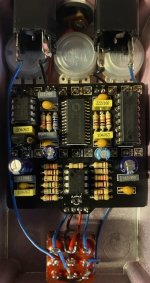
 

Attachments

  • 9AAAE831-1F5C-426B-9731-39FBEFC5BCE8.jpeg
    9AAAE831-1F5C-426B-9731-39FBEFC5BCE8.jpeg
    92 KB · Views: 13
First, make sure power is reaching the ICs. Check the voltage you are getting on the pins at the ICs. (pin 13 of the FV1, pin 8 on the T072, pin 1 for the 4049.

For the audio probe, if you have not used one before, first make sure you know how to hook it up. The plug in a sound source to the input jack, use your probe to check the tip of the input jack. if you have sound there, if means you have the probe hooked up correctly. then you can check places where the sound should be going on the PCB. put the pedal out of bypass and check to see if the sound reaches the input on the PCB. Then check to see if the sound is reaching the ICs -- check TL072 pins 3, 1, 5 and 7. for the FV-1, use the audio probe to check pins 2, 1, 27 and 28.

Let us know the voltage on the pins, and whether you hear audio on the other pins.
 
Thank you! Below are my voltages

FV1 pin 13 3.23v

4049 pin 1 3.3v

tl072 pin 8 9.09v

Pin 3 of the tl072 I have clean audio
Pin 1,7 and 5 give me broken intermittent sounds. I swapped out the chip and got the same thing

pin 2 FV1 give me the same broken audio
Pin 1 nothing

pin 27 broken audio
Pin 28 I get a swishy sound that could be reverb
 
look at your schematic. at least the first problem is figuring out why your sound gets distorted between pin 1 of the TL072 and pin 2 of the FV-1.

there are only a few parts between those points, so check your connections and resistor and capacitor values for R3, C2, and C3. also check to make sure that the solder for those parts is not touching another part and shorting out.
 
Ive checked for shorts and bridges, but can’t find any. The part values are all correct per the schematic.

below are additional voltages on the TL072:

pin 1. 1.4v
Pin 2. 1.41v
Pin 3. 0.95v
Pin 4. 0.00v
Pin 5. 1.05v
Pin 6. 1.17v
Pin 7. 1.41v
Pin 8. 9.09v

Thank you,
 
This seems weird. I must have tried 20 different TL072. None worked. I plugged in a 4558 and it works. If I play hard it clips

voltages are:

pin 1. .89v
Pin 2. .89v
Pin 3. .72
Pin 4. 0.00v
Pin 5. .82v
Pin 6. .85v
Pin 7. .87v
Pin 8. 9.09v

Any wild guesses here?
 
They are. I have Three different brands on the chips. I think something is still wrong as there is a very harsh clipping if I play hard. I’ll see if I can get some sound samples posted later
 
It will probably be easier to troubleshoot if you put one of your TL072 chips back on the board instead of the 4558 since that makes the problem more obvious to spot.

The voltages on you 072 look good. If you are getting clean signal at pin 3 but not at pin 1, reflow all the pins on the socket to make sure they are in good contact with the PCB. with no IC in the socket, check with your DMM to make sure that pins 1 and 2 are connected through a trace on the board.

Then put in the IC and see if you are still getting a distorted signal on pin 1 of the TL072. If you are, I suggest pulling that IC, bending pin 1 out so it does not go in the socket and then putting the IC back in the socket (without pin 1). Use your audio probe to see if you are getting a clean signal on pin 1 after you do that. If so, you know that something on the PCB connected to the socket for pin 1 is degrading your audio signal.

If you have triple checked the part values for R3, C2 and C3 and they are OK, you might have a damaged trace between them. You can check the connections between the parts that go from the TL072 to pin 2 on the FV-1.

Look at the schematic in the build doc and use you dmm to check for connectivity between pin 1 of the 072 and one side of C2, then check to make sure the other side of C2 connects to one side of R3, then that the other side of R3 connects to pin 2 of the FV-1 and also connects to one side of C3. Make sure the other side of C3 connects to ground. If all of those are good and you still get bad sound at pin 2 on FV-1, then something else must also be connecting to some part of that path so do a close visual inspection.

That is a relatively small section of the board to check, and you know something is wrong there. Good luck.
 
Thanks again! My meter doesn’t have a continuity tester, so I’m going to pick up a new one to make this easier. If anyone has recommendations for an affordable meter, I’d be most appreciative.

I will try the trick with pulling out pin 1 of the ic and get back to you.

here’s a video of the audio problem, if it helps at all.
 
Back
Top