How does Electro-Harmonix mix and match fonts so well?!

mzy12

Active member
I've been trying to mix multiple fonts together on my pedal graphics for a while now (usually two, never more than three) just to break the visuals up and clearly distinguish between controls and the pedal name, and I've got to say, it's pretty hard getting multiple fonts working together! I know there's, like, entire professions whose purpose is to do that sort of stuff, so I've got to take my hats off to the Electro-Harmonix people who have done the pedal graphics throughout the years. Something about, say, the EHX big muff variants in the 70's just has the right feeling to the weight of the font.

Has anyone else been trying to add multiple type-faces to their DIY pedal decals and labels? What has been your experience with doing that? And have you a better way of executing it than scrolling through a list of your installed fonts to see what matches well together :ROFLMAO:
 
Well, to be fair, EHX had fewer fonts to deal with in their day... if memory serves they were using Letraset to create silkscreens. That being said, I've generally only gone with 1 or 2 fonts on any particular enclosure (unless I was doing an homage to EHX, and then I lifted a couple of their fonts, or something close). Of course, having Illustrator and being able to change groups of fonts at a keystroke helps.
 
What EHX does is not complicated.

They use alway the same sans-serif font for knob labeling. And their logo is always the same, too.

Then they have the pedal name. For that, they use some kind of “poster” font, and in some cases, a secondary, simpler font (normally another sans-serif) to support the first one.

Use a limited color palette (one main color, usually bold and saturated, plus black and white and in some cases a secondary color to support the first). And that’s it.

They’re pretty consistent with their style, and that’s why you can normally identify their pedals.
 
I'm switching jobs, and to celebrate leaving my old job I had grown very tired with, I bought a non-DIY pedal for one!

Well it's a tiny bit DIY in that you switch the liquid in the cup to change the tone. But mostly I just felt like having it for the gimmick. So far coffee (and lemon juice, which sounded very similar) were both quite nice, but just sort of a dark low gain tone. Whiskey however gave me a pretty nice distortion sound, which I've been enjoying for a bit.

View attachment 55514
Congratulations on leaving your old job! Rainger is insane haha. Only they could come up with something so outrageous and fun and have it still be useful.
 
the easiest way to mix fonts, coming from someone who’s done a fair share of paid graphic design jobs, is to rip off someone else’s pairing.

Chances are you’re looking to combine fonts to convey some sort of visual connotation - ie, put your design in conversation with other designs of a similar style so that it is, more or less, that style.

From that starting point the individual fonts don’t matter as much in terms of exact matches, etc. A tight gothic is gonna look similar on quick glance to all but type nerds. You don’t even need to be creative (I’m not, and I get paid for it!) once you break it down.

Graphic design is just applied semiotics :)
 
What EHX does is not complicated.

They use alway the same sans-serif font for knob labeling. And their logo is always the same, too.

Then they have the pedal name. For that, they use some kind of “poster” font, and in some cases, a secondary, simpler font (normally another sans-serif) to support the first one.

Use a limited color palette (one main color, usually bold and saturated, plus black and white and in some cases a secondary color to support the first). And that’s it.

They’re pretty consistent with their style, and that’s why you can normally identify their pedals.
This makes a lot more sense to me, a common graphic design noob, now. Thanks for breaking it down like that!

Usually two fonts that either compliment each other while using contrast and a visual hierarchy of sorts.

Here's a decent article that talks about those basics:
Thank you, I will check that article out!
 
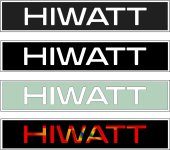
There's a difference between a full font and just a few letters! BIG MUFF only six letters. It's very easy to pull in a picture, zoom up to 1000+ and then trace over it with a vector drawing tool. Then you can resize it. I did it with this HIWATT logo. I think the top one is the original bit map, the ones under that are the vectorized copies. And it looks like I either made the line on the "I" the same as the fill or made it "no line".... oops.... easy to fix.

In my early days of programming, and managing the IT department (called 'the computer department' back in the late 70's) I had to support marketing, and they needed a drawing program. So we got Corel, but no one knew how to use it. So my boss told me to learn it. I use Visio now as it has vastly superior vector drawing - it'll even help you stay on the line in a bitmap!


Hiwatt Logo Traced and Original.jpg
 
I use Visio now as it has vastly superior vector drawing
You’re the first person I’ve heard of that uses Visio as a vector drawing program…
I mean, apparently the program has vector drawing capabilities, but I always thought of it as a tool to draw diagrams. But if it works for you, just go ahead! 😄

For somebody new, though, I would recommend Inkscape, if they don’t want to spend money and they’ll use it sparingly, Affinity Designer if they want to take it a little more seriously and don’t mind spending a little and Adobe Illustrator if they’re going professional (but be prepared to spend a lot).
 
You’re the first person I’ve heard of that uses Visio as a vector drawing program…
I mean, apparently the program has vector drawing capabilities, but I always thought of it as a tool to draw diagrams. But if it works for you, just go ahead! 😄

For somebody new, though, I would recommend Inkscape, if they don’t want to spend money and they’ll use it sparingly, Affinity Designer if they want to take it a little more seriously and don’t mind spending a little and Adobe Illustrator if they’re going professional (but be prepared to spend a lot).
Inkscape for me is incredibly frustrating. Any time I want to draw something relative to a line with any degree precision, I end up having to create rectangles for rectangles for rectangles to use as guide and hope that it's not at too strange angles that one of the snapping tools won't decide to just not work. It also crashes and consistently produces inconsistent results as things just bug the hell out. Maybe I'm just using it incorrectly. Who knows haha. Still not gonna pay the money on something like Illustrator :ROFLMAO:
 
Inkscape for me is incredibly frustrating. Any time I want to draw something relative to a line with any degree precision, I end up having to create rectangles for rectangles for rectangles to use as guide and hope that it's not at too strange angles that one of the snapping tools won't decide to just not work. It also crashes and consistently produces inconsistent results as things just bug the hell out. Maybe I'm just using it incorrectly. Who knows haha. Still not gonna pay the money on something like Illustrator :ROFLMAO:
Yeah, I'm not a fan of Inkscape of Gimp, but there are not many free Graphic Design apps out there. So for people on a budget, I guess those are the options, even though they're sub-par in my opinion.
I'm really happy with the Affinity suite (for images I use Pixelmator Pro, though). It's cheap, not subscription and for most uses, it's all you may ever need.
But professionally, I always used Adobe apps. Though, I won't pay for them for myself, I only use the apps when a company I work for pays the license.
 
You’re the first person I’ve heard of that uses Visio as a vector drawing program…
I mean, apparently the program has vector drawing capabilities, but I always thought of it as a tool to draw diagrams. But if it works for you, just go ahead! 😄

For somebody new, though, I would recommend Inkscape, if they don’t want to spend money and they’ll use it sparingly, Affinity Designer if they want to take it a little more seriously and don’t mind spending a little and Adobe Illustrator if they’re going professional (but be prepared to spend a lot).
Inkscape is a coreldraw clone. It acts and feels like corel did back around 1997 or so. It is vastly inferior when it comes to drawing. I've been using corel and visio since *version 1*. Inkscape makes hundreds of control points in a curved line, and managing the direction controls for each point is fruitless. Visio make 2 to 3 control points in a curved line, and you just click on the direction control for each control point and pull it or change the angle to change the shape of the line.

Yes Inkscape is free, sometimes you have to spend money to get better software. In Visio's case I buy much older versions than current which can usually be had for 30 to 60 bucks on ebay.

At 67 years old, I don't need to go pro, but if I was younger I would shell out the AI license. It's a great platform. And I say this as a programmer that did graphics dev before going into manufacturing and ERP programming.

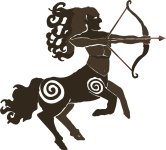
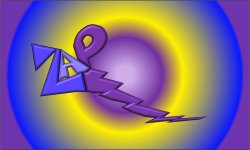
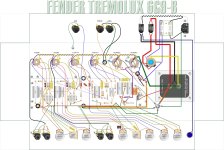
A few of the images I've drawn with Visio, the bottom one is a Tremolux 6g9-b layout, and the heading was a font that I modified in coreldraw, and then imported to visio and shaded and made part of the layout. I drew all of the components in Visio. There is actually a very large number of people employed using Visio for everything from Map creation to advertising. http://www.visguy.com/


Riker siloette.jpg


My Klon Centaur.jpg


Elwood Monogram.jpg
Zap 3d.jpg


Byzantine Cross blk bkgnd.jpg


Tremolux 6G9B v06012023.jpg
 
Last edited:
Inkscape is a coreldraw clone. It acts and feels like corel did back around 1997 or so. It is vastly inferior when it comes to drawing. I've been using corel and visio since *version 1*. Inkscape makes hundreds of control points in a curved line, and managing the direction controls for each point is fruitless. Visio make 2 to 3 control points in a curved line, and you just click on the direction control for each control point and pull it or change the angle to change the shape of the line.

Yes Inkscape is free, sometimes you have to spend money to get better software. In Visio's case I buy much order versions than current which can usually be had for 30 to 60 bucks on ebay.

At 67 years old, I don't need to go pro, but if I was younger I would shell out the AI license. It's a great platform. And I say this as a programmer that did graphics dev before going into manufacturing and ERP programming.

A few of the images I've drawn with Visio, the bottom one is a Tremolux 6g9-b layout, and the heading was a font that I modified in coreldraw, and then imported to visio and shaded and made part of the layout. I drew all of the components in Visio. There is actually a very large number of people employed using Visio for everything from Map creation to advertising. http://www.visguy.com/


View attachment 55652


View attachment 55649


View attachment 55648
View attachment 55651


View attachment 55650


View attachment 55654
Okay those are some very convincing results. Damn.
 
Back
Top