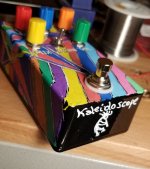
Kaleidoscope

tdukes

Active member
NOTICE: From testing, I think the width and feedback labels are swapped. Don't copy my labeling without checking for yourself.


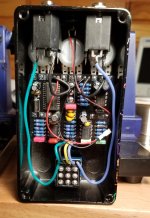
This is enclosed in one of the pre-drilled Tayda enclosures. I hand soldered the FV-1 from electro-smith since PedalPCB was out of stock.

The design is supposed to remind you of a kaleidoscope.

20191108_130030.jpg 20191108_130041.jpg 20191108_125331.jpg
 
Last edited:
Is it "that hard" or challenging or a risk-of-destroying the pricey FV-1 for a beginner to solder it by hand?
 
I recently hand soldered one for the first time on my current arachnid build for the exact same reason.

I used a fine point tip for the iron and I didn’t think it was “that hard”. With a bigger tip I’m not sure how hard it would be.
 
Maybe Jovi will add some SMT techniques to his Workflow post. In the meantime, here are some suggestions:
1) Ensure that the leads are properly formed. They should all be in the same plane and sit flat on the board, close to the center of the pads.
2) I usually prefer to install semiconductors last, but in this case you want to install the SMT IC first because other parts may get in the way of soldering, cleaning and inspection.
3) Restrain the IC with tape or putty until you get at least 2 corner leads soldered. The IC will literally float on the molter solder and slide off of the pads if left unrestrained.
4) Use the right tools. A temp controlled iron with a fine tip is essential.
5) Use good light and magnification when you solder. The pad spacings are under a millimeter and it's very easy to get a solder bridge.
6) Minimize the time that the iron is on each IC lead and pause for several seconds (or longer) between solder joints to allow the IC to cool.
7) Perform thorough cleaning and inspection immediately after soldering. I have seen the pros miss a solder joint on SMT ICs. Better to find it now than in the Troubleshooting forum.

Good luck!
 
Maybe Jovi will add some SMT techniques to his Workflow post. In the meantime, here are some suggestions:
1) Ensure that the leads are properly formed. They should all be in the same plane and sit flat on the board, close to the center of the pads.
2) I usually prefer to install semiconductors last, but in this case you want to install the SMT IC first because other parts may get in the way of soldering, cleaning and inspection.
3) Restrain the IC with tape or putty until you get at least 2 corner leads soldered. The IC will literally float on the molter solder and slide off of the pads if left unrestrained.
4) Use the right tools. A temp controlled iron with a fine tip is essential.
5) Use good light and magnification when you solder. The pad spacings are under a millimeter and it's very easy to get a solder bridge.
6) Minimize the time that the iron is on each IC lead and pause for several seconds (or longer) between solder joints to allow the IC to cool.
7) Perform thorough cleaning and inspection immediately after soldering. I have seen the pros miss a solder joint on SMT ICs. Better to find it now than in the Troubleshooting forum.

Good luck!
I also bought solder that is hair thin, it's a PITA to use but less likely to get a bridge
 
I use a liquid flux (Kester 186) and try to get the corners down with the pads aligned. Getting the first two pins with all the other pads lined up is the hard part. Then I just solder everything down with solder bridges and too much solder (but not way too much solder). I go back and clean it as good as I can with solder wick. Then I clean the flux off and go back and touch each pin and watch the solder reflow. If a pin looks to need more solder I add a little. I use a 2.5x magnification headset to get a good view. That is how I did the FV-1 you see above.
 
I updated the first message in this thread. I believe I have the width and feedback labels swapped. Be sure to check what you think they should be called before copying my labelling.
 
Back
Top