started learning Eagle using two sided layouts, so this is a little more challenging just having the top side to use, but I at least get to put a ground plane on top which helps.
Advice from the dudes that would know: are there any components that shouldn’t be near each other that would cause any weirdness? Is that ever an issue?
I spent a good hour on a layout before I realized I had the pots on the top side instead of the bottom, fixing it actually made the layout significantly better so I guess it's a positive. I've been spoiled by working on 4 layer boards recently, it's quite a challenge getting all the power and ground where it needs to go on a single layer.
I threw a layout together real quick for fun, and I have to say single-sided board layout is HARD. I ended up with 11 jumpers. I didn't realize how much I relied on having multiple layers to get things done!
I tried to follow the rules as closely as possible while also making 100% sure I would get disqualified, and I think I pretty well nailed it
I did some research trying to find what a good trace width was. I saw a post that for beginners, etching 10mil traces with 20 mil clearance was a good starting point, I work in mm so I just converted it and decided to do 0.5mm traces and spaces to be safe. So with that in mind and a couple hours tinkering I have an only slightly ridiculous board with 0 jumpers.
Advice from the dudes that would know: are there any components that shouldn’t be near each other that would cause any weirdness? Is that ever an issue?
Keep IN & OUT away from each other. Keeps all nets as short as possible, especially anything connected to pin 2 or 6 on the dual opamp. Fortunately, this is a low-gain circuit and is pretty forgiving w.r.t. layout. #1 layout mistake: wrong part footprint.
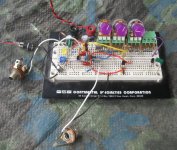
I have breadboarded it, it works and sounds great. I would not jerk you guys around by posting a schematic that I hadn't verified. I think Fig's comment was a compliment to those of you who are moving so quickly. This one was a quickie for me; a little over 2 days for simulation, modification, breadboard, test and iteration. I usually like to go slower, but was working to a deadline.
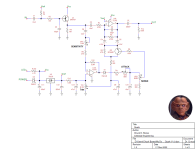
Updated schematic below, complete with "illegal" ref des & net names. The only changes are correcting the duplicate ref des and the date in the title block.
Some build instructions: Q1 can be any N-ch JFET with Idss between 1mA & 3mA. Q2 can be any high-gain, low-noise Si NPN. Note that Q2 is installed "upside-down." In other words, the emitter & collecter are swapped. This is deliberate. You can sub other opamps, but IMHO FET-input opamps are best for this circuit.
Trim is there to fine-tune the behavior when RANGE is at zero. Start with Trim centered. Play it for a while to get a feel for the controls. To adjust Trim, set SENSITIVITY, ATTACK & RANGE to zero. Play quietly and listen to the wah sweep. If the wah doesn't sweep, slowly turn Trim up until you hear a slight change in tone. Otherwise, do the opposite.
Here's how it all works. Q1 is a unity gain buffer. U1a and the stuff surrounding it form a current-controlled bridged-T filter. C4, C5, R6, R7 & Q2 are the T. R5 & C6 are the bridge. This filter is an under-damped low-pass filter, similar to the CryBaby. The response is more-or-less unity up to the cutoff freq, then there is a 12dB resonant peak and above that a fairly steep drop-off. Q2 is used as a current-controlled resistor. Dr. Q & Nurse Quacky had a 1nF cap from the opamp's - input to GND. This is a circuit-design no-no. I took that cap out and added C6 instead. U1b and the stuff surrounding it form an envelope detector. It makes a voltage on C10 that sort-of follows the instantaneous volume of the guitar signal. I say "sort-of" because if we set the SENSITIVITY control high enough, U1b saturates and flattens the top of the amplitude signal. The ATTACK control limits how fast the amplitude signal can rise. C10 stretches out the release time. The voltage on C10 is fed to Q2 thru the RANGE control and R8. When the voltage on C10 rises, the current in R8 also rises which make Q2's resistance go down which in turn makes the filter's freq go up. How far and how fast the filter freq goes up is controlled by the three knobs. Those knobs all interact to some degree, so if you turn one, you may need to adjust the others. U2 provides a stable reference voltage for biasing the envelope detector and Q2. This is about as stripped-down as an auto-wah circuit can get. It works amazingly well in its simplicity. At higher signal levels, Q2 will add some distortion. This is normal; consider it part of the effect. If you want to tune this circuit for bass, double the values of C3-C6. If you want slower attack & release, increase C10.
For the purest auto-wah tone, you need to place an auto-wah near the front of the signal chain. Anything you put in front of it that changes the guitar's envelope which will affect the auto-wah's sweep. This includes dirt, compressor, modulation and delay pedals. Definitely experiment with the pedal order because you will no-doubt discover some strange & wonderful tones.
I threw a layout together real quick for fun, and I have to say single-sided board layout is HARD. I ended up with 11 jumpers. I didn't realize how much I relied on having multiple layers to get things done!
You should be able to reduce the jumper count. The trick is to use components to jumper over traces. Hint: there's no rule that says resistor and diode footprints all have to be the same length.