Quality of Life improvements for bulk builds?

rwl

Well-known member
I've started making a modest number of pedals for sale at a local guitar store - dropping off 3-4 at a time. I'm doing this to basically try to break even on the hobby, use up spare boards and parts, etc.

I really enjoy soldering, and don't mind placing resistors, capacitors, ICs, transistors or pots. On the other hand, I dislike wiring - measuring, cutting, stripping, and often applying some heatshrink. LEDs that need a lead of wire are the worst. Likewise I don't really like placing knobs onto pots with their fiddly tiny Allan nuts.

For those of you making a number of pedals by hand, do you have any tips? I'll start with two recent ones:
  • I got a 3D printer in December and printed some of these Rocket Socket clones. I've found them to be surprisingly useful, I was very skeptical. Before that I was using a crescent wrench that I needed to adjust by hand, and I always worried about it slipping and ruining my finish. These are faster, easier to use, and have no risk of ruining the paint job.
  • Getting the sizing of Tayda drill holes right, and getting all enclosures drilled. I don't know why I tolerated this for so long, but for probably 20 pedals I didn't have the right 3mm bezel size. No problem... I figured I'll just use a step drill bit at home. But the steps were just slightly too large - the bezel would fit but look a little unprofessional. Really bothered me. Even worse was builds with fewer holes I'd drill myself to save time - using a hand drill. The drill would wander a bit and the result looked bad. Typically it was covered by washers so no real problem, but I just hated looking at the beautiful prints with mangled holes before I got the components in. It's great to have pedals come in and not have to worry about drilling at all, just placing components.
 
I hate wiring passionately enough that if I were to make pedals in some kind of volume, I'd try my best to have every component on the PCB. Jacks, switches, you name it. Everything except maybe the footswitch, due to mechanical stress/vibrations. It takes a lot of design work to make this happen (I've done it before), but I'd rather design for 10 hours than wire for 2.

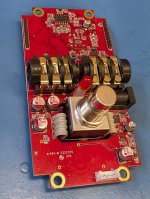
If you have a bunch of commercial pedals around, I would open them all up and see how the "pros" do it. Here's one example from my very small pedal collection (MXR X100):

PXL_20250606_160807221.jpg
 
gawd I haaatee soldering wires to things. I use JST connectors wherever I can. You can get pre-wired cables from Aliexpress in 50mm size (good from daughterboard to main PCB) and 100mm (good from IO board to daughterboard). Are they the *exact* size you need to have the super-finished look? Nah. Are they good enough? Yeah probably.

Also as @JTEX just linked, you could try making some with the whole board as one piece (minus the footswitch). I've been trying this out, too, and like the results so far. I'm still fiddling a little bit with the top jacks, what I have is a tight fit -- it snaps in with some force, but once it's in the 'innie' jacks protrude enough through the enclosure to make removal a pain. It looks like the pedal linked above, the 'innie' jacks don't extend past the PCB at all, which probably works ok for the audio jack part but the DC jack for sure will be recessed relative to the enclosure. But maybe they just use a round external drill and the plug recesses a bit into the enclosure? hmm. If you make the board close to full length, you can even just solder pin headers rather than a ribbon cable for the footswitch daughterboard.

I've got some pics/links to this in the schematic / PCB 'community boardroom' section (pinned posts)

re: the enclosures - I think part of this is hardcore standardization. You have a couple sets of layouts and stick to that as much as you can. For me, I've started doing faceplates so I can even have every enclosure drilled with 6 holes and just have the faceplate cover up the holes I'm not using. I know you do the really nice artwork on your pedals so you probably can't batch them up that way. If you really wanted to finish holes at home you'd probably be better off with a small drill press and a jig. Also it might look better to drill from the back so the next step of the step doesn't dish out the front artwork. (But you kind of need a jig for that for sure, maybe even a block of wood you drop into the enclosure with your pattern on it). But honestly why risk the other $10 worth of the enclosure to save $2.50 in drilling costs.
 
oh, and for the knobs thing - I guess you could use the D shaft pots, or splined shaft pots, and use
push-on knobs rather than fiddle with the set screws. Has anyone here tried that with any success?

(I think the Tayda selection is much less for those types of knobs and pots, but maybe it's worth trying
to redesign with that in mind)
 
Getting the sizing of Tayda drill holes right, and getting all enclosures drilled. I don't know why I tolerated this for so long, but for probably 20 pedals I didn't have the right 3mm bezel size. No problem... I figured I'll just use a step drill bit at home. But the steps were just slightly too large - the bezel would fit but look a little unprofessional. Really bothered me. Even worse was builds with fewer holes I'd drill myself to save time - using a hand drill. The drill would wander a bit and the result looked bad. Typically it was covered by washers so no real problem, but I just hated looking at the beautiful prints with mangled holes before I got the components in. It's great to have pedals come in and not have to worry about drilling at all, just placing components.

I definitely enjoy using the drill service much of the time, but I still do a lot of drilling at home. I’ve completely eliminated this issue by always drilling holes one step size too small, and then using a fluted reamer to enlarge the holes to the exact size needed for a secure but not too-snug fit.

For accuracy, the biggest improvement I made was from upgrading my automatic center punch from the cheap husky and cobalt branded ones I was using, to a nice, solid Starrett.
 
Not a fan of wiring either.
Using extra long male headers for the footswitch in lieu of wiring is the way for me. If the PCB is tall enough, I'll align the PCB and breakout board in drilling and just use straight headers. You can be off vertically +/-3mm or so and it still works.
For small PCBs where there's a gap between the breakout and PCB, you can get headers up to 70mm from mouser. I just use some flat nose pliers and bend them into a block U shape as needed.

This also holds up extremely well in the event you need to remove the PCB for any reason. By far the most sturdy option when it comes to this. Also, as long as you don't overdo the solder, the header pins tend to self clear the holes when desildering if you leave 5mm or so excess. So in the event of a switch failure, it's a pretty quick and clean operation to replace it.

Since you layout your own boards, in your shoes, I'd stanrdize a PCB size that accomadates alignment with the 3pdt in the location you desire.
 
For any task I don’t enjoy, it’s more manageable if I do each step in bulk and embrace the suck. For example, set up for a wiring session, and just start going through them do just the wiring. I break it down further and cut all the wires together, then strip all the wires, then add all the bends/angles. When I get to the end I’m just soldering the wires in, instead of doing all those steps sequentially for each build.
 
I'll update my github repo with this layout as the template, since it seems to be the best-fitting one so far. The jack
selection is kind of a pain. If I leave the footprint holes large like this, it fits the Rean/Neutrik NYS215 (Tayda A-7115)
really well (and the A-3575 might fit, too) but the Rean/Neutrik NMJ6HCD2 and the Tayda A-3617/ A-1122 have much
smaller pins and wiggle around a bunch in the bigger holes.

The NMJ6HCD2 is nice because it has the same pin landings but the plastic housing is ~2mm narrower so it fits in
a crowded top-jacks setup a little better -- as it stands you can see how little clearance there is between the input
jack and the DC jack. (It's fine IMO because I don't use either one, they're both the 'cable inserted' detection
pins which are helpful if you want to use a 9V battery but not that useful otherwise):

Using the full board template here are some pics:

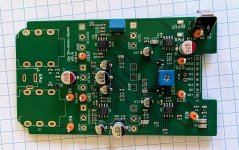
Board straight from JLCPCBA:

Note the test points w/ loops to make it easy to test on the bench w/ test hooks.
From the MAS Effects DIY tower, I have test hooks on GND, 9V, EIN, EOUT, and
can hook Q2D / Q2S with my multimeter, with the alligator clip on the ground clip for biasing:

I put a ground spring here (Keystone 590) because with the 'innie' jacks there's no longer anything
metal on the jacks that make contact with the enclosure. I've been looking into ways to drill into
the enclosure and use a ground screw, also.

PXL_20260419_210108665.jpg

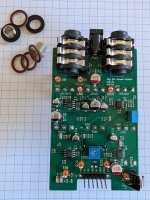
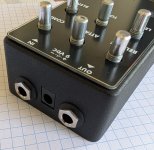
Controls and jacks soldered in. Using the Rean / Neutrik "Innie" NYS215 jacks (there are tayda equivalents too):

PXL_20260419_210137861.jpg

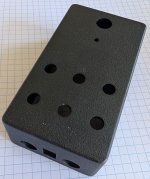
The pre-drilled enclosure -- I lost my 9x11mm rectangle drill bit in a move, so get them drilled at Tayda:

PXL_20260419_210202682.jpg

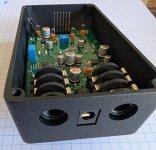
Board resting in place - DC jack sticks through a bit, innie jacks are a little further back. I've had to back these footprints up over the course of a couple revisions or else I entomb the board once it snaps in the first time.


PXL_20260419_210236660.jpg


This is what it looks like with the inserts for the jacks in there. The DC jack is pretty flush. There's a little bit of space below it -- honestly I had to leave the drill with a little bit of space to make it so I could get it in and out. In a finished build this probably wouldn't be too noticeable, or I might add a shim of some kind post-build. (black silicone caulk? or just leave it like this):


PXL_20260419_211120394.jpg


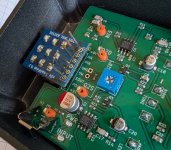
With the footswitch daughterboards on the pins - (yes, unsoldered because this is a demo and the board is still a WIP and doesn't work right yet
:p )


PXL_20260419_211037224.jpg


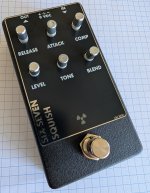
Final with the faceplate on-- you can use your imagination on what it might look like if I'd spent the time putting the washers/nuts on the pots and screwing on the knobs :-)


PXL_20260419_211021950.jpg
 
If you're using a 125b then you can design your PCB so you can board mount pretty much everything except the footswitch, and then have that on a separate daughterboard that attaches to the main board with pin headers, making it easily removable.

You could design the board with the footswitch mounted to it, but the height of some components becomes an issue, in particular toggle switches.

If you want to use a 1590b then you will have to use off board mounted audio jacks. There isn't a jack meant to be secured from the outside (critical) that is narrow enough to fit in a 1590b with top jacks.

You're going to want to spend a lot of time with a PCB design software, but it's actually pretty fun getting deep into it. I would try to keep notes in a folder somewhere about different aspects of the board. I normally keep everything in my head but with this in particular there are so many details it's nice to be able to come back and read about design decisions you've made in past revisions so you don't have to make the same mistakes again.

But on the other hand, off board wiring isn't really a big deal once you're able to place the process into the back of your mind and focus on speed. I fit all my wires into the PCB once it's already mounted in the enclosure, with needle nose pliers from the underside, and it's easier for me because it keeps the project more organized than if I were to wire up the PCB before mounting it into the enclosure.

I've had these in an open tab for like a month
 
Cool idea. I will add to the anti-wire-chorus. They fray, melt, break and get in the way. That said, I buy the pre-cut wires from suppliers. I drill my own enclosures but if I was doing more than a few I would have them pre-drilled. I only have a hand drill so if pre-drilling was a no go, I would get a drill press.
 
For wiring, a third hand tool can be really convenient. I have an omnifixo and it really makes things a lot easier. Make a fixture for cutting the right lengths and it will go quick.
 
gawd I haaatee soldering wires to things. I use JST connectors wherever I can. You can get pre-wired cables from Aliexpress in 50mm size (good from daughterboard to main PCB) and 100mm (good from IO board to daughterboard). Are they the *exact* size you need to have the super-finished look? Nah. Are they good enough? Yeah probably.
This thread has inspired my to get pre-cut wires. Will see how AliExpress works - my part orders from them got cancelled and never delivered.

oh, and for the knobs thing - I guess you could use the D shaft pots, or splined shaft pots, and use
push-on knobs rather than fiddle with the set screws. Has anyone here tried that with any success?
I think push-on knobs tend to look uglier, and my supply of pots is partly 6mm and partly 6.35mm. I have seen some knob positioning tools that at least makes the position and height consistent I think Stompbox Parts sells one and I've seen 3D printable models. I'll try to give those a shot.

Anyone got recommended 3D printable models for third hands or wiring tools? I've seen a few floating around.
 
For small PCBs where there's a gap between the breakout and PCB, you can get headers up to 70mm from mouser. I just use some flat nose pliers and bend them into a block U shape as needed.
Oh I'd never thought of this, I like this idea. Just bend into a Z shape or a U shape and solder that way instead of dealing with ribbon cables.
This might even be an acceptable replacement for the JST cables between the footswitch and the PCB.
 
Oh I'd never thought of this, I like this idea. Just bend into a Z shape or a U shape and solder that way instead of dealing with ribbon cables.
This might even be an acceptable replacement for the JST cables between the footswitch and the PCB.
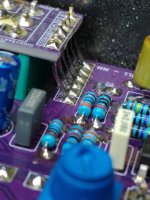
2026-04-1922.11.478486139100479791808.jpg
It can be pretty clean.
Recent gigahearts build that is 99% done where the drill alignment was just barely off so there's a slight Z bend to the headers.
Ignore the flux if it bothers you. It's a figment of your own self doubt. 🤣
(or my past prime kester that was recently replaced)
Edit to add: no stray strands and no breaking is the biggies for me. I use milspec SPC but even it will break eventually.
And honestly, this feels faster. Evenmoreso if you plan for it.
 
Yeah, if the floor is $1 that's pretty expensive.
These are what I ordered, 50 cents/ea.

You have to pay shipping but the shipping charge was still $3.37 even after adding 10 to my cart.
IMO 50mm is kind of the floor for the length of these - much shorter and they're honestly too hard to
wrangle to plug in.
Shame 5cm with JST XH doesn't seem to be a common config, only because I already own heaps of JST HX headers lol.
 
Okay - github repo updated w/ templates. I re-installed KiCad 9 and did the edits there so that the templates would be KiCad 9 compatible in case yall haven't upgraded yet! To use the templates, copy them into your ($wherever)/Kicad/<version>/templates/ directory. LMK how these work for you!

 
Back
Top