
You are using an out of date browser. It may not display this or other websites correctly.
You should upgrade or use an alternative browser.
You should upgrade or use an alternative browser.
Resistors 100R and 47R
- Thread starter Pasquada
- Start date

drew.spriggs
Well-known member
R just means resistance - makes it clear that 100 is 100, and not 100k.Hello
Newbie here. Have done a thorough search of the forum to understand this with no answers.
Going through component list for a pedalpcb board … have had 100R and 47R resistors …
What does the ‘R’ represent as opposed to ohm value representation?
Thanks.

dot matrix madness
Active member
Since the greek character for Ohm is not straight forward available on most keyboards/fonts "R" is used instead.
As @drew.spriggs pointed out, it makes absolutely sure which value is meant.
As @drew.spriggs pointed out, it makes absolutely sure which value is meant.

Feral Feline
Well-known member
Another reason for the "r" is that the Omega may be misconstrued as an extra zero, depending on the size and font choice of the text:
I prefer to use lower case "r" because at a glance an upper-case R may be misconstrued as a K —
The OHM symbol, Ω, is easily obtained on a Mac with "OPTION-ZED":

Press the OPTION key while using "Keyboard Viewer" and you can see what each key becomes...

Of course, you don't need to pull up the Keyboard Viewer to use OPTION-ZED, just press the two keys and you get a perfect Greek Omega every time.
Also, if you want to have the symbol for MICRO instead of wussing out with a letter "u", press OPTION-M and you get the proper "µ", so your micro-farads can be properly addressed, for example "10µF"
(Having caps-lock on screws up the OPTION-key combos, btw)
120Ω vs 1200
I prefer to use lower case "r" because at a glance an upper-case R may be misconstrued as a K —
100r 100k
100R 100k
100R 100K
100r 100K
The OHM symbol, Ω, is easily obtained on a Mac with "OPTION-ZED":
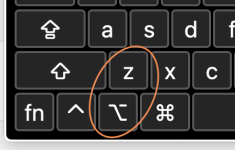
Press the OPTION key while using "Keyboard Viewer" and you can see what each key becomes...
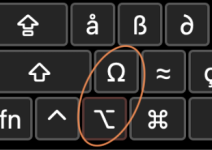
Of course, you don't need to pull up the Keyboard Viewer to use OPTION-ZED, just press the two keys and you get a perfect Greek Omega every time.
Also, if you want to have the symbol for MICRO instead of wussing out with a letter "u", press OPTION-M and you get the proper "µ", so your micro-farads can be properly addressed, for example "10µF"
(Having caps-lock on screws up the OPTION-key combos, btw)

Erik S
Well-known member
easily obtained on a Mac with "OPTION-ZED"
It's been a long time since I messed with any special characters. I remember at some point having a post-it with a list of alt-codes for doing it in windows. Alt+230 on the number pad in Windows will also get you a "µ". Weirdly only works with the numbers on the number pad though.
Apparently Window key + period key will also get you to a special symbols menu I wasn't aware of.

Fama
Well-known member
Ohm and 0 gets especially tricky because sometimes the symbols can be partially cut off by the pads on PCB's. That's also why I agree, 100r would be better than 100R. Thankfully PPCB boards are always very clean about this and I don't remember seeing it happen, but it does happen on some other boards (arguably it's also a point for RefDes, although those have their own issues with some designations looking pretty identical due to some part of the symbols being cut off).Another reason for the "r" is that the Omega may be misconstrued as an extra zero, depending on the size and font choice of the text:
120Ω vs 1200
I prefer to use lower case "r" because at a glance an upper-case R may be misconstrued as a K —
100r 100k100R 100k100R 100K100r 100K
The OHM symbol, Ω, is easily obtained on a Mac with "OPTION-ZED":
View attachment 109252
Press the OPTION key while using "Keyboard Viewer" and you can see what each key becomes...
View attachment 109255
Of course, you don't need to pull up the Keyboard Viewer to use OPTION-ZED, just press the two keys and you get a perfect Greek Omega every time.
Also, if you want to have the symbol for MICRO instead of wussing out with a letter "u", press OPTION-M and you get the proper "µ", so your micro-farads can be properly addressed, for example "10µF"
(Having caps-lock on screws up the OPTION-key combos, btw)
Feral Feline
Well-known member
EXACTICKLY-wickly — clarity — it's so easy to miss the decimal point with a poor resolution screen/print-out, smeared page etc...I always thought the "R" was used instead of a decimal "." like 4R7 would be 4.7 ohms (hard to see that decimal).
Same as 2K7 would be 2.7K ohms
.
Is that a smudge on your screen or did I sneak in a decimal, somewhere, full stop?
 really appreciate your time explaining this.