What's on the drawing board? 🎨🖌️

I did not. I literally just pooped the princeton pre section into my schematic. And that's from Mike Freda's 1 watt princeton schematic. I thought about the math, but never did it. Not even sure how I could begin. I did the Uncle Doug windings count!
I also had the thought last night of just rewiring the V3 octal for a 6sc7, 6sj7 or a 6sl7. All are duo triode instead of the single triode that's in that position now. It should be enough gain to go from line to instrument level.
Rob Robinette has 750 pages of how-to's on amps, everything from how to read a schematic to how to build an amp. Somewhere in those pages he goes through the math to show the juice needed for adding/subtracting tubes. I did not bookmark the page, it's in there somewhere.

Every time I go to his site my mind fills with so much information that I have to stop reading so I can soak in what I just read..... All the mods I got for the Bassman are from his mods, but I did radically change the layout to make it more straightforward...

I'm a computer programmer by trade, retired, with no formal education in electronics. I learned how to read schematics on Rob's site MANY moons ago! I built my first amp back in the early 00's, tho I'm not sure of the date.....

 
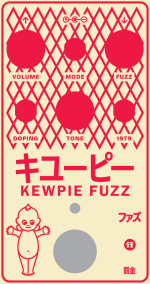
Work in progress for the Kewpie Fuzz. Gonna wait until I build one up to finalize the design because I want less ambiguous toggle labels, and I still would kind of rather find a kewpie tattoo design to rip off instead of the mayo logo. Owe credit to @benny_profane for all of his feedback on this design so far too

View attachment 64360

This is more or less what I envisioned after buying a bottle of the stuff.

Bottle contents:
I will say it's not my favourite mayo, but it's okay.


Looking forward to seeing what you come up with for the Tattoo. I came across a few tattoos of Kewpie in my search but didn't think to save any at the time, doubt I'd ever find them again or if I did they'd be something you've already seen.
 
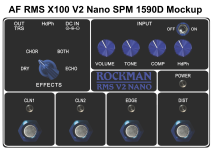
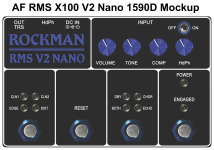
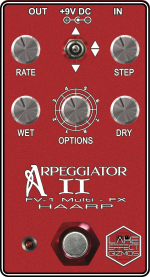
Just finalizing the beta Photoshop mockups for both of the RMS Rockman V2 Nano projects.
The V2 Nano SPM is the "Stomp per Mode" version and the other is a miniaturized version of larger V1/V2 with the sequential switching for the Modes and FX.

AF_RMS_X100_V2_Nano_SPM_1590D_Mockup.png
~~~~~~~~~~~~~~~~~~~~~~~~~~~~~~~~~~~~~~~~~~~~~~~~~~~~
AF_RMS_X100_V2_Nano_1590D_Mockup.png
 
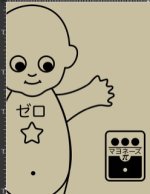
Working on my Kewpie Fuzz design a bit more now that I got inkscape working again. I swear, no resemblance to @finebyfine's incredible design was intended with this– When I came up with the Kewpie name, it was specifically because I thought it would be hilarious to imagine Corgan as a Kewpie doll lol
I need to work on a handful of things, including fixing the hand shapes (I'm not great at manipulating bezier curves to look the way I want), give some eyelashes, find a better font for the shirt (something round and bubbly that would translate well to being outlines maybe), and make the face overall less happy looking. Also need to work on the fuzzbox that'll be in his hand to make it less detailed so it scales down better. Also need to figure out the feet situation since it's gonna be tough to draw those lol.
So far I think I'm succeeding at making 'Kawaii Corgan' as I'm now calling it.
Screenshot 2024-01-13 at 7.17.05 PM Small.jpeg
 
Last edited:
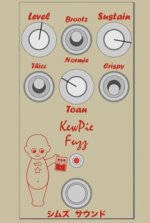
Here's what I have so far in the context of the full pedal. The atrocious fonts will obviously be changed– just placeholders for the general shape I was thinking of at one point. Also have absolutely no idea what to label any of the toggles, so I have painfully stupid placeholders rn. I think I dig having my 'brand name' in Japanese instead of latin characters at the bottom of this one. Reminds me of the Japanese edition Catalinbread stuff that I geeked out over when I was younger.

Also if I move over to a side-switch LED placement, I can scale Kawaii Corgan up a bit more for a more pleasing placement of everything. Still a lot of work to do, but I'm usually pretty secretive about my designs as I'm working on them, but I figured I might like documenting a bit more of the process this time.
Screenshot 2024-01-13 at 7.51.08 PM Small.jpeg
 
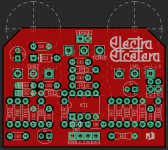
Trying to find a name for this Electra Distortion 500D I'm working on, and in a conversation with @jwin615 it came to me. Since it had like 6 names/localizations, why not?

3P3fiTs.png


I'm not 100% on the letterforms and kerning, and I'm fighting my battle of authenticity vs typography… those tangents are killing me, but, but original…

Original product enclosure lockup for reference:

GNHsLJr.png
 
I'm not 100% on the letterforms and kerning, and I'm fighting my battle of authenticity vs typography… those tangents are killing me, but, but original…

Original product enclosure lockup for reference:

GNHsLJr.png
Dig it.
bugged by the unfinished kerning of the "et". Looks like a free font 😂
and the inversion of the third "t" in "cetera"
Can you can pull off an A that looks like a D to mirror Electra?
(Electra et ceterA)
But I'm ignorant to this and it's terminology and it's 4am and can't sleep. Apologies if the above is dumb, rude or incoherent.
aaannnddd now Sweet and tender hooligan is stuck in my head
 
Here's what I have so far in the context of the full pedal. The atrocious fonts will obviously be changed– just placeholders for the general shape I was thinking of at one point. Also have absolutely no idea what to label any of the toggles, so I have painfully stupid placeholders rn. I think I dig having my 'brand name' in Japanese instead of latin characters at the bottom of this one. Reminds me of the Japanese edition Catalinbread stuff that I geeked out over when I was younger.

Also if I move over to a side-switch LED placement, I can scale Kawaii Corgan up a bit more for a more pleasing placement of everything. Still a lot of work to do, but I'm usually pretty secretive about my designs as I'm working on them, but I figured I might like documenting a bit more of the process this time.
View attachment 65860
I’m also learning Inkscape and find adjusting the curves to be difficult sometimes. The best way I have found is to try to think ahead in the node placement to make the fewest possible nodes as it is then easiest to adjust. Then if I find I need more detail somewhere I add an additional node between the previous 2.

I have been thinking about trying some of the Tayda UV prints are you able to give them the Inkscape SVG with success? Their site says to use illustrator but I feel like they should be more or less the same output.

1705251175074.jpeg

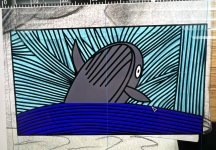
This is one of the designs I’m working on in Inkscape. It’s based on a drawing I did after seeing some whales feeding in Monterey bay. I think it’s going to go onto the Doxie preamp I’m building.
 
I’m also learning Inkscape and find adjusting the curves to be difficult sometimes. The best way I have found is to try to think ahead in the node placement to make the fewest possible nodes as it is then easiest to adjust. Then if I find I need more detail somewhere I add an additional node between the previous 2.
Definitely a key aspect to getting good results. I’m just a bit of a Luddite, and switching between node types tends to give me issues, plus I often wind up accidentally selecting multiple nodes (if you use the wheel on a mouse, or a two-finger pinch on a trackpad, it expands node selection to include adjacent nodes) when I mean to only move one, or I accidentally move the node when I mean to move its handles. Pretty much just issues of physical practice over theory.

I have been thinking about trying some of the Tayda UV prints are you able to give them the Inkscape SVG with success? Their site says to use illustrator but I feel like they should be more or less the same output.
Nope. I use Illustrator as well, but like I said, I’m a bit of a Luddite. I learned on Inkscape years before I had access to illustrator, and now I’m too accustomed to the quirky ways drawing works in Inkscape. I need to dedicate some time to learning illustrator better and developing a full workflow in illustrator, but for now I design my graphics 90% of the way in Inkscape, then import them into Illustrator, where I finalize the designs, delete my extraneous layers (hardware mockups, references, templates), set the color mode to CMYK and color grade everything, and then convert my white and gloss layers to the appropriate spot colors.

View attachment 65887

This is one of the designs I’m working on in Inkscape. It’s based on a drawing I did after seeing some whales feeding in Monterey bay. I think it’s going to go onto the Doxie preamp I’m building.
Looks neat! What enclosure color are you thinking of pairing it with?
 
Trying to find a name for this Electra Distortion 500D I'm working on, and in a conversation with @jwin615 it came to me. Since it had like 6 names/localizations, why not?

3P3fiTs.png


I'm not 100% on the letterforms and kerning, and I'm fighting my battle of authenticity vs typography… those tangents are killing me, but, but original…

Original product enclosure lockup for reference:

GNHsLJr.png

This was really quick, but what about something like this? It's obviously spelled wrong, but it kinda fits and is easy to say.

1705253032856.png
 
Definitely a key aspect to getting good results. I’m just a bit of a Luddite, and switching between node types tends to give me issues, plus I often wind up accidentally selecting multiple nodes (if you use the wheel on a mouse, or a two-finger pinch on a trackpad, it expands node selection to include adjacent nodes) when I mean to only move one, or I accidentally move the node when I mean to move its handles. Pretty much just issues of physical practice over theory.


Nope. I use Illustrator as well, but like I said, I’m a bit of a Luddite. I learned on Inkscape years before I had access to illustrator, and now I’m too accustomed to the quirky ways drawing works in Inkscape. I need to dedicate some time to learning illustrator better and developing a full workflow in illustrator, but for now I design my graphics 90% of the way in Inkscape, then import them into Illustrator, where I finalize the designs, delete my extraneous layers (hardware mockups, references, templates), set the color mode to CMYK and color grade everything, and then convert my white and gloss layers to the appropriate spot colors.


Looks neat! What enclosure color are you thinking of pairing it with?
I got in the habit of clicking off to deselect nodes when editing curves for that reason (mouse wheel accidents). Highlighting single nodes and changing their type helps a lot too. I do tons of crude bezier pen drawings that I reshape. That's basically my whole workflow in inkscape
 
Definitely a key aspect to getting good results. I’m just a bit of a Luddite, and switching between node types tends to give me issues, plus I often wind up accidentally selecting multiple nodes (if you use the wheel on a mouse, or a two-finger pinch on a trackpad, it expands node selection to include adjacent nodes) when I mean to only move one, or I accidentally move the node when I mean to move its handles. Pretty much just issues of physical practice over theory.
I have heard lots of people mention that before. I haven't had that issue myself but I also tend to select with the box and do shift or control select/deselects. I switched to one of these https://www.amazon.com/Logitech-Erg...coYm58H4Vx7UGUwJsXE13S6rPdCRG8aBoCmkkQAvD_BwE about 10 years ago for CAD drawing and for me it made things much easier.


Nope. I use Illustrator as well, but like I said, I’m a bit of a Luddite. I learned on Inkscape years before I had access to illustrator, and now I’m too accustomed to the quirky ways drawing works in Inkscape. I need to dedicate some time to learning illustrator better and developing a full workflow in illustrator, but for now I design my graphics 90% of the way in Inkscape, then import them into Illustrator, where I finalize the designs, delete my extraneous layers (hardware mockups, references, templates), set the color mode to CMYK and color grade everything, and then convert my white and gloss layers to the appropriate spot colors.
I guess I will either have to move over to a PC for my hobby stuff of find an alternative. I have a 4K chromebook I do all my hobby stuff on. I can run Linux programs on it and they tend to be free. I have always been worried if I switch to a PC it might feel too much like what I do at work and might not like it as much. I honestly don't mind the plastic enclosures for myself as they are quiet enough at the volumes I play and my pedal board is really more about exploring different sounds blowing off steam/excess energy at the guitar in the evenings. I keep thinking it would be nice to be able to run a batch of enclosures and say build them and give them to friends or if I come up with a pedal board I really like I might do some in UV printed enclosures.


Looks neat! What enclosure color are you thinking of pairing it with?
This one will be another 3D print enclosure for me. I have been printing all my enclosures in white. I'm working on fine tuning printing text and linework,ect and the white makes it easy to spot any issues, so until I get to where I want with the text and linework they will probably be white for a while.
 
Back
Top