Tayda UV Printing

View attachment 22421
First mishaps with the UV print (of the 30-something I had printed) You can see that part of the “PRO-FILTER” chipped away, and just from normal handling. The rest seems fine, as I kind of rubbed my finger on the enclosure to test it. @finebyfine did you ever had that issue, I know you printed quite a few on the black matte sand like this?

Bummer to hear that on such a great design.

I chipped part of the border on my Caesar recently (https://forum.pedalpcb.com/threads/caesar-chorus.8742/), but it was under a mountain of other pedals on my pedalboard as I was moving stuff around. Not sure when it happened exactly, but it lost a good 1 inch chunk. I've also had thin lines (less than 1pt) chip off one, but I wasn't surprised by it, and would have suggested thicker strokes if someone else had asked me for opinions on that design anyway. Both had gloss over the print.

I've probably printed 20-30 on matte black sand (most of them with the exact same border as my caesar) and those were the only ones that have chipped, and neither really in my opinion are reflective of the general durability. Prints on matte black sand are definitely the most fragile though.

Did the text in yours that chipped have gloss over it? I am still unsure whether I think a gloss layer adds protection to matte black sand or makes it more fragile. On the rest of the colors though I think it's no question it adds durability.
 
Last edited:
Bummer to hear that on such a great design.

I chipped part of the border on my Caesar recently (https://forum.pedalpcb.com/threads/caesar-chorus.8742/), but it was under a mountain of other pedals on my pedalboard as I was moving stuff around. Not sure when it happened exactly, but it lost a good 1 inch chunk. I've also had thin lines (less than 1pt) chip off one, but I wasn't surprised by it, and would have suggested thicker strokes if someone else had asked me for opinions on that design anyway. Both had gloss over the print.

I've probably printed 20-30 on matte black sand (most of them with the exact same border as my caesar) and those were the only ones that have chipped, and neither really in my opinion are reflective of the general durability. Prints on matte black sand are definitely the most fragile though.

Did the text in yours that chipped have gloss over it? I am still unsure whether I think a gloss layer adds protection to matte black sand or makes it more fragile. On the rest of the colors though I think it's no question it adds durability.
Thanks for your input Alex.
No gloss on it. The border and pictograms look sturdy as usual, don't know why these parts flaked so easily without any impact/force scratching.

Bummer too for your Caesar, I love your design. That turquoise color is 😍
 
Last edited:
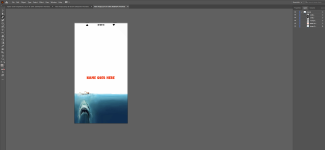
I am still burning through this thread and trying to figure things out. Feeling a little slow. Here is an enclosure for a sea machine I am working on. I still need to add labels.

Do I understand this correctly?

-My background is white. I assume I should be cutting all of that out and having it blank?

-Since I am printing this on a white enclosure do I have anything to worry about at all with layers? Can I just have the one color layer and get away with it? This is my first time ever opening illustrator. Any help is greatly appreciated?

- I do see that I forgot to convert from RGB to CMYK so I will fix that.

I am new to all of this. I just built my first pedal 2 weeks ago and I am about to start my 4th and 5th when my pcbs arrive in the next few days. Maybe it is the solder fumes but I am hooked.

I was thinking about doing some horror film themed enclosures but I fear it isn't going to be as simple as copy and pasting some movie posters like I am doing here.

1643846813774.png
 
Last edited:
Is a raster image OK to use with the Tayda UV printing service if I don't care about alignment of anything? I'm not into, like, labels, man, and plan to order patterns with no text or specific objects. How would it turn out if I sent a high-res jpeg and wasn't fussed about which section got used?
 
I am still burning through this thread and trying to figure things out. Feeling a little slow. Here is an enclosure for a sea machine I am working on. I still need to add labels.

Do I understand this correctly?

-My background is white. I assume I should be cutting all of that out and having it blank?

-Since I am printing this on a white enclosure do I have anything to worry about at all with layers? Can I just have the one color layer and get away with it? This is my first time ever opening illustrator. Any help is greatly appreciated?

- I do see that I forgot to convert from RGB to CMYK so I will fix that.

I am new to all of this. I just built my first pedal 2 weeks ago and I am about to start my 4th and 5th when my pcbs arrive in the next few days. Maybe it is the solder fumes but I am hooked.

I was thinking about doing some horror film themed enclosures but I fear it isn't going to be as simple as copy and pasting some movie posters like I am doing here.

View attachment 22499
Can I ask a question that I can't find the answer to in this thread or in @dmnCrawlers tutorials? How do I convert images and text in inskcape that will be printed in the color layer to cymk? My first design I am using only black and white images so it is less of a concern, though I want to make sure I get the black printed correctly.

Also, when adding the gloss layer, is it a better practice to just add a box for that layer covering the entire printable area or just on the text and images being printed?

Thanks! This thread is an amazing resource.

-Ian
 
I am new to all of this. I just built my first pedal 2 weeks ago and I am about to start my 4th and 5th when my pcbs arrive in the next few days. Maybe it is the solder fumes but I am hooked.
Congratulations on your staggering progress. Do your first 2 pedals work OK?

I don't think anyone answered your question, but my understanding is that yes, you're right: if printing on a white background, you don't need the white layer. But you should still include a blank white layer according to other posts in this thread. The consensus is that Tayda's printer expects to see all three layers in order. (Gloss layer is optional.) So you can just leave your white layer blank, and have your color layer on top of that. Good luck!

PS - If you've already submitted it, I suspect it would still print fine even if you only had a single color layer. Their printers only print white if you specified the special white selection from the palette so anything else it would have to assume is color.
 
Also, when adding the gloss layer, is it a better practice to just add a box for that layer covering the entire printable area or just on the text and images being printed?

I've done it both ways and they both work fine. It just depends if you want "spot gloss" (?? analogous to "spot color") or overall gloss.
If you're doing a full image background, I think you'd want to use full gloss.
 
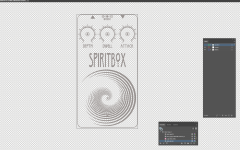
Thanks for the response. My first 3 builds Worked flawlessly. Greengage, Spiritbox, and Muzzle. I 100% owe that to Pedalpcb boards. Everything is so nicely laid out.

Once I get this all figured out I will likely redo all of the enclosures.

I have a Sea machine and Integral showing up next week to build. I am hooked.
Cheers!
 
Huge shoutout to @dmnCrawler for the templates and everyone else in this thread that has helped

Sanity check.
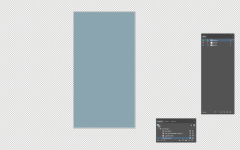
This will be on a black enclosure. I am only using the White and Gloss-V layers. I want to gloss over the whole thing...I think.
When I show all layers I only see a blue (Gloss) Rectangle. I THINK this is all correct.

Gloss layer Hidden
1644185023933.png
Gloss layer shown
1644185050145.png
Bit of a learning curve to this stuff but I think I might be almost there. Please let me know if you spot any glaring issues.

Thanks again!
 
Last edited:
Bit of a learning curve to this stuff but I think I might be almost there. Please let me know if you spot any glaring issues.

Thanks again!
Looks good. On a side note, I would round off the corners of the gloss layer. I once did a full rectangle print on a design, and the pointy corners look weird as the enclosure corners are rounded.
 
Amen! Really well produced. I watched the whole thing.

Even as a guy who's successfully printed at Tayda, I still learned a lot, especially in the Adobe Illustrator realm. Bravo Jeff!
Thanks man! Much appreciated! Will do more in time. Maybe tackle other topics.
 
Can anyone tell me the CMYK values for RDG_GLOSS and RDG_WHITE? Having trouble importing the Versaworks color palette so trying to make spot colors. Though I'm not entirely sure it will matter...

Edit: I believe they are 50/25/25/0 for RDG_GLOSS and 30/10/10/50 for RDG_WHITE
 
Last edited:
Back
Top