What's on the drawing board? 🎨🖌️

The after dark boards are beautiful, but pretty expensive.

Another option that seems to work well with JLCPCB is having exposed copper instead of silkscreen:
View attachment 44113

Right, that's exactly what I was getting at, maybe use the copper layer for most of the art.

I'm pretty spoiled by having Amplifyfun so close by, and am very satisfied with their work, but I'm not building nearly as many pedals as most of you guys either. ;)
 
The exposed copper looks killer! Is that an option you have to select when ordering?

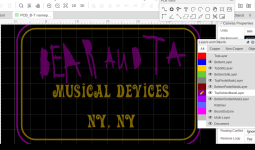
It’s part of the design process and is included in the gerbers. I use EasyEDA, but the process should be similar regardless. You do a copper pour (ground plane) and then select areas to not have solder mask. In EasyEDA, I was able to import an image in the solder mask layer and that the image would be the only area not covered by the mask.

Here's a picture of what it looks like with the copper pour hidden.

Screenshot 2023-03-16 11.36.39 AM.png
 
It’s part of the design process and is included in the gerbers. I use EasyEDA, but the process should be similar regardless. You do a copper pour (ground plane) and then select areas to not have solder mask. In EasyEDA, I was able to import an image in the solder mask layer and that the image would be the only area not covered by the mask.

Here's a picture of what it looks like with the copper pour hidden.

View attachment 44117
Dude thank you so much for sharing this! I’m still new to all of this, I knew I could do it I just didn’t know how lol
 
I finally finished up some graphics files, and I'm just prepping them all for printing. One I'm doing is sorta a stealth white thing- Gloss 'white' on a white sand enclosure. Anyone have a suggestion for what shade I should go with for the printing to make it a bit less invisible while still having a stealth white look? Right now I have it set as a 5% grey (f2f2f2), but I wonder if perhaps something half as dark (f9f9f9) might pop well enough once the gloss is there to cast additional shadow. Anyone have thoughts?
 
I finally finished up some graphics files, and I'm just prepping them all for printing. One I'm doing is sorta a stealth white thing- Gloss 'white' on a white sand enclosure. Anyone have a suggestion for what shade I should go with for the printing to make it a bit less invisible while still having a stealth white look? Right now I have it set as a 5% grey (f2f2f2), but I wonder if perhaps something half as dark (f9f9f9) might pop well enough once the gloss is there to cast additional shadow. Anyone have thoughts?

Since the 'sand white' isn't really 'white', you may have to have an exemplar to really judge the substrate and inform the color choice. Sorta just guessing otherwise.
 
Since the 'sand white' isn't really 'white', you may have to have an exemplar to really judge the substrate and inform the color choice. Sorta just guessing otherwise.
Good to know. I haven’t done any sand white stuff yet, but it appeared to me to be a textured titanium-white sort of color. Is it more of an off-white, or more of a neutral-temperatured very light grey?
 
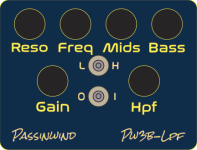
I'm really enjoying this thread and when I finally stop building variations of the same thing over and over I intend to do a deeper dive into various less expensive and/or cooler ways of doing it. Meanwhile, I've mainly evolved things a bit to make labels easier to read from a distance in dark lighting conditions, kind of the form follows function mantra:

PW3B-LPF_v5.PNG

I was favoring outline lettering in obscure partly DIY fonts previously, but many people have commented on how much easier something like this is to read. The logos and switch labels are meant to track the enclosure's color shifting finish when it goes to purple mode, not sure if that'll actually translate or not though.
 
Good to know. I haven’t done any sand white stuff yet, but it appeared to me to be a textured titanium-white sort of color. Is it more of an off-white, or more of a neutral-temperatured very light grey?
I'm not sure exactly. I just meant that 'white' can mean many different shades. If you're looking for subtle or 'stealth,' you'll probably want to do some color measuring to ensure you get the effect you're going for.
 
I'm not sure exactly. I just meant that 'white' can mean many different shades. If you're looking for subtle or 'stealth,' you'll probably want to do some color measuring to ensure you get the effect you're going for.
Ah yeah, I get that. If I’m just doing grey ink and clear without a white layer it should maintain the same color temperature though— just a matter of how much it’ll “pop”
 
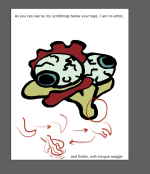
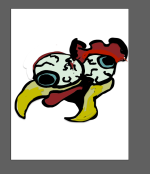
Ok thanks to Jedi Master @dawson for taking my drawing and making it look much better :ROFLMAO: I did the color but will but messing around with different finishes for different pedals. Hes my new logo. Again couldn't be more thankful to Dawson for helping me out of nowhere!
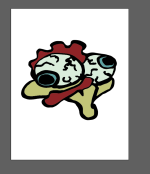
Chicken Wing Audio Logo.png
 
Last edited:
Just to compare...

logo-png.44036
chicken-wing-audio-logo-png.44202
 
I don't want to step on anybody's chicken feet, especially not on @dawson's digits; and everybody already knows I'm a fool so there's no risking looking like one now...

Suggestion:

The old one looks like a 3/4 of the chicken's left side (right side of frame looking at it)
The new colour one looks like a 3/4 the other way, looking more at the right side of the chicken's face. I think that's owing to how the comb is arranged on top, it's changed the perspective as has the new beak.

The colour one looks like the beak curves up ...

Chicken Wing Audio Logo.png

I do like having the eyeball that should be closer to the viewer further away, as that's more jarring and comical when exaggerated.

To keep your first drawing's perspective, but with the new colour version, I'd change the comb the other way, going back over the Rooster's left eyeball (right from viewer's perspective) and tongue as tongue... SORRY FOR MY BUTCHERY!

Chicken Wing Audio Logo FIRST PERSPECTIVE.png

Again, apologies to Stevie, Dawson, and to all who have to gaze upon my savage slaughtery.
 
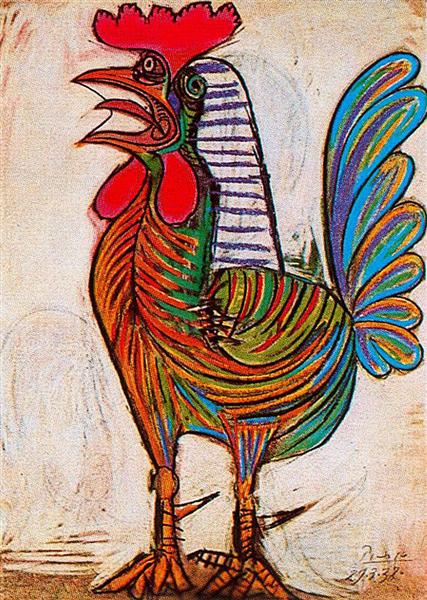
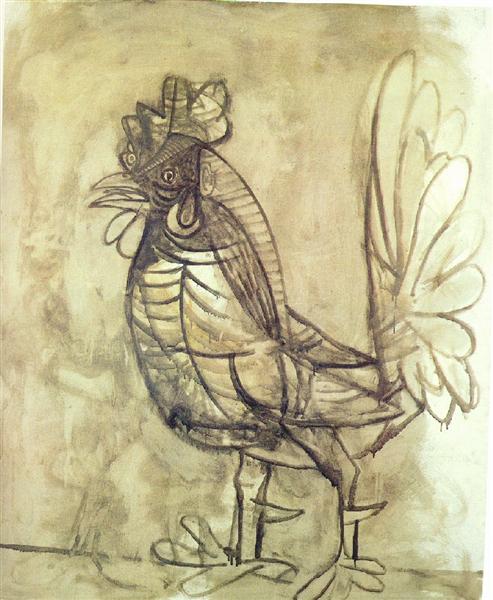
Picasso was commissioned by a woman to do a drawing of a chicken.

The woman paid handsomely for the drawing, in advance, and the artist said:

"Come back in a few weeks."

The woman came back in three weeks and Picasso told her:

"Come back in a month, it's not ready"

She gave Picasso an extra week and went to him a total of two months after the commissioning; Picasso said:

"It's not ready, come back in three months."

She contained her irritation at being brushed off and left. In three months she came back promptly.

"Come back at the end of the year, that's the soonest it'll be ready", said the painter.

Visibly annoyed, she left but then regularly came back again and again and was rebuffed just as many times. After three years since the original commission, she went to Picasso with her lawyer and demanded the Chicken Drawing, and unwilling to take her money back as the artist's works had appreciated in value overall.

Picasso went to the back of his studio, grabbed charcoal and paper and returned to the waiting woman and lawyer; in a few deft strokes he drew the chicken for her and handed it over.

She spluttered: "You, you — could've...done that... before! It took you less than A MINUTE!"

Picasso rebutted: "Au contraire, madam, it took me more than three years to become capable to draw thusly that chicken."
 
I think it looks great with that beak as well! I’m not an artist myself I wouldn’t know how to mend it the way you did. Maybe I’ll play around with that image in adobe illustrator and see if I can make it work!
 
Back
Top