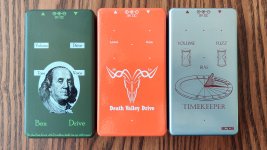
Tayda UV Printing

I thought you are not supposed to have any white in color layer?
I think it is more that you cannot trust the white in the color layer.

I used the incorrect spot color for the white layer and got that gray for my logo, labels and such. But the white in color layer really brightened it up for the graphics. Now if that actually had a good white layer under it, I expect it would look really white and not the dull white.
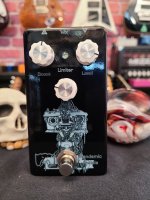
101.jpg
 
Would anyone have coordinates for a dual footswitch 125b 6 knob layout?

Or is there a directory somewhere on this forum of various interesting drilling coordinates for Tayda's custom service?
 
Yep! Although I already learned my lesson that the printing and the drilling won't necessarily line up, so I'm drilling everything myself. Definitely wouldn't be possible if I didn't spring for that drill press.
That's awesome. It's great to see that they are working for people. Is there anything that needs correcting or that could be made easier.
 
I just got an order that Hugo said wasn't up to snuff queued up to get redone at no additional cost. It never got to me so I'm not sure how bad it looked but thought I'd share that in here.

edit: leaving my original post intact but it is inaccurate. turns out it was an enclosure I received earlier this month. Emailed back and forth with Hugo because I didn't understand it at first and he had high res pictures of streaks and brushmark like lines on the enclosure. I noticed it in person myself but just chalked it up to them being busy because of the water festival - and after all it's a service that is an absolute steal for the price. Really feel Hugo went above and beyond on this one.
 
Last edited:
Yep! Although I already learned my lesson that the printing and the drilling won't necessarily line up, so I'm drilling everything myself. Definitely wouldn't be possible if I didn't spring for that drill press.
Yeah, I just received one where I had drilling and UV print done, and with the tolerance of those, the pot indicators are a bit off, but I knew it was a possibility. Still looks good though and as it'a a gift for a friend (who I know won't car about it), it's not that bad, but I would refrain to use indicators for that case in the future. Still looks better than would my shady hand drilling... But I had better results (using indicators) with their pre-drilled enclosure. Pics to come if building goes fast this week.
 
That's awesome. It's great to see that they are working for people. Is there anything that needs correcting or that could be made easier.
I'm the wrong person to ask because if there was anything custom I needed, I just did it in Affinity. And it probably didn't even register that it needed doing.
 
I just got an order that Hugo said wasn't up to snuff queued up to get redone at no additional cost. It never got to me so I'm not sure how bad it looked but thought I'd share that in here.

edit: leaving my original post intact but it is inaccurate. turns out it was an enclosure I received earlier this month. Emailed back and forth with Hugo because I didn't understand it at first and he had high res pictures of streaks and brushmark like lines on the enclosure. I noticed it in person myself but just chalked it up to them being busy because of the water festival - and after all it's a service that is an absolute steal for the price. Really feel Hugo went above and beyond on this one.
Had a similar thing happen with an order recently: Hugo emailed me and said the enclosures looked okay but could have been better, said the technician forgot to clean the print heads between layers or something. He credited the amount for the enclosures back to me.

Truth be told, they didn't look that bad. I've payed full price for worse results in the past... Just another example of Hugo being a hero for all of us in the pedal world!! Like you said, he went above and beyond 👍
 
Hello,
Thanks everyone to share the knowledge! I just read 22 pages and it is difficult to digest. I'd like to sum up Affinity Designer part in the process of UV Printing. Could you please correct me if I am wrong?

You can use Affinity Designer:
  • If you want to use only COLOR layer especially with light colored enclosers (of course with cmyk)
You cannot use Affinity Designer:
  • If you want to use multi layers epecially WHITE layer
  • Even you can create proper layers with Roland swatch which Tayda ask, even you can see those layers properly created in acrobat reader unfortunately it won't work. There is a compability issue between Illustrator and Affinity Designer for pdf format.
Cheers
 
So after fussing around for 2 months trying to make graphics and such, I put in my first order for UV printed and drilled enclosures from Tayda.
I really wanted the Emboss gloss option, but it's no longer showing up in the dropdown for gloss options. Only matte and varnish are available now (or for the time being).. Anyhoo will report back on the prints when they arrive!!
 
So after fussing around for 2 months trying to make graphics and such, I put in my first order for UV printed and drilled enclosures from Tayda.
I really wanted the Emboss gloss option, but it's no longer showing up in the dropdown for gloss options. Only matte and varnish are available now (or for the time being).. Anyhoo will report back on the prints when they arrive!!
Can't wait to see them.

Hello,
Thanks everyone to share the knowledge! I just read 22 pages and it is difficult to digest. I'd like to sum up Affinity Designer part in the process of UV Printing. Could you please correct me if I am wrong?

You can use Affinity Designer:
  • If you want to use only COLOR layer especially with light colored enclosers (of course with cmyk)
You cannot use Affinity Designer:
  • If you want to use multi layers epecially WHITE layer
  • Even you can create proper layers with Roland swatch which Tayda ask, even you can see those layers properly created in acrobat reader unfortunately it won't work. There is a compability issue between Illustrator and Affinity Designer for pdf format.
Cheers

I believe the white layer works. You need to be sure to have the correct spot colors though. I made the mistake of just using the values and they were not spot colors. So my last order did not come out exactly right. I have an order that should be here this week so I will if it worked then.

I am just super cautious and do not want to say yes until I have done it. I believe others have had better luck than me.


Now we need to find out what happened to the emboss option. It was my favorite.
 
Now we need to find out what happened to the emboss option. It was my favorite.
Hopefully it comes back— I’ve been spending months designing graphics for dozens of pedals, and I had about 6 that I planned on doing in sand black with just the emboss option for some cool stealth graphics 😓
 
Back
Top