
You are using an out of date browser. It may not display this or other websites correctly.
You should upgrade or use an alternative browser.
You should upgrade or use an alternative browser.
Join the challenge - design a pcb
- Thread starter temol
- Start date


steviejr92
Authorized Vendor


andare
Well-known member
This is overwhelming. I've watched several tutorials but there is so much I don't know. Single-sided, ground planes, vias...help!
I just wanna make my own vintage PCBs like Kaisertronics

 www.instagram.com
I just wanna make my own vintage PCBs like Kaisertronics
Kaisertronics Inc. on Instagram: "The Hellcat is coming."
Kaisertronics Inc. shared a post on Instagram: "The Hellcat is coming.". Follow their account to see 230 posts.
www.instagram.com

temol
Well-known member
Design rules, castellated holes, acid traps.... no mercySingle-sided, ground planes, vias...help!

The example board you showed is relatively simple. Large space, easy routing. The only difficulty for a beginner is a double-sided board, but still doable.

Passinwind
Well-known member
Something that works for more than just electric guitar, perhaps? What's the simplest optical compressor?I'm not insisting it has to be a drive pedal. I'm open to any type of the circuit.
But for practical/cost reasons, I would exclude any projects that require mechanization (wah), Belton bricks, THAT chips, FV-1, transformers, vintage/unobtainable parts, etc
Last edited:

KR Sound
Well-known member
I have some ideas that would make this kinda fun and to get it started quickly
That’s my idea and how I would do this if it were up to me.
- Simple, timeless, ‘foolproof’ circuit that has several component value possibilities
- Rat
- TS
- Fuzz
- Etc
- Boards
- Do we use self-made
- Or do we allow self-designed and outsourced PCB manf?
- Non-standard enclosure. Instead of a traditional 125, you must use something else
- OR any size enclosure is acceptable
- Lunchbox
- Altoids tin
- Television
- Blue Ford Escort
- Cool custom painted artwork
- No UV printing
- Water slides, paint pens, spray paint , stamping, etc are all good
- Include a video demo of how it sounds
- Setup a specific forum and sub-forum for each competition.
- Each project starts their own post
- Stickied top-post updates and list a link to each
- Another stickied post will be created and the end date with a poll for voting that lasts a week or so to give everyone a chance to check out all the build threads.
- Winner is ‘Overall’
- May not be the best board, but it’s the coolest enclosure and sounds the best
- Or the PCB is amazing and the artwork is just ok.
That’s my idea and how I would do this if it were up to me.
steviejr92
Authorized Vendor
I 2nd this!I have some ideas that would make this kinda fun and to get it started quickly
- Simple, timeless, ‘foolproof’ circuit that has several component value possibilities
- Rat
- TS
- Fuzz
- Etc
- Non-standard enclosure. Instead of a traditional 125, you must use something else
- OR any size enclosure is acceptable
- Lunchbox
- Altoids tin
- Television
- Blue Ford Escort
- Cool custom painted artwork
- No UV printing
- Water slides, paint pens, spray paint , stamping, etc are all good
- Include a video demo of how it sounds
- Setup a specific forum and sub-forum for each competition.
- Each project starts their own post
- Stickied top-post updates and list a link to each
- Another stickied post will be created and the end date with a poll for voting that lasts a week or so to give everyone a chance to check out all the build threads.
That’s my idea and how I would do this if it were up to me.
temol
Well-known member
I have some ideas that would make this kinda fun and to get it started quickly
I hope you don't get me wrong here... I'd like to keep it as a "pcb design challenge". To encourage forum members to try their hand at pcb design and possibly in diy pcb fabrication. I'm not sure there's a better way to feel confident in understanding schematics, locating schematic blocks on a pcb, tracking down issues, than designing own board from scratch.
There's no need to think about an artwork, demoing, knob types. All of this is secondary here.
If you prefer to order finished pcb from a fab house - it's fine. But my assumption is that the participants' projects are possible to fabricate at home. I think I explained my idea in the first post of this thread.
I see no obstacles in organizing further challenges/contests on the terms you have proposed.
KR Sound
Well-known member
Right on, ya you're right. I re-read your initial post just now and see what you're talking about. Just trying to put together some ideas out there- my project manager side just came out and started writing a requirements list! lol.I hope you don't get me wrong here... I'd like to keep it as a "pcb design challenge". To encourage forum members to try their hand at pcb design and possibly in diy pcb fabrication. I'm not sure there's a better way to feel confident in understanding schematics, locating schematic blocks on a pcb, tracking down issues, than designing own board from scratch.
There's no need to think about an artwork, demoing, knob types. All of this is secondary here.
If you prefer to order finished pcb from a fab house - it's fine. But my assumption is that the participants' projects are possible to fabricate at home. I think I explained my idea in the first post of this thread.
I see no obstacles in organizing further challenges/contests on the terms you have proposed.
To get this going, I say you put a definitive list of what you want the requirements to be and we get this going. I'm excited to try it out!

steviejr92
Authorized Vendor
Just ordered my copper clad! This is all getting me pretty excited rereading this thread anyone come up with a circuit yet?
KR Sound
Well-known member
My local electronics supply has everything I need so I’ll be picking them up as soon as it’s decided what we’re doing!Just ordered my copper clad! This is all getting me pretty excited rereading this thread anyone come up with a circuit yet?
steviejr92
Authorized Vendor
I just started working with Eagle trying to get proficient at it so i can come up with something good!My local electronics supply has everything I need so I’ll be picking them up as soon as it’s decided what we’re doing!
steviejr92
Authorized Vendor
Oh thats right duh i even agreed to that haha Friday it is!We don't know the circuit yet and I hope we won't know until after the start - that is on Friday
steviejr92
Authorized Vendor
Alright first time using Eagle. Just trying to familiarize myself with it before the contest. Got the schem now to start designing the layout.
BTW this is the Lovepedal Je'Taime schem from here at Pedal PCB
EDIT: I erased that hanging trace already

BTW this is the Lovepedal Je'Taime schem from here at Pedal PCB
EDIT: I erased that hanging trace already
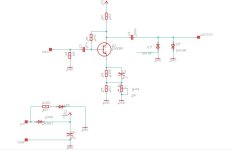
Last edited:
I’m far from an expert so take any advice I might offer and shine a good strong light at it.
Give yourself a few extra GND pads.
You might want a pad for the LED to the switch.
When choosing a capacitor footprint from the library make sure it's the right size, nothing worse than doing your design and etching it only to discover your neatly packed 1uF box caps don't fit because you used the standard size which is great for 100nF but no good for 1uF!
When you start your layout:
I think the default trace thickness of 6 is too thin for home developing and etching as a default I’m using 28 but will make it smaller if needed.
Give yourself a few extra GND pads.
You might want a pad for the LED to the switch.
When choosing a capacitor footprint from the library make sure it's the right size, nothing worse than doing your design and etching it only to discover your neatly packed 1uF box caps don't fit because you used the standard size which is great for 100nF but no good for 1uF!
When you start your layout:
I think the default trace thickness of 6 is too thin for home developing and etching as a default I’m using 28 but will make it smaller if needed.
temol
Well-known member
Alright first time using Eagle.
Bravo!
Couple things to consider and remember. This applies to design in general.
- Don't go crazy with trace width. Eagle's default width of 16mil is ok. 10mil for toner transfer may be problematic sometimes. Especialy with aggresive etchant sollution. 10mil is ok for a fab house.
- Keep an eye on separation between traces. Don't go below 16-20mil.
- Make sure that the solder pads of the components you are using are not too small. It's possible to enlarge them by modifying component package (library). They're often designed for a fab house fabrication, automated drilling. It's easier to damage a small solder pad while drilling, soldering, desoldering.
- Check the board and schematic for errors. For the schematic - look for the unconnected pins, overlaping connections.
For the board - run design rules check before making the board. Check the resutls for any clerance warnings, overlaping traces.
- Lay out the critical elements first - supply and in/out pads, potentiometers, switches,
- Draw outline of the enclosure or find a library that contains drawings of the enclosures/switches/jacks. There's one available for Eagle (on a Madban Forum).
- Do not hesitate to use jumpers instead running 10 inch long trace just to go around the IC or any other components.
- Keep separation between in/out pads and traces, especially on high gain circuits.
- Don't put tall components under a jack space.
- You can always install the LED off the board and take positive supply directly from the DC jack.
- Compare components you're goig to use with a footprints on the pcb. For transistors - check the pinout.