Kliche Overdrive - No Input?

jalcumb

New member
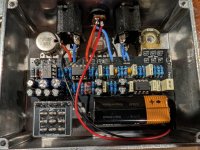
Hello everyone. I just finished a kliche overdrive, the problem is all it does is hum when it's on. The volume pot makes it hum louder and quieter but no actual guitar signal seems to be getting through.

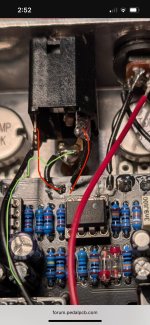
The last thing I tried before this picture was switching the lugs connecting to the in on the PCB and the negative battery connector. I can't remember if the pedal was even humming before I did that so I don't know if it changed anything with the signal, but now the pedal doesn't turn on from battery power, it requires the wall plug to turn on.

I can remove everything from the enclosure for more pictures if needed but for now I'm hoping that someone with more experience will see the wiring or the symptoms and have an idea of the problem.

I will also take troubleshooting advice anyone has. I have just been doing continuity tests on things that make sense but that's basically my troubleshooting experience.

Thanks for the help
1350.jpg
 
I hear the word hum and start suspecting a bad ground somewhere.
Also make sure the jacks are right. I think usually the enclosed jack Tip (Left) is opposite how you have it. On the cheap ones I have anyway. I remember mine by "ground is the flattened side, put that down and Tip is the top right side" when you're looking at it from the inside. The shape makes a little house with a roof and Tip is the right side of the roof on mine. I suppose mine could be made the opposite way, though.
 
What I mean to say is, make sure your input jack is wired with tip to in, ring to battery -. Can't tell for sure from pic but looks backwards.
I think you are right about that. Which is why my led doesn't power on from just the battery anymore. I had it right but switched it thinking it was wrong.

I'm going to switch it back and update the thread but I think it will still just have a hum rather than actual output signal
 
I have now switched the T and R lugs and now it turns on from battery power and/or wall power. Still just a hum though, no guitar signal. The Volume and Gain pots for make it louder and quieter but that's it
 
Go in and clean up your wires esp at the power plug.

Also your input jack connections are backwards. The ground is correct but the bottom lead in your pic should go to the battery
I have switched the input Jack connections and now everything power wise works as expected. Audio output is just a hum though that can be louder or quieter but no guitar audio is going through.

Any ideas on how I can check if the problem is on the PCB or in the connections to the audio jacks? I swapped my ICs into my cousin's pedal that works and they passed the test so I'm confident that they are good.

Just looking for next steps in the troubleshooting process or common culprits based on the symptoms
 
It's time to build an audio probe if your willing to do the work to trace the signal path...
you will need an amp or practice amp and a signal tracer at minimum.
You will connect signal tracer to amplifier and then the two leads of the signal tracer will act as your cable from effect to amp.. The ground lead will attach to ground on your pedal.. the tip lead will act as signal input. If you have a looper pedal would be helpful to inject a signal into the input of the effect pedal or a tone generator from PPCB. you can however hook up your guitar.. it's just a pain to strum and trace... print out the schematic and locate the components in order on your pcb that the signal flow through... plug in your guitar or tone generator... place lead from signal tracer on the pedals input jack... you should be hearing signal.... then you just go down the path until you no longer get a signal and that usually points out where your issue is.... your essentially bypassing all the components along the path and straight to your amp... thusly showing you where your signal stops... I made my tracer out of a miss drilled 125b and a set of leads from a cheap harbor freight multimeter. As well as a 1/4" jack and a 100nf film cap.
IMG_8880.jpeg
 
I have switched the input Jack connections and now everything power wise works as expected. Audio output is just a hum though that can be louder or quieter but no guitar audio is going through.

Any ideas on how I can check if the problem is on the PCB or in the connections to the audio jacks? I swapped my ICs into my cousin's pedal that works and they passed the test so I'm confident that they are good.

Just looking for next steps in the troubleshooting process or common culprits based on the symptoms
The most common culprit is poor soldering. In your power jack alone you can see stray strands of wire. That kind of thing needs to be cut short. When you solder, start by stripping off 1/4" of insulation from the wire, twisting the strands together, then tinning the wire. Tinning is when you hold the tip of the iron to the wire for a few seconds, enough to heat it up, then apply solder directly to the wire. Then you can feed this thru the solder holes of your components, solder it in place, then trim off the extra length.

Here's an example
Ct5Krcz.jpeg
 
The most common culprit is poor soldering. In your power jack alone you can see stray strands of wire. That kind of thing needs to be cut short. When you solder, start by stripping off 1/4" of insulation from the wire, twisting the strands together, then tinning the wire. Tinning is when you hold the tip of the iron to the wire for a few seconds, enough to heat it up, then apply solder directly to the wire. Then you can feed this thru the solder holes of your components, solder it in place, then trim off the extra length.
Yeah these aren't my proudest connections lol. I rewired the DC and input jacks about 3 times in the enclosure and each time they got worse. I didn't want to go through the trouble of pulling it out and cleaning it properly but I'm gonna do that before anything else at this point.

Your wiring is really clean. What pedal is that one?
 
Yeah these aren't my proudest connections lol. I rewired the DC and input jacks about 3 times in the enclosure and each time they got worse. I didn't want to go through the trouble of pulling it out and cleaning it properly but I'm gonna do that before anything else at this point.

Your wiring is really clean. What pedal is that one?
It's okay. It's worth taking the time to do it slowly and cleanly because it'll save you more time later on

This is a Skylight Overdrive, it's a Mad Professor Sky Blue circuit.

Just remember with soldering, go slow and try to enjoy it. You will develop speed thru repetition.
 
Hello everyone. I just finished a kliche overdrive, the problem is all it does is hum when it's on. The volume pot makes it hum louder and quieter but no actual guitar signal seems to be getting through.

The last thing I tried before this picture was switching the lugs connecting to the in on the PCB and the negative battery connector. I can't remember if the pedal was even humming before I did that so I don't know if it changed anything with the signal, but now the pedal doesn't turn on from battery power, it requires the wall plug to turn on.

I can remove everything from the enclosure for more pictures if needed but for now I'm hoping that someone with more experience will see the wiring or the symptoms and have an idea of the problem.

I will also take troubleshooting advice anyone has. I have just been doing continuity tests on things that make sense but that's basically my troubleshooting experience.

Thanks for the help
View attachment 108982
Does it pass signal in bypass? If the pedal is powering up and LEDs lighting it’s probably not the power connection. Most common culprit is a bad solder joint as already mentioned. Could also be a broken trace that isn’t able to be seen. Essentially a factory defect. Not as common but it’s happened to me twice in my building journey so far. The audio probe is the best route after you’ve check all the joints and make sure all resistors are correct value. And also make sure nothing is accidentally being bridged/shorted on the bottom of the pcb.
 
Last edited:
Does it pass signal in bypass? If the pedal is powering up and LEDs lighting it’s probably not the power connection. Most common culprit is a bad solder joint as already mentioned. Could also be a broken trace that isn’t able to be seen. Essentially a factory defect. Not as common but it’s happened to me twice in my building journey so far. The audio probe is the best route after you’ve check all the joints and make sure all resistors are correct value. And also make sure nothing is accidentally being bridged/shorted on the bottom of the pcb.
Just hums in bypass. No guitar signal. I'm going to clean up the connections to the audio jacks and rewire them. If that doesn't work I'm going to try learning more about audio probes and try that out.

I'm also definitely gonna check out all the joints and make sure nothing is bridged like you said. Two connections bridged during the build which I had to fix so I'm gonna check to make sure I did fully clean them up.

Thanks for the response
 
Just hums in bypass. No guitar signal. I'm going to clean up the connections to the audio jacks and rewire them. If that doesn't work I'm going to try learning more about audio probes and try that out.

I'm also definitely gonna check out all the joints and make sure nothing is bridged like you said. Two connections bridged during the build which I had to fix so I'm gonna check to make sure I did fully clean them up.

Thanks for the response
Not working in bypass means it’s wiring/bad joint or a broken trace. More likely the first. Foot switch could be bad or could have had a bit too much heat put into it, but that’s not that common either. I’d still check it with a multimeter continuity test to see if the lugs are connecting in the positions they’re supposed to. I noticed your first picture had the wires reversed for the tip and ring connections and was convinced that was the issue…until I scrolled down and saw you swapped them and it’s still doing the same thing. Just for reference, this is how it should be. IMG_3835.jpeg


If no difference when everything is cleaned up, post another pic of the changes. It’ll end up being a learning experience. Debugging helped me learn a lot early on. You’ll get it.

Also just to add to the good advice given above: wire up the pcb first and then add the jacks and switches. Put the wire through the pcb hole and pull it snug so the wire casing is up against the pcb. Then bend the bare piece sticking out the other side so it won’t move. Then solder it. That way there won’t be any exposed wire and no easy way for it to break off and cause a poor connection.
 
Last edited:
Not working in bypass means it’s wiring/bad joint or a broken trace. More likely the first.
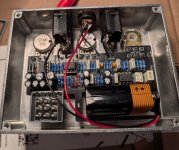
Welp, you are spot on. I rewired the audio and DC jacks and now it works in bypass mode. Still just hums when it is engaged though. Unless there is something obvious to do next I will just take this victory and figure out my next step later.

Here is an updated picture of my pedal 1364.jpg
 
Welp, you are spot on. I rewired the audio and DC jacks and now it works in bypass mode. Still just hums when it is engaged though. Unless there is something obvious to do next I will just take this victory and figure out my next step later.

Here is an updated picture of my pedalView attachment 109182
Wiring looks much better now. Does your led light up when switched on and humming?

If the footswitch tests ok with a continuity meter and you cleaned up the bottom of the board then it’s time for the audio probe. Double check all your resistor values too just to be sure. Usually it would still somewhat work and just sound bad but it’s good to eliminate easy things first.
 
Wiring looks much better now. Does your led light up when switched on and humming?

If the footswitch tests ok with a continuity meter and you cleaned up the bottom of the board then it’s time for the audio probe. Double check all your resistor values too just to be sure. Usually it would still somewhat work and just sound bad but it’s good to eliminate easy things first.
Led lights up. I believe foot switch tested good on continuity but I'll test again. Thanks for all the help
 
Ok so it sounds like your footswitch is ok. It has to be a solder joint somewhere or a broken trace. The traces that connect to the solder pads are very delicate. If one gets too much heat during soldering it can break off from the pad and it will be somewhat hard to see. You tested all your ICs so we can rule those out. If the resistors are all the correct values then it’s probably a small connection somewhere not being made. The audio probe is the best and probably quickest way but the continuity meter works in this situation too. You can look at the schematic and test between points on the pcb that you know should connect. If they don’t, then that’s where the problem is. But it won’t tell you if a resistor or capacitor is bad, just all the points around them. That’s why the probe is really the best way. I usually start with the continuity test on the pcb because it’s quick and then if I don’t find anything I’ll use the probe to narrow it down.
 
Last edited:
Back
Top