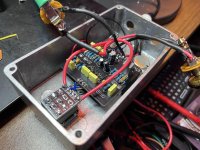
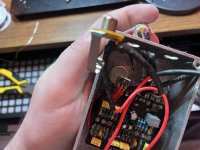
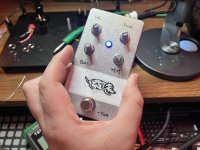
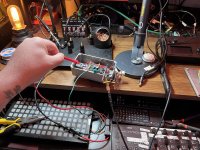
Nein Fuzz 3rd Attempt/Failure

Depattern

New member
this is probably a lost cause since im not skilled enough to properly troubleshoot. I have a multimeter but aside from basic voltage and continuity testing, i dont really know what im doing but i wanted to give it a shot after buying the pcb and jfets 3 separate times.

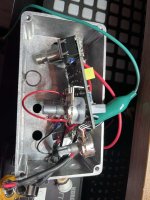
i thought i accounted for the dumb obvious mistakes in my first two builds (soldering the wrong component or pad, then severely botching the desoldering - im really bad at desoldering), and i felt like i did everything according to the instructions i had here. im 95% sure i didnt use any incorrect components like 470k vs 470r, and r2 is 47k. everything is oriented properly. q2 is only soldered like that because i was trying to get ai to help me and it wanted to me swap that jfet for another one due to the weird drain voltages:

d68646a8-0436-47d0-87a2-eb6f717bdfe3.jpg
but i think the orientation is correct (d,s,g from left to right when facing the top of the pcb). and the pins are soldered on the top and bottom. I know my soldering is shotty but the continuity tests ive done dont show any obvious issues


this is what i have so far:
  • Q1 D: 8.06V
  • Q2 D: 8.93V
  • Q3 D: 1.248V
  • Q4 collector: 3.9V
  • Supply: 9.41V
  • All carrier orientations verified (potentially)
  • All resistors measured correctly (mostly)
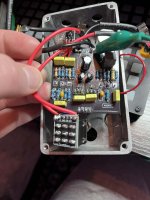
powers on, led comes on with the switch but no audio when engaged. i get my clean guitar signal when switch is bypassed. sometimes i hear a tiny bit of scratchiness when turning the vol in pot (much moreso in my last build attempt), but really almost completely silent. one thing im kind of unsure of is the in/out jack soldering, which should be the most basic aspect of a build like this, but i guess that since im getting the clean bypassed signal its ok? i dont even know if thats true or helpful. i was thinking maybe its something simple like the ground points arent all connected, or the jfets arent making proper contact, but i've had the same issue when i soldered the smd jfets (non-pre-soldered) directly to the pcb pretty successfully.

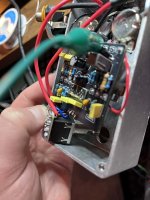
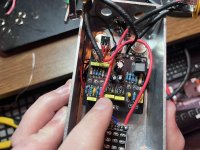
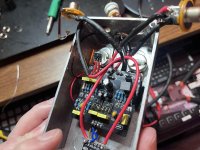
I don't know if this is enough info for direct troubleshooting but im wondering if anything glaring sticks out, maybe even the poor soldering? although i have reflowed almost every single point that was even slightly dull but there are some bigger blobs remaining which ive attempted to re-do a few times. the jacks and power connections especially are bad due to the twisted awg wire, but those dont seem to be the issue as far as i can tell(?)

i used film caps for the first 2, then i bought a bulk box film cap pack for this one. i had some others on order from stompbox parts but they didnt arrive in time for this one. thats what the yellow 100n (104 100v) and 10n (103 100v) are

maybe someone as unskilled shouldn't be attempting this but i would really love to give this pedal a shot and i feel that it would be so much more satisfying that just buying another pre-built fuzz, even though i may unfortunately end up with no choice. it seems like a really rewarding pedal to build: the kind of overdriven tones, the unruly gnarly timbres, the chaotic biasing.

so really, any general troubleshooting or any ideas at all that maybe you would try yourself if you werent sure why a pedal build isnt working would be very helpful. claude ai usually does not steer me wrong but its been sending me down some mind numbing rabbit holes that arent helping with these builds at all
b6090539-9496-4c9e-b8ff-e74ce97e57bd.jpg c980c832-7981-4af1-96d3-116ac5cdb64d.jpg 6b883e45-29bf-4e33-89a1-0df2e9dca1d7.jpg e8a23c0e-4e46-49a7-b17f-f6bc200352a8.jpg

kind of a sentimental thing, as i had the genius idea of dedicating it to my dog who passed recently. so feels extra depressing to leave it broken
 
ok, this is great. i was able to take some time this morning to build the audio probe and test some things, reflow & resolder everything i could find from the top, insulate the two lower pots with plastic caps

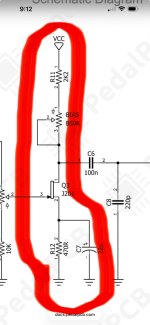
i successfully made an audio probe which works great. love it, thank you guys for that. this is exactly the kind of testing i wish i had been doing all along.so im getting audio at a lot of points, but it seems to stop after r12. here's what i wrote down:
  • audio present at r11
  • audio very quiet but present at r12
  • audio present at q3 drain
  • no audio at c8 (220pF, correct value confirmed by "221" marking)
  • no continuity between c8 top leg and q4 base (but there is continuity between the c8 bottom leg and q4 base)
  • jumper wire placed directly from c8 top leg to q4 base, still no audio at q4 collector
  • 3pdt footswitch pins 6, 1, 2 & the input ground pad and input pad on the switch breakout output audio to the probe
  • no audio anywhere after q3 drain, i believe. i was initially trying to follow the schematic and figured the path i was following went to at least r12, but after that: c6, c8, r13, r14 get no audio. im not positive which component exactly i should be focusing on
so i felt like c6 should've been the focus, but thats just a guess. im not very confident in r13 or even r14, but im hoping its just a single point of failure here. if it is c6, and it isnt being solved by reflowing the solder, where would you start here? or am i looking in the wrong place?

it felt very promising, testing this way. the signal even sounded saturated when probing the b50k pot so its niec to know theres something happening here and it really doesnt feel that far off now. all of the jfets seem fine too, which im very happy about

any ideas?

706d17f0-c8be-4d85-b176-f2d80c4b94b6.jpg 5d74d0d9-ba8f-43dc-b816-f64757dcc2a3.jpg e72b8ada-93e2-41cd-af34-989002f36cb5.jpg b127a73e-bd04-4ba1-88c5-4a164b9c9fff.jpg
i also bumped c9 with my iron and melted it slightly, but i assume its not a huge deal if its just the outer film/superficial?
 
Last edited:
I have another question as well, if I were to start this over, is there something I can do differently to make it go more smoothly?

This appears to be mainly a soldering issue. Even though I thought I did pretty good from under the pcb, a lot of them didn’t have solder that flowed through to the top pad. Is it normal to solder both top and bottom of the pcb? Or if I do it right, it shouldn’t be an issue?

I just wonder if I’m missing something fundamental

I think im definitely going to use a flux pen on every pad next time I build anything
 
Your troubleshooting skills sound excellent. You made a lot of progress so far. Work on your soldering. Either try a flux pen or maybe just some better solder and get a little more heat into each joint. I'll throw some in some basic tips I've heard a million times. Make sure you're cleaning and "tinning" the tip with solder before each joint. Don't use a pointy conical tip. Make use of the flat part of the tip to hold tinning and then use it to transfer heat. Find an angle for each joint so that the tip touches both the pad and the wire at the same time. Having a good angle of approach for each and every joint is the most important thing in my opinion. Keep the iron there and put solder into the hole until it's full. From the top you should at least be able to see there's plenty of solder in the hole. If it's not wicking all the way up the wire on the topside it's okay but if you see any "volcano-ing" around the lead on either side then you have to reflow. Get a magnifier to inspect. I use an old telescope lens.

As an experiment, you can take some scrap parts and try to kill them by over heating them with your iron. Back in the day I tried it with a LED while it was lit. I literally couldn't kill the diode even when the plastic starting melting. Iron at 750F. After that I never really worried about overheating parts again. The main things to watch out for are PCB traces lifting and the lugs on cheap switches. But both of those tend to happen from too much force along with too much heat.

But anyway the short version is it just looks like you need better heat transfer and a little more solder.
 
Your troubleshooting skills sound excellent. You made a lot of progress so far. Work on your soldering. Either try a flux pen or maybe just some better solder and get a little more heat into each joint. I'll throw some in some basic tips I've heard a million times. Make sure you're cleaning and "tinning" the tip with solder before each joint. Don't use a pointy conical tip. Make use of the flat part of the tip to hold tinning and then use it to transfer heat. Find an angle for each joint so that the tip touches both the pad and the wire at the same time. Having a good angle of approach for each and every joint is the most important thing in my opinion. Keep the iron there and put solder into the hole until it's full. From the top you should at least be able to see there's plenty of solder in the hole. If it's not wicking all the way up the wire on the topside it's okay but if you see any "volcano-ing" around the lead on either side then you have to reflow. Get a magnifier to inspect. I use an old telescope lens.

As an experiment, you can take some scrap parts and try to kill them by over heating them with your iron. Back in the day I tried it with a LED while it was lit. I literally couldn't kill the diode even when the plastic starting melting. Iron at 750F. After that I never really worried about overheating parts again. The main things to watch out for are PCB traces lifting and the lugs on cheap switches. But both of those tend to happen from too much force along with too much heat.

But anyway the short version is it just looks like you need better heat transfer and a little more solder.
That’s great advice, thank you.

That’s kind of why I was thinking I did a relatively good job on this one because I did learn to hold the tip so it’s touching but the leg and the pad and then bringing the solder in (60/40 lead rosin core .8, I used to use thinner solder but this feels easier if not a little messier?) to flow through naturally

But obviously it does need work, so all that is just to say I think I get the concept, I just need to practice I think, like you said. And yes I’m terrified of overheating pads mostly and ruining the trace

But wait, don’t use a conical tip? That’s all I ever use. What should I use, the kind of bent pointy ones? I’ve never heard this before

And if you have any advice for solder, I’m open to trying but I really like what I have now after going through a lot of trial and error with some awful solder

I do get little solder bulbs sometimes or the volcano cone shapes but I always forget whether or not that’s not going to conduct at all. so that’s good to remind myself of, thank you

Also I switched from my Weller iron to a Fanttik electric iron which has been very convenient, but I’m still getting oxidized tips even though I make sure to keep the tip tinned literally at all times. But I do keep it around 750f. Because the next option down on the stepped temp control is 660 which doesn’t flow as easily. But maybe that’s a bad decision

Anyway, i appreciate these tips very much. Maybe I should get a new pcb and try again, I just want to make absolutely sure I don’t mess anything up this time, but I should practice soldering on something first
 
That’s great advice, thank you.

That’s kind of why I was thinking I did a relatively good job on this one because I did learn to hold the tip so it’s touching but the leg and the pad and then bringing the solder in (60/40 lead rosin core .8, I used to use thinner solder but this feels easier if not a little messier?) to flow through naturally

But obviously it does need work, so all that is just to say I think I get the concept, I just need to practice I think, like you said. And yes I’m terrified of overheating pads mostly and ruining the trace

But wait, don’t use a conical tip? That’s all I ever use. What should I use, the kind of bent pointy ones? I’ve never heard this before

And if you have any advice for solder, I’m open to trying but I really like what I have now after going through a lot of trial and error with some awful solder

I do get little solder bulbs sometimes or the volcano cone shapes but I always forget whether or not that’s not going to conduct at all. so that’s good to remind myself of, thank you

Also I switched from my Weller iron to a Fanttik electric iron which has been very convenient, but I’m still getting oxidized tips even though I make sure to keep the tip tinned literally at all times. But I do keep it around 750f. Because the next option down on the stepped temp control is 660 which doesn’t flow as easily. But maybe that’s a bad decision

Anyway, i appreciate these tips very much. Maybe I should get a new pcb and try again, I just want to make absolutely sure I don’t mess anything up this time, but I should practice soldering on something first
Super pointy conical tips are for SMD stuff in my mind. My favorite tip for plated-through-hole is a Hakko T18-S9 if you want to look it up, to just see what it looks like. The flat sides are the key to what makes a good tip.

I use MG Chemicals 63/37 No-Clean Solder, .032"/22 gauge. I had 60/40 before and hated it. The difference is the way it crystalizes as it cools. It seems like most people don't care though. I also have 23 or 24 gauge but it's too thin.

I left my Hakko iron on the default 750F for almost a decade after I got it but now I have it on 700F. I'll likely go back to 750F soon but I think most people use 700F (or less) for lead solder.

Definitely get some type of scrap boards. Try different types of board if you can. The gold plated stuff is the easiest but once again other people say they don't notice a difference. Get some perf board or some stripboard and go nuts.
 
Super pointy conical tips are for SMD stuff in my mind. My favorite tip for plated-through-hole is a Hakko T18-S9 if you want to look it up, to just see what it looks like. The flat sides are the key to what makes a good tip.

I use MG Chemicals 63/37 No-Clean Solder, .032"/22 gauge. I had 60/40 before and hated it. The difference is the way it crystalizes as it cools. It seems like most people don't care though. I also have 23 or 24 gauge but it's too thin.

I left my Hakko iron on the default 750F for almost a decade after I got it but now I have it on 700F. I'll likely go back to 750F soon but I think most people use 700F (or less) for lead solder.

Definitely get some type of scrap boards. Try different types of board if you can. The gold plated stuff is the easiest but once again other people say they don't notice a difference. Get some perf board or some stripboard and go nuts.
You may have solved one of my main issues. I’m now discovering that chisel tips are supposedly better for thru hole soldering as they cover a wider area and can more easily heat the pad and leg. Probably much better for desoldering wick and soldering stranded awg wire also

luckily I have like 5 of them at home because I’ve never even tried using that type, so I’ll try that today

Thanks again
 
Last edited:
I have another question as well, if I were to start this over, is there something I can do differently to make it go more smoothly?

This appears to be mainly a soldering issue. Even though I thought I did pretty good from under the pcb, a lot of them didn’t have solder that flowed through to the top pad. Is it normal to solder both top and bottom of the pcb? Or if I do it right, it shouldn’t be an issue?

I just wonder if I’m missing something fundamental

I think im definitely going to use a flux pen on every pad next time I build anything
Take your time, go slow. Make sure each component is exactly where you want it before soldering, when you do solder, do it one leg at a time, ie push the capacitor thru, solder one leg, look at the component and see if it needs to be straightened, and if so then hold the board in your hand while putting pressure on the component with one of your fingers, then hold the soldering iron to the solder to melt it while applying pressure to move the component where you want it to go.

Use a lot of heat, like 750F. Use a 1mm or 2mm tip. Touch the iron to the component and the solder pad at the same time, like wedge it between the two. Hold it there for a second or two, then feed solder in. The solder should melt instantly. If it doesn't then try holding it there for one more second or turn up your heat another 25 degrees. Then instead of pulling the iron out, drag it up along the component leg to disperse extra solder. You don't need solder to come thru to the top side as the inside of the hole is plated.

To make off board wiring clean, remove insulation on the end of the wire, then twist the strands together, then tin the wire by heating it up with the soldering iron and applying solder. You can smooth it out by running the iron along the wire. If you use silicone insulated wire it won't melt when doing this. With the wire tinned it's easy and clean to feed thru holes. Stick it all the way thru until the insulation butts up against the PCB, solder it in from the back, and trim if off cleanly.
 
What us your voltage at q3 drain and have you adjusted the bias pot at all? It sound like you are losing audio there and that is where the trim comes in.
last i checked, it was 1.248V but i may have mistakenly written down the gate voltage. I'm not sure. I haven't tried replacing c6 yet, so I'm going to try that this morning and see if i can get a more accurate q3 drain voltage

what do you mean by adjusting the Bias pot? just turning the actual knob? I guess I haven't even really considered that, now that im using the audio probe, or even before i was using that, it would affect the signal obviously. I haven't really touched the pots since my initial post-build tests with my guitar plugged in

this is the type of common sense fundamental interrogation i needed, thank you


@falco_femoralis i cannot thank you enough for this extremely helpful advice. you are the man :dmm: 🤜
 
Back
Top