PSA: Affinity Designer v2 released, 40% discount

I'd especiallylike to see a three layer PDF that was exported directly from AD with the right layer order, I've yet to be able to achieve that and Tayda's tutorial insists it flat out has to be that way. For my last print job with them I very reluctantly reverted to Illustrator and Tayda mucked it up badly even after several revisions on my part. I'm super happy with Amplifyfun but there are still times when using Tayda might be useful.
I'm happy to share a PDF that was created using only Affinity Designer and printed flawlessly with Tayda. I've also attached a couple pics of the finished enclosure.
 

Attachments

I'd especiallylike to see a three layer PDF that was exported directly from AD with the right layer order, I've yet to be able to achieve that and Tayda's tutorial insists it flat out has to be that way. For my last print job with them I very reluctantly reverted to Illustrator and Tayda mucked it up badly even after several revisions on my part. I'm super happy with Amplifyfun but there are still times when using Tayda might be useful.
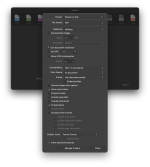
Here's a screenshot of the settings I use for PDF export when doing Tayda UV prints. You may try creating a Tayda UV Print PDF export preset that matches these settings and see if you have better luck.
 

Attachments

  • Screen Shot 2022-11-11 at 1.38.02 PM.png
    Screen Shot 2022-11-11 at 1.38.02 PM.png
    691.3 KB · Views: 20
Here's a screenshot of the settings I use for PDF export when doing Tayda UV prints. You may try creating a Tayda UV Print PDF export preset that matches these settings and see if you have better luck.
Thanks, dont see anything obviously different than how I did it but I will double check on that.
I have some in the link in my signature but they’re all single layer. I’ve done dual layer but never gloss. I’ll sort out a dual layer one for you. Nearly all the time it’s not using spot colors in the swatches for the white or gloss layer.
It all works just fine except for the layer order in the PDF, which invariably comes out reversed. I've seen many posts elsewhere regarding the same thing too, so I don't think it's just me. ;)

In any case, Tayda has already lost quite a bit of business from me by not providing better tech support which I would happily pay for. Their choice, and mine!
 
Last edited:
I've been using both Affinity Designer and Photo for some time now. And, like many have mentioned, they're definitely worthy replacements for Adobe products. Granted, there are certain things that are harder to do in Affinity that are easier to do in Adobe. But that's at a cost though.

Only thing that sucks is not having great cross compatibility with Adobe. While you can receive and open AI files in Affinity Designer, you can't export one. You can export a PDF but the layers aren't retained in Illustrator. I've tried sending files to Tayda and just couldn't make it work. Only Illustrator files worked.

That said, I've since switched to using AmplifyFun and haven't looked back. The reason is that Spencer at AmplifyFun accepts Affinity Designer files. That's a big win to me. :)
 
Does anyone have any idea how long the discount will run until? I wont be able to download it until next week and dont want to miss out...
Send the company an email explaining your circumstances, make sure you have one point of contact so you're dealing with the same person in a week's time.

I can't see them not doing it, but then again so much stuff nowadays is automated and beyond the control of flesh & blood with common sense — bottom line, they would rather make a sale than lose one.
 
You can download it from your account page any time after purchasing. (Or even before, there's a 30-day trial)

The links never expire and there is no limit to the number of times you can redownload.

I still have the option to download V1, and there are even links on their forum to download older releases if you need to downgrade for some reason.

The license even allows you to install on more than one computer, no weird activation/deactivation process like some other apps.
 
The beauty of the Universal License is that you can download anywhere, any time.

I would assume so, yep. I haven't installed V2 on my work computer yet, but I've had V1 loaded on both machines for years without any issues whatsoever.

Install, enter product key, done.

My V2 Universal License doesn't list a product key, it was activated with email/password, so I'll give it a shot on the other PC today and see how that goes.
 
I noticed Affinity fixed one of my biggest complaints with Photo in V2.

The Magic Wand threshold and "contiguous" settings are retained when closing/reopening the program. :)

Now if only the "Transform by Origin" button could stay ticked.
 
Reason #1021 why Adobe is dead to me
View attachment 35829

Now don't get me wrong, I fully expected a charge for cancelling early.... but what I expected was the pro-rated difference that I would have paid if I hadn't received the annual plan discount. I've received the "annual plan" discount for four months, it seems more than fair I would be charged the difference between the full price and the discount I received for those four months.

Instead, Adobe is going to fine me for the months I won't be using the software.

Well played Adobe.... well played.... you won't get me again. ;)(y)
Biastards!
 
Sunzebeeches.

I called their bluff and said "Fine, f**kit, we'll do it live ✏️, cancel anyway!"

Wait wait wait, what if we give you two months free?

Yes. I'll wait two months to cancel. That'll knock that early cancellation fee down some. Reminder set.
This O'Reilly reference has made my morning.
 
I've created a UV printing template guide for Affinity Designer for a 4-knob PedalPCB project enclosure from Tayda.

The repository was just created so the file is in there by itself (for now):

I'd like to ask if someone that is fluent with Affinity Designer will please download the file and let me know if they find it useful (or if they find anything I missed). If this will be useful to those trying to build PedalPCB projects with Tayda's UV printing service, I can work on getting more of these guides built for other control layouts (3-knob, 5-knob, etc).

Thanks!
 
I'm happy to share a PDF that was created using only Affinity Designer and printed flawlessly with Tayda. I've also attached a couple pics of the finished enclosure.
Followup: your PDF file actually has the exact same layer "reversal" as mine have all had. It all stacks fine and if you mute the "bottom" layer (Gloss) it goes away as expected, IOW it is actually still functionally the top layer. So I can only conclude that Tayda are not correct in insisting that they will only be able to print orders with the Gloss layer on the first listed layer of the PDF. Which is great to know and what I've been trying to figure out all along. No more Illustrator free trials and scrambling to deal with new software...yay! :cool:

I'm liking the look of v2 so far, so I'll probably spring for the whole bundle since I do have a Pad too.
 
Followup: your PDF file actually has the exact same layer "reversal" as mine have all had. It all stacks fine and if you mute the "bottom" layer (Gloss) it goes away as expected, IOW it is actually still functionally the top layer. So I can only conclude that Tayda are not correct in insisting that they will only be able to print orders with the Gloss layer on the first listed layer of the PDF. Which is great to know and what I've been trying to figure out all along. No more Illustrator free trials and scrambling to deal with new software...yay! :cool:

I'm liking the look of v2 so far, so I'll probably spring for the whole bundle since I do have a Pad too.
The best I can tell, the layers are in the correct order (at least on my end). They appear to be in reverse order listing compared to design software (where they are typically stacked with lowest layer at bottom), but visibility wise, they appear correct.

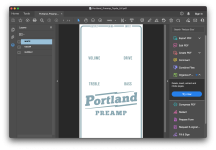
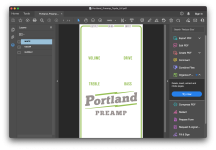
See first screenshot. If WHITE layer was truly on the top, the color of the visible curves would actually be RGD_WHITE (a grayish color) instead of the RDG_GLOSS (the blueish color shown).
Screen Shot 2022-11-13 at 2.22.58 PM.png
For further clarification with the GLOSS layer disabled and only WHITE and COLOR layers shown:
Screen Shot 2022-11-13 at 2.27.44 PM.png
Of course, it's possible that yours is different than this, but things look A-okay on my end in regards to proper layer stacking.

Edit: After re-reading your post, I think we're seeing the same thing but I'm not entirely sure that the layer stacking is the same between Adobe Acrobat and the design software being used. It wouldn't be the first time I've seen software companies with inconsistent features between programs.

 
The best I can tell, the layers are in the correct order (at least on my end). They appear to be in reverse order listing compared to design software (where they are typically stacked with lowest layer at bottom), but visibility wise, they appear correct.

See first screenshot. If WHITE layer was truly on the top, the color of the visible curves would actually be RGD_WHITE (a grayish color) instead of the RDG_GLOSS (the blueish color shown).
View attachment 35954
For further clarification with the GLOSS layer disabled and only WHITE and COLOR layers shown:
View attachment 35955
Of course, it's possible that yours is different than this, but things look A-okay on my end in regards to proper layer stacking.

Edit: After re-reading your post, I think we're seeing the same thing but I'm not entirely sure that the layer stacking is the same between Adobe Acrobat and the design software being used. It wouldn't be the first time I've seen software companies with inconsistent features between programs.
If you export from Illustrator and read in Acrobat the stack stays the same, not apparently reversed, and IIRC if you export a PDF from AD to Illustrator it comes out broken. It’s been a while though, and since I found Amplifyfun it’s moot for the moment, but sooner or later I’m sure I’ll want to give Tayda another chance. Thanks for your help!
 
Back
Top