Quicklime Girl below unity output

bluedmc777

Well-known member
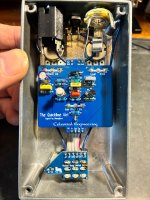
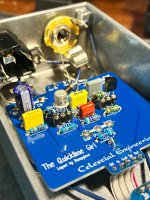
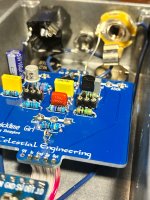
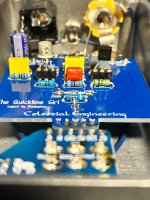
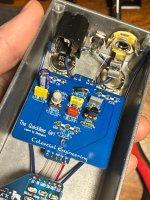
So I finished this up and I’m getting below unity gain with all knobs maxed. Seems like the only know that does anything is the Drive, top left knob, while the others don’t seem to do anything. At first I accidentally had a 100n C5 (1uf) location. Thinking that was the solution I replaced it but the outcome is exactly the same. Works in bypass, led comes on, both transistors tested to be working on my cheap CCT, but it isn’t working as it should. I’ve tried 2 different BS170s. I’ve confirmed that the 2N2222A legs are oriented correctly. Can’t decide if I should just chalk this up as a loss or if it’s fixable. I’ve never really troubleshooted anything so hopefully I can learn something and fix it. Any ideas on what would make it behave this way? Any help would be appreciated but please be patient with me if I have noob questions for the troubleshooting process lol! @Chuck D. Bones @szukalski @MichaelW

IMG_4396.jpeg IMG_4354.jpeg IMG_4355.jpeg IMG_4356.jpeg IMG_4357.jpeg IMG_4358.jpeg
 
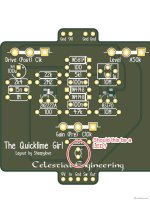
What's goin on with (what I assume) is the LED, right above where the footswitch is attached? It looks like a short from + to -.
(I guess it would go through the CLR so it's not a dead short, but... ). If you don't want an LED in there you should be able
to leave it unpopulated.

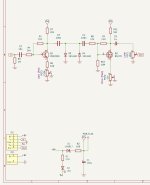
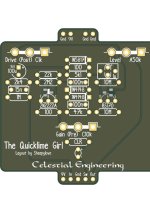
Do you have a "map" of what goes where to check the resistor codes?
(It's a simple enough circuit that I can almost trace it by eye and it looks ok, but ... )

At least in the first photo, it looks like your pots are incompletely soldered, if you haven't done so,
you should reflow those and add some solder (and flux if you have it).
Diodes also could use a touch more solder, it looks like they might be incompletely soldered.

Do you have a pot condom on the gain pot? Any chance it is contacting the solder points in back?
 
Talking about something like this? I’ll reflow the pots and double check the values. It’s probably staring me in the face. I don’t see where the led is shorted. I’m not having any issues with the led. Appreciate the help!

IMG_4382.jpeg
 
annotely_image (1).jpeg


Not my board so I'm not sure, but from your pictures it looks like there's just a loop of metal connecting those two
pads, rather than the leads of a LED. But I dunno if it's supposed to be that way. Based on the traces you're gonna
want to have an LED in there and not the pads shorted together. (Or nothing at all, if you don't want the LED)
 
100n in place where there is a 1uf dual footprint on the right column, above the 10M resistor?
It was already mentioned, and it's the coupling/output cap, it's not going to drop the volume heavily if it's 100nF instead of 1uF.

I'm most interested in two of the pots not doing anything, that's a clear sign of something being messed up. I'm going to assume you meant "top left" from the front since that would be the output level pot, and if that one doesn't work something's very wrong. Resoldering the pots sounds like a good starting point like others mentioned, and why not go through all the others too while you're at it.
 
I think I actually meant the level. Top left as viewing from outside the pedal but I’ll have to confirm it tonight.

The 100n HAS been replaced with the correct 1uf value.

I’ll look into building an audio probe and how to use it as well

Thanks for the help thus far
 
Do you have another transistor to drop in there to replace the 2222A? Even a cheap 3904, etc.

+1 on the audio probe. It's absolutely the most useful tool for debugging guitar effects. IMO it is
often more useful than a multimeter, especially as a first pass. Finding out where the audio goes
to die is the quickest way to narrow down where in the circuit something has gone wrong.
 
Always ground your input. Your guitar needs a solid ground reference.
Outputs, meh.
They don't really matter because the input is always grounded. This is why ground lift switches are on outputs. You only need one good one per connection. Plus, if the jack gets lose, you're gonna have issues.
 
Back
Top