
Band of Dans
Well-known member
Mine moved to “started” this morning. Maybe your message kickstarted both of oursI logged another case, asked them to change colour if they have to, then got told that apparently it will ship tomorrow.



Mine moved to “started” this morning. Maybe your message kickstarted both of oursI logged another case, asked them to change colour if they have to, then got told that apparently it will ship tomorrow.


Me too! I’ve had a couple slow ones in the past, but this one was by far the slowest. Hugo told me they had one good batch, then the supplier sent them a bad batch of powder and they were struggling to get good results. All that to say: I don’t think this is a portent of things to come.Well it took a month but my order has just been sent. Hopefully this isn't a precedent for the two other orders I have in the queue because this has taken so long
I've started doing exactly that. Most of my "production" pedals are winked silver, but I have a couple oddballs, and I once had a batch of candy green sparkle delay a batch of 150 winked silvers that were ready to ship.In the future if I want to try out new or unusual finishes I’ll probably put those in their own orders so the more boring ones don’t get stranded.
Bugger, I was eyeing that oneMy metallic black order placed May 20 is still sitting at Pending on powdercoat. I'm sure I'll get it eventually.
Put an order in, maybe it will push mine to go fasterBugger, I was eyeing that one
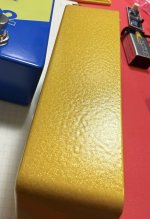
 It is a really cool finish, I like it a lot. When I was designing this pedal I got one each of every black or gray finish they had (13 total I think) so I could compare them and metallic black was the winner.
FWIW there was a metallic black in my last order and it finished up in just a couple of weeks. I think that one’s at least moderately popular.Bugger, I was eyeing that one


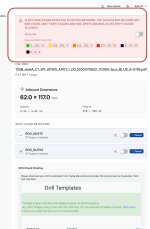
could try the trick of:View attachment 118729
Any quick thoughts here? Tayda says some of my colors are RGB, but when I select them in the illustrator file, they come up as CMYK. I can't even "convert to cmyk" because they already are...
Document was set to RGB. Not sure how that happened...let's see if that fixes it!could try the trick of:
- select your artwork (obvs make sure nothing is hidden or locked or both)
- go to the swatches palette
- on the menu select "add selected colors" and check the "make global colors" if it's still there (I'm on CS4…)
then you can see ALL the artwork's colors in the swatches, and they'll be made into individual swatches with the little white corner mark (not the white corner with dot for Spot colors). Then you can make any adjustments, check their color config, etc.
Also, probably a no-brainer, but make sure the document mode is CMYK, double check.