
finebyfine
Well-known member
Thank you so much @dmnCrawler & @SYLV9ST9R !!


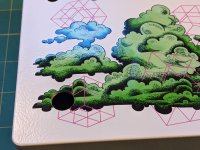
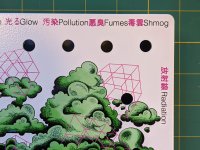
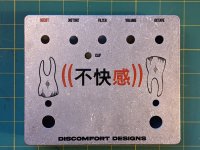
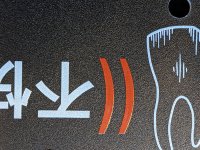
This forum overall, and especially this thread have been such an awesome resource! Thank you everybody!
Just wanted to share a couple things that I've learned with my last couple of orders:
1. The gloss varnish makes colors look more vibrant, and (to me) feels more premium than the matte varnish or no varnish options. I usually love matte when I'm spraying, but Tayda's seems too pebbly2. High res raster will print fine, but don't tell Hugo. (The cloud illustration isn't vectorized)3. Raw aluminum enclosures are candidates for print. I hadn't wondered about this until recently, but last order came in fine with no questions asked.4. Personally, I think the one pass of white is enough. Though I'm curious compare to double passes...View attachment 10477View attachment 10478View attachment 10479View attachment 10480
Thanks! I used Affinity, went through the whole process of using the Tayda template, creating spot colors from scratch, convert to CMYK, set up / name the layers and then saving that file as my own template. Now whenever I prepare new artwork, I dump it in to my template and have the spot colors already there. That's been a time saver... When I export, I use the PDFX4 setting and confirm that 'honor spot colors' is on...Great looking enclosures!
Can I ask you how did you prepare the files and in which extensions did you send them to Tayda?
I'm also preparing a first order and I do have a design of white on matte black sand. So I should use a kind of varnish?
Oh man, they look great. Wish I wasn’t such a lazy assThis forum overall, and especially this thread have been such an awesome resource! Thank you everybody!
Just wanted to share a couple things that I've learned with my last couple of orders:
1. The gloss varnish makes colors look more vibrant, and (to me) feels more premium than the matte varnish or no varnish options. I usually love matte when I'm spraying, but Tayda's seems too pebbly2. High res raster will print fine, but don't tell Hugo. (The cloud illustration isn't vectorized)3. Raw aluminum enclosures are candidates for print. I hadn't wondered about this until recently, but last order came in fine with no questions asked.4. Personally, I think the one pass of white is enough. Though I'm curious compare to double passes...View attachment 10477View attachment 10478View attachment 10479View attachment 10480


Oh man, those look awesome!This forum overall, and especially this thread have been such an awesome resource! Thank you everybody!
Just wanted to share a couple things that I've learned with my last couple of orders:
1. The gloss varnish makes colors look more vibrant, and (to me) feels more premium than the matte varnish or no varnish options. I usually love matte when I'm spraying, but Tayda's seems too pebbly2. High res raster will print fine, but don't tell Hugo. (The cloud illustration isn't vectorized)3. Raw aluminum enclosures are candidates for print. I hadn't wondered about this until recently, but last order came in fine with no questions asked.4. Personally, I think the one pass of white is enough. Though I'm curious compare to double passes...

Have you guys managed to get a decently strong red? The cmyk red isn't exactly red, it's a bit orange.
I'm curious, did you include the same exact design on the "white" layer, so the printer lays down a pass of white for the design before adding the black on top? I wonder if that helps increase the contrast ever so slightly. Otherwise, I would imagine there could be some issues with registration/things lining up perfectly.I just sent out 3 new designs to Tayda. All only using Inkscape and Affinity Designer. I even did one that is black ink on the black sand enclosure with the emboss finish over top. That way we can see what black out pedals will look like. Wish me luck.
View attachment 10470
For what it’s worth, I have a file setup for a black on black for one of my next orders. Thought about it for a while and settled on havit setup with the complete design on:I'm curious, did you include the same exact design on the "white" layer, so the printer lays down a pass of white for the design before adding the black on top? I wonder if that helps increase the contrast ever so slightly. Otherwise, I would imagine there could be some issues with registration/things lining up perfectly.
Also, did you use a simple black CMYK blend? (C0, M0, Y0, K100)? Or did you go with a rich black build (C75, M68, Y67, B98)?

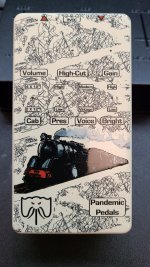
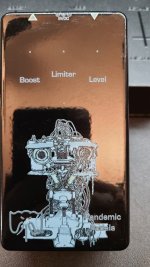
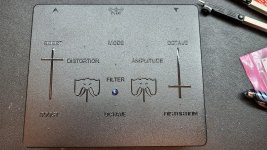
I just sent out 3 new designs to Tayda. All only using Inkscape and Affinity Designer. I even did one that is black ink on the black sand enclosure with the emboss finish over top. That way we can see what black out pedals will look like. Wish me luck.
View attachment 10468View attachment 10469View attachment 10470
In case anyone is wondering [ you probably aren't] the little thing in color is a rat fetus. I figured it was fitting since this is the life pedal and it is a modified rat. Clever huh. It's probably just gonna look like a smudge when it comes back.
Looks great. That black on black emboss seems to have turned out nicely.Here they are:
Affinity will allow the multiple layers even if it does not open in Illustrator that way. These are all 3 layer designs. I will pay for the extra pass of white on black next time though.

I need to try some more designs again. Does anyone have some Affinity templates worked out for a good starting point?
Also used emboss on that. I like the exaggerated way it raises the ink.Looks great. That black on black emboss seems to have turned out nicely.
What varnish did you use on the locomotive?
I will have some up shortly.I need to try some more designs again. Does anyone have some Affinity templates worked out for a good starting point?
Yeah. I did it once for an MXR pedal which were my favorites from years back and now I just seem to use it for everything.That black on black is cool. Sucks for live use though.
Also, I like your commitment to Eurostile.

Yeah. I did it once for an MXR pedal which were my favorites from years back and now I just seem to use it for everything.

Also used emboss on that. I like the exaggerated way it raises the ink.
Just so I am clear; you did white, black and emboss passes on that Parenthesis enclosure?
I have attached the file I sent to Tayda.