PCB design challenge #1

I couldn’t get mine to work 🙃 so I’ll be watching! I must’ve read the rules incorrectly I thought you had to have a board presentable as well!

I still want to submit something this is far as i got and the board did not work!

View attachment 40070
View attachment 40071

View attachment 40073

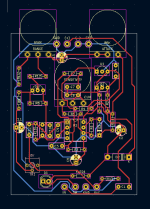
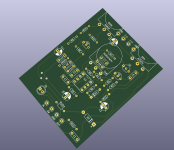
What an experience this was! Im glad to have participated, I learned so much! I ended up using KiCAD as my program of choice. The toner transfer was successful but the board itself does not work! I ended up having to use 5 jumpers.

View attachment 40074

View attachment 40075

View attachment 40076


Im going to take everything i learned here and move onto Buddys contest! Thank you @temol for making the contest but sorry to present you an incomplete piece of work that is not in pdf. format. I have a new found respect for everyone here making these circuits! Thanks for reading!
I spotted the problem... you didn't insert the Op Amp or transistors... :)
 
I spotted the problem... you didn't insert the Op Amp or transistors... :)
That pic was before i did insert them. haha Thank you for the help! I just fixed the problem now time to test hopefully that VCC trace was the only issue!
 
Last edited:
77e6j5.jpg
 
I left the files on my work computer which I don't have access to again until Monday, so it looks like my design gets disqualified for being late even before it gets disqualified for being SMD
That is why I like the EasyEDA cloud workspace. Can access all my projects and components from any internet connection. Its been pretty handy and I've been using it long enough now it would be hard to switch to another CAD EDA. I don't see a lot of people using it for some reason. I've tried pretty much all of them and its the best free program IMO
 
That is why I like the EasyEDA cloud workspace. Can access all my projects and components from any internet connection. Its been pretty handy and I've been using it long enough now it would be hard to switch to another CAD EDA. I don't see a lot of people using it for some reason. I've tried pretty much all of them and its the best free program IMO
The free programs have certainly come a long way, but I've been using a paid program for the past 5 years or so and I'm super comfortable with it. I'm pretty sure it can handle cloud storage, but I never set it up.
 
So.. Thank you, good night! See you next time!

Just joking...

First of all - thank you for participating in the challenge.
I didn't know what to expect when it comes to the number of participants. I was hoping there would be more projects, especially since there was quite a lot of time :)
But enough complaining. I think the projects are great. Vintage designs are a nice surprise, I thought I was the only one who came up with it ;). Please, let us know in which programs you created them.

Everyone here's a winner but since it's a challenge, we should pick three projects. I have my favorites, but more on that soon.
I invite you to comment on challenge entries.

 
It was really nice to see how you folks approach designing single layered boards! Will certainly take a lot of inspiration for my projects going forward.

All entries were really nice, but, to me, Brett's layout is the winner. Just looks amazing and everything seems to be very well thought
 
It was really nice to see how you folks approach designing single layered boards! Will certainly take a lot of inspiration for my projects going forward.

All entries were really nice, but, to me, Brett's layout is the winner. Just looks amazing and everything seems to be very well thought
WOW, thank you @lrgaraujo! Very kind of you to say!

Im torn between @Brett and @Chillums boards :p
Thank you so much @steviejr92! @Chillums board is indeed pretty sweet!

So.. Thank you, good night! See you next time!

Just joking...

First of all - thank you for participating in the challenge.
I didn't know what to expect when it comes to the number of participants. I was hoping there would be more projects, especially since there was quite a lot of time :)
But enough complaining. I think the projects are great. Vintage designs are a nice surprise, I thought I was the only one who came up with it ;). Please, let us know in which programs you created them.

Everyone here's a winner but since it's a challenge, we should pick three projects. I have my favorites, but more on that soon.
I invite you to comment on challenge entries.
Your vintage-inspired design was awesome and your custom made enclosures (all of them) are crazy cool.

I think it's pretty easy to tell on mine, but I created my PCB in EagleCad.

Thank you for holding the contest @temol!
 
I was impressed by the quality of everyones layouts, I especially liked the vintage inspired ones. Everyone managed to get it pretty condensed and clean. @Brett and @temol did what I was trying to do better, since I think temol can't win their own contest my vote is for Brett.
 
I should probably start getting that prize together that I promised. Where does the time go...

Well done to everyone that participated, I've designed a good handful of PCBs over the years, but this one was a bit of a struggle for me. Kudos to everyone that pulled it off!
 
My favorites:
@Chillums - in my opinon best overall project. Great attention to detail - check the description layer. Arrows, graphics, component outlines. Super cool. Then - fancy board outline, vintage look. I'm not sure about extra holes for caps (more drilling ;) ).
Btw - quite small distance between trace and a solder pad here
1673778526346.png

@Brett - nice and compact design, I like the clean and elegant pcb look.

@swyse - classic pcb design, clean and elegant.


Also (in random order): @lrgaraujo - the only design with 3 pots in a row and nice small pcb. @steviejr92 - applause for actual pcb. @homebrewtj - nice design, I like the pcb look (try moving some traces around, there might be some clerance problems with diy pcb). @perfboarder - nice, oldschool Eagle design.

Thank you all!
 
My favorites:
@Chillums - in my opinon best overall project. Great attention to detail - check the description layer. Arrows, graphics, component outlines. Super cool. Then - fancy board outline, vintage look. I'm not sure about extra holes for caps (more drilling ;) ).
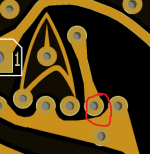
Btw - quite small distance between trace and a solder pad here
View attachment 40281

@Brett - nice and compact design, I like the clean and elegant pcb look.

@swyse - classic pcb design, clean and elegant.


Also (in random order): @lrgaraujo - the only design with 3 pots in a row and nice small pcb. @steviejr92 - applause for actual pcb. @homebrewtj - nice design, I like the pcb look (try moving some traces around, there might be some clerance problems with diy pcb). @perfboarder - nice, oldschool Eagle design.

Thank you all!

This was my first time ever attempting something like this and many thanks go out to @steviejr92 for the guidance and advice along the way.

I used KiCad and then redrew the traces in Illustrator to try something different.
Here’s what it looked like in KiCad. I could tell there was definitely room for improvement, but I only had a few nights here and there to work on it. The blue is the ground trace just to differentiate it.

I wish there was a way to move components and have the traces locked on without having to redrawn them each time. Maybe there is, and I don’t know.

I’m definitely going to try this again and try to make my own circuit someday.

1673797483463.png

1673797380530.png
 
Back
Top