What’s on *YOUR* workbench?

I have a CHinese Pignose, still sounds great but yours is US made judging by the sticker. Do you know how to ground it? Mine has an adapter but it's not grounded and it hums. Using batteries is a PITA
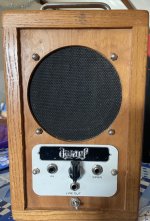
I haven’t had any issues with hum, but I’ve used one of the original red label adapters mostly. I don’t know of a way to ground it. The original doesn’t have a ground either. It is falling apart and so far what I can see on the insides is a cap and a transformer. I have 5 of the red label. I think I have an obsession with these little portable amp from the 70s and 80s! I snagged a non working Dwarf amp, traced the circuit, then figured out it had a bad IC. Was able to find the IC, amazingly enough, and get the little amp back up and rockin! I think it’s 8 watts and can be powered by battery and it also has an AC cord(no ground).
29C0C3BE-66E5-4CCC-A59A-EA532B0E5C72.jpeg
 
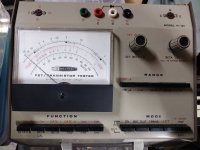
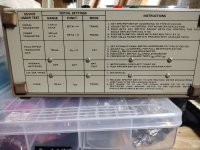
Heathkit IT-121
2023-11-0121.39.483009525559232901365.jpg

2023-11-0121.40.335735595852398470491.jpg
A lot cheaper than a DCA and came off a bench of a repair house so should work. Measures gain and leakage of transistors and fets. I'm sure a DCA kills it all day, but still looks fun and since it's Heathkit, all the manuals are out there, forum support and apparently Heathkit is BACK, selling replacement parts of either NOS status or pulled from their boneyard. Heathkit and Sons FTW!
 
I haven’t had any issues with hum, but I’ve used one of the original red label adapters mostly. I don’t know of a way to ground it. The original doesn’t have a ground either. It is falling apart and so far what I can see on the insides is a cap and a transformer. I have 5 of the red label. I think I have an obsession with these little portable amp from the 70s and 80s! I snagged a non working Dwarf amp, traced the circuit, then figured out it had a bad IC. Was able to find the IC, amazingly enough, and get the little amp back up and rockin! I think it’s 8 watts and can be powered by battery and it also has an AC cord(no ground).
View attachment 59645

Mine is exactly like yours but it has a different sticker. A rare case of a product not not changing when it's built overseas. Sounds the same too.
I haven't tried a different adapter but I'm pretty sure it would still hum with two prongs.
 
@finebyfine @Harry Klippton

What type of jacks do you guys use? (DC and 1/4")

Lumberg thinline dc and the enclosed toothed stompbox parts 1/4" jacks

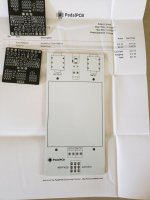
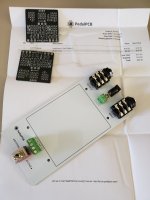
Same here but I'm experimenting with other DC jacks - there's a few flange mounted ones that I'm gonna try out. For tighter builds I use the same 1/4 jacks that you use on PPCB IO module that I have breakout boards for. If absolutely need be I'll grab some of those open frame lumberg 1/4 jacks but I really hate using them.

Are they easier because they are precut? Are these spaced correctly? This looks like it would make my job much easier.

It's more the spacing that makes it easier, imo. The other ribbon wire I have is 1.27mm pitch and so it has to be stripped, tinned, spread apart, and then placed.
 
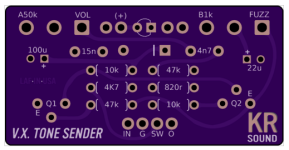
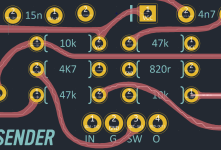
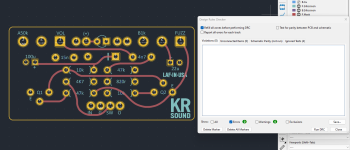
I'm going to see how this will work. I can't figure out if there's a way to designate graphics on the copper layer as a NET. So instead, I imported an svg and connected the pads with tiny traces. Not sure if I need to do that or not to be honest.

This should be pretty rad with the After Dark clear mask.

1699029636522.png

1699029488870.png

1699029567758.png
 
This is what I started with and it's all good.

I did notice that close trace right after I received an email saying they already set it up for a panel! I'll get creative if it causes any issues.

View attachment 59765
What’s wrong with using the rounded tracks plugin, then running KiCad’s built-in teardrop tool? Exporting the copper layers, redrawing them, then reimporting as SVG, and following that with reconnecting all traces again seems like a ton of work when tools can automate most of that, quite easily.

It’s also possible I’m missing the entire point of what it is that you’re working towards here.
 
What’s wrong with using the rounded tracks plugin, then running KiCad’s built-in teardrop tool? Exporting the copper layers, redrawing them, then reimporting as SVG, and following that with reconnecting all traces again seems like a ton of work when tools can automate most of that, quite easily.

It’s also possible I’m missing the entire point of what it is that you’re working towards here.
I’m just experimenting with stuff to eventually get creative with traces and the copper and mask layers in general. I was trying to make them look old-school/hand drawn/whatever so the traces are all varied widths and messy looking.

What is really like is to be able to import a graphic and assign it a net, or to replace a trace with a graphic. Still exploring!

I may try to send over the pcb file without re-tracing and see if the copper layer would do fine in production.
 
What is really like is to be able to import a graphic and assign it a net, or to replace a trace with a graphic.
I think it’s possible to do this using the BMP import tool.

Try this: Copy as footprint to clipboard, paste on your board. Select footprint, E (edit), edit footprint. Set visibility to F.Silkscreen only. Select all. Menu>Edit>Edit graphics. Select footprint graphics and only selected. Change layer to F.Cu. Save local footprint. Then, I believe you can choose the copper if you disallow footprint selection. From there, you should be able to select your desired net. I seem to recall doing it like this before.
 
I think it’s possible to do this using the BMP import tool.

Try this: Copy as footprint to clipboard, paste on your board. Select footprint, E (edit), edit footprint. Set visibility to F.Silkscreen only. Select all. Menu>Edit>Edit graphics. Select footprint graphics and only selected. Change layer to F.Cu. Save local footprint. Then, I believe you can choose the copper if you disallow footprint selection. From there, you should be able to select your desired net. I seem to recall doing it like this before.
Awesome. I'll try that this weekend- appreciate it! And i just found the Teardrops tool. I won't have to do those by hand again. smh.


Edit- and the 'Round Tracks' plugin. I was filleting each trace individually. I just did this in 10 seconds and I dig it.

1699035662605.png
 
Back
Top