
You are using an out of date browser. It may not display this or other websites correctly.
You should upgrade or use an alternative browser.
You should upgrade or use an alternative browser.
Tayda UV Printing
- Thread starter dmnCrawler
- Start date
already tried vignette and emboss, i just thought that the matte has that dull flat effects, never expect it to have sparkly effect since it has a name Gloss Matte, I thought TAYDA forgot to put the layer.I've done both Gloss Matte and Gloss Varnish. Echoing what SYLV9ST9R said earlier, the Gloss-M adds a glossy sheen to the otherwise flat (matte) UV print. The Gloss-V takes it up a notch by adding some thickness to the gloss. You can see it and feel it -- think applying vinyl sticker. The Gloss Emboss takes the thickness up even more. Hope this helps. I'll try to post some pics of the Gloss-V that I did on my Informant enclosure when I get the chance and post it.
Thank you for your answer.

Yes, if you just want a flat matte look than no need for the Gloss layer. Just the straight Color layer...already tried vignette and emboss, i just thought that the matte has that dull flat effects, never expect it to have sparkly effect since it has a name Gloss Matte, I thought TAYDA forgot to put the layer.
Thank you for your answer.
yes, will do that from now on.Yes, if you just want a flat matte look than no need for the Gloss layer. Just the straight Color layer...
By the way, your preference might defer, but I did a matte UV on a matte enclosure and it was super dull looking. I think I may spray it with semi gloss lacquer.yes, will do that from now on.

dmnCrawler
Well-known member
Just got 3 new enclosures in. I still have more to learn. All were created in Inkscape and Affinity Designer but I had to get the layers and spot colors correct in Illustrator. I will try again.
I really do like the gloss and emboss effects. Gloss-V on Julia and Emboss on VfE BumbleBee.

I really do like the gloss and emboss effects. Gloss-V on Julia and Emboss on VfE BumbleBee.
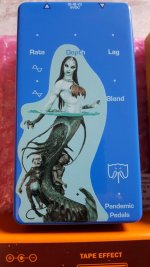
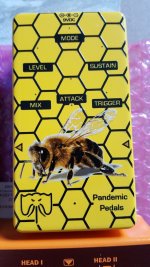
Looks great, did you image trace the picture to get it into vector?Just got 3 new enclosures in. I still have more to learn. All were created in Inkscape and Affinity Designer but I had to get the layers and spot colors correct in Illustrator. I will try again.
I really do like the gloss and emboss effects. Gloss-V on Julia and Emboss on VfE BumbleBee.
View attachment 9968View attachment 9969
dmnCrawler
Well-known member
Yes..... the Julia I did the trace bitmap with 16 colors and stacked the traces. On the bumblebee I did the same without stacking.Looks great, did you image trace the picture to get it into vector?
Looks really good, I did the same with my pedals. I should really find the time to do a write up about the process. Opacity masks came in really clutch instead of the weird pathfinder for removing sections of images.Yes..... the Julia I did the trace bitmap with 16 colors and stacked the traces. On the bumblebee I did the same without stacking.

cooder
Well-known member
Those look great, yes it would be great if you guys in the know could elaborate as much as possible, much appreciated indeed!
I have Inkscape and Affinity Designer, I'm just wrapping my head around Affinity Designer. Would love too know best process to work with those programs without needing Illustrator as that seems a too expensive option for most here I guess.Just got 3 new enclosures in. I still have more to learn. All were created in Inkscape and Affinity Designer but I had to get the layers and spot colors correct in Illustrator. I will try again.
I really do like the gloss and emboss effects. Gloss-V on Julia and Emboss on VfE BumbleBee.
View attachment 9968View attachment 9969

SYLV9ST9R
Well-known member
Those look great! Always wondered about the emboss, but never had a design where it would warrant it. Those alveoli seem perfectly suited for more texture. Did you do a white underlay for both?Just got 3 new enclosures in. I still have more to learn. All were created in Inkscape and Affinity Designer but I had to get the layers and spot colors correct in Illustrator. I will try again.
I really do like the gloss and emboss effects. Gloss-V on Julia and Emboss on VfE BumbleBee.
dmnCrawler
Well-known member
Yes, white underlay, color and the top coats.Those look great! Always wondered about the emboss, but never had a design where it would warrant it. Those alveoli seem perfectly suited for more texture. Did you do a white underlay for both?
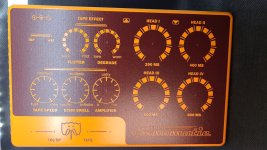
This pedal also had white undercoat, color layer and I used gloss-m on this. I wanted to see what each of the topcoats did. I like them all for different applications.
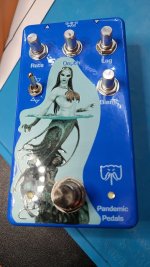
The julia only has the gloss on the siren so the background light blue is still matte.
SYLV9ST9R
Well-known member
Nice. The gloss on only the siren makes for a great look, and the reverse lettering is a nice touch. I also went with the waveforms for the switch on a design I'm doing for the Caesar/Julia.Yes, white underlay, color and the top coats.
This pedal also had white undercoat, color layer and I used gloss-m on this. I wanted to see what each of the topcoats did. I like them all for different applications.
The julia only has the gloss on the siren so the background light blue is still matte.
You're right, each top has its own application. I was weary of the gloss-M at first, because of the checking, but from a couple of feet, I think it looks good. Also, I just recently stumbled on the Sonomatic, and it looks like like a fun pedal.
dmnCrawler
Well-known member
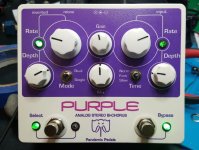
I believe he only has 5 boards right now so I got one of each. I've only finished the Purple and am about to get the Sonomatic boxed.Nice. The gloss on only the siren makes for a great look, and the reverse lettering is a nice touch. I also went with the waveforms for the switch on a design I'm doing for the Caesar/Julia.
You're right, each top has its own application. I was weary of the gloss-M at first, because of the checking, but from a couple of feet, I think it looks good. Also, I just recently stumbled on the Sonomatic, and it looks like like a fun pedal.
cooder
Well-known member
Is there any update if the creation of the different white/color/loss layers In Affinity designer works to get this done at Tayda and what the steps are?
In dmnCrawler excellent tutorial it reads so far that it's not possible to do it with Designer, is that the state of things or has someone found a way?
Cheers
In dmnCrawler excellent tutorial it reads so far that it's not possible to do it with Designer, is that the state of things or has someone found a way?
Cheers

Danbieranowski
Well-known member
I’ve done it. And I’m planning to throw together a video tutorial. I just have to find the time.Is there any update if the creation of the different white/color/loss layers In Affinity designer works to get this done at Tayda and what the steps are?
In dmnCrawler excellent tutorial it reads so far that it's not possible to do it with Designer, is that the state of things or has someone found a way?
Cheers
dmnCrawler
Well-known member
I am going to try again soon (meaning next 2 weeks or so) with the suggestions from @Danbieranowski and see if it works. If so I will update the tutorial as well.Is there any update if the creation of the different white/color/loss layers In Affinity designer works to get this done at Tayda and what the steps are?
In dmnCrawler excellent tutorial it reads so far that it's not possible to do it with Designer, is that the state of things or has someone found a way?
Cheers
Danbieranowski
Well-known member
Rad! If you want we can set up a screen share meeting and I can show you what I’ve figured out. I think you have the most comprehensive tutorial by far.I am going to try again soon (meaning next 2 weeks or so) with the suggestions from @Danbieranowski and see if it works. If so I will update the tutorial as well.
dmnCrawler
Well-known member
Rad! If you want we can set up a screen share meeting and I can show you what I’ve figured out. I think you have the most comprehensive tutorial by far.
I was actually just looking at your instructions in the other UV printing thread and trying to see where I went wrong last time. I would really like to get this working to avoid the monthly fees.