Tayda UV Printing

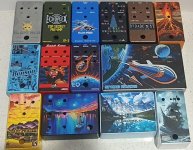
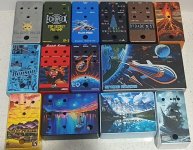
Your prints look fantastic dude. I like how you got your signature so close to the edge but still perfectly intact. Whatever issue you're talking about isn't really visible in the pictures, so I'd call that a win.

Is the yellowing actually part of the paint job below? Tayda's painting exhibits the "orange peel" effect that sticklers tend to bitch about. It's good enough for my standards, but it's something I notice. Even Mammoth Electronic's (RIP) discounted "blemished" stock was smoother. (Although Mammoth's were power-coated, not painted, so maybe an unfair comparison.)

Anyway, after 1 successful UV print, I'm ready to ride the Tayda UV bandwagon. Thank you to all you dudes who posted in this thread. I read the whole thing. Now I'm ready to conquer the world with some VFE builds converted to 125b enclosures for breathing room. Mobius Strip, BumbleBee, and Tractor Beam are on the agenda. 🤘
Thanks! I’m really happy with how the signature showed up as well. The “orange peel” doesn’t bother me at all. The yellowing is just a roughly 2” segment of the border line that fades from the normal white to an ever so slightly yellow color, almost as if the clear gloss layer overtop the white layer had been exposed to something in just that one spot before the UV print cured. It’s bare noticeable though, and I have no complaints about anything else. I’ll definitely be ordering plenty more UV prints in the future!

I look forward to seeing your VFE builds. I have a Möbius Strip PCB as well that I’m just trying to finalize a design (mostly just settling on the solar scheme at this point) for, and I’ll be hopefully getting that and a few other enclosures (XC Phase, Madbean Uber Tuber, and a few circuits/PCBs of my own design) in my next Tayda order after the new year.
 
I look forward to seeing your VFE builds. I have a Möbius Strip PCB as well that I’m just trying to finalize a design (mostly just settling on the solar scheme at this point) for, and I’ll be hopefully getting that and a few other enclosures (XC Phase, Madbean Uber Tuber, and a few circuits/PCBs of my own design) in my next Tayda order after the new year.

No one will even notice the yellow unless you point it out to them. :) Very pro. The colors on your 808 look metallic. Must be the sand texture?

Looking forward to seeing your finished designs dude. I'm working on the Mobius Strip now and can't figure out what color it should be. I'm feeling either blue or grey, maybe "ball grey." I dunno. I'll just keep screwing around until it looks OK.

So far I'm coming up with stupid shit and using the texture effect like the amateur that I am. And you know, drop shadows, cuz that's moist pro.
mob.jpg
 
Last edited:
I finished art for 3 pedals, and submitted them for printing. On one of them, I copied all of the stuff in the color layer to the white layer and then I applied the RDG_WHITE Roland swatch to all of them so that there would be a white layer underneath the color. I submitted the job, and tayda put an error message on the job saying there was no RDG_WHITE in the white layer. I tried re-applying the RDG-WHITE to everything and re-submitting it. Hopefully that works.
 
I finished art for 3 pedals, and submitted them for printing. On one of them, I copied all of the stuff in the color layer to the white layer and then I applied the RDG_WHITE Roland swatch to all of them so that there would be a white layer underneath the color. I submitted the job, and tayda put an error message on the job saying there was no RDG_WHITE in the white layer. I tried re-applying the RDG-WHITE to everything and re-submitting it. Hopefully that works.

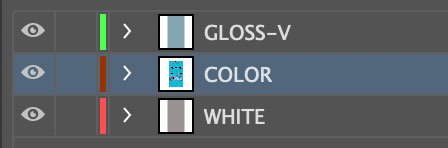
From what I've read: your color layer has to be in the middle of the 3 layers. The printer is relatively dumb and works from the bottom of 3 layers to the top. It starts with white, then does color, then gloss, regardless of what you've named these layers.

What you submit should be 3 layers in this order. Make sure all 3 are "visible" with the eyeball turned on in the left corner before you save to PDF.
Good luck!!

lookee.jpg
 
Has anyone ever submitted a color layer with information OUTSIDE of the artboard? I'm assuming their printer just discards everything outside the artboard, and that's just fine.

I can't help but notice the big red warning on their website:
PLEASE MAKE SURE YOUR ARTWORK IS NOT BIGGER THAN YOUR ARTBOARD AND THERE IS ABSOLUTELY NOTHING OUTSIDE ARTBOARD BORDERS.

You'd think it would be easy for me to just crop everything outside the artboard. But I can't find a way that works, after reading several different tutorials. It's shockingly complicated with a giant complex vector image. Anyone try this and get off-centered art?
 
Has anyone ever submitted a color layer with information OUTSIDE of the artboard? I'm assuming their printer just discards everything outside the artboard, and that's just fine.

I can't help but notice the big red warning on their website:
PLEASE MAKE SURE YOUR ARTWORK IS NOT BIGGER THAN YOUR ARTBOARD AND THERE IS ABSOLUTELY NOTHING OUTSIDE ARTBOARD BORDERS.

You'd think it would be easy for me to just crop everything outside the artboard. But I can't find a way that works, after reading several different tutorials. It's shockingly complicated with a giant complex vector image. Anyone try this and get off-centered art?
Follow these steps and should be good.
  • Make a rectangle the size of the artboard.
  • Select it and your artwork.
  • Make Clipping mask.
  • Object - > Expand
  • Pathfinder - > Crop
 
THANK YOU!!!
I think ultimately I just had a corrupt file. It was a downloaded eps that turned into hundreds of sublayers. Even trying to merge them caused Illustrator to crash. I appreciate the quick tip though. That method is working perfectly with other files. 🤕
 
Last edited:
From what I've read: your color layer has to be in the middle of the 3 layers. The printer is relatively dumb and works from the bottom of 3 layers to the top. It starts with white, then does color, then gloss, regardless of what you've named these layers.

What you submit should be 3 layers in this order. Make sure all 3 are "visible" with the eyeball turned on in the left corner before you save to PDF.
Good luck!!

View attachment 20111
Yeah I had it setup just like that, but your post made me realize I screwed it up when I tried to fix it. I hid the color layers and reapplied the RDG_WHITE to all of the things in the white layer. I saved it and re-uploaded it. I just realized I forgot to unhide the color layer before saving it. Well I guess I will have to see what happens. Its going on a matte black pedal so I guess if I just got the white layer it won't be the end of the world.
 
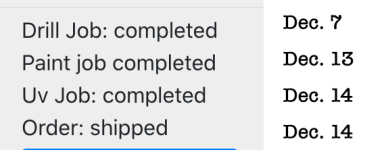
Tayda discovery: shipping is much faster if you skip custom drilling. (Dec. 2021.)

Watching my Tool Box
Dashboard earlier this month, the only delay happened in the powder coating dept. after a custom drill pattern.

watching.png

Yesterday: I ordered 4 more UV-printed enclosures at 6:20 pm, and got a shipping notification at 5:30 this morning. (!) Four enclosures—UV-printed and shipped in 11 hours.

That is all. Here's some personal shit you should skip:
I was determined to not spend more than 1 day on all 4 designs. I'm doing this out of sheer laziness rather than aesthetics. Most of them look distinctly unimpressive. Big thanks to SYLV9ST9R and Chris420 for the personal assists. And thanks to everyone who added to this thread. I'm stoked.

I'm trying the black print on black sand-texture enclosure inspired by this thread. 🙃
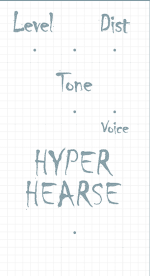
Here's my Disarray Distortion.

hh.png
 
Last edited:
Tayda gave me a second opportunity to fix it so I fixed the file. They have already completed my UV print and shipped. So excited to see how these pedals turn out. I got a Uni-cab, Abyss and Caesar Chorus coming. Thanks everyone for your help!
 
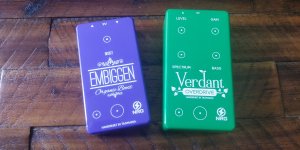
My latest Tayda prints arrived today 😎

View attachment 20175

View attachment 20176

giphy.gif
 
I've had 14 UV prints done and for some reason, the most simplistic one of them all turned out bad (Broadcast). I looked at the original PDF and can't see why.


1.jpg
 

Attachments

I've had 14 UV prints done and for some reason, the most simplistic one of them all turned out bad (Broadcast). I looked at the original PDF and can't see why.
The only thing I could see is that you have a lot of intricate/competing paths under the black.
For future prints, I would suggest cleaning this and using a single RDG_WHITE rounded rectangle underneath and have cutouts in the black on top. It might be what caused this.

Also, I finished my design for my coming Cherry Pie trem last week-end, and it will be similarly colored/themed ;)
 
Also, I finished my design for my coming Cherry Pie trem last week-end, and it will be similarly colored/themed ;)
I had a few other designs that all had mountain but then I decided to convert a shot of a real pic from the Rocky Mtns. I think the Cherry Pie will be one of the last ones I do out of all of these. (or maybe the Orion Spring Reverb). I don't even own a drill in Aus so plan to finish all the pre drilled ones first. I might be back in Canada by March and have a drill and access to a drill press there. This is assuming I get a job and this Omicron stuff settles down. Just got my booster shot a few days ago. Still feeling a bit achey.

The good thing with the Broadcast is that I can just reprint a decal on white sticky paper. I am glad the rest turned out ok.

The Broadcast logo was created by just vectorizing an image of their actual logo and modifying it. What do you mean by cleaning?
 
I had a few other designs that all had mountain but then I decided to convert a shot of a real pic from the Rocky Mtns. I think the Cherry Pie will be one of the last ones I do out of all of these. (or maybe the Orion Spring Reverb). I don't even own a drill in Aus so plan to finish all the pre drilled ones first. I might be back in Canada by March and have a drill and access to a drill press there. This is assuming I get a job and this Omicron stuff settles down. Just got my booster shot a few days ago. Still feeling a bit achey.

The good thing with the Broadcast is that I can just reprint a decal on white sticky paper. I am glad the rest turned out ok.

The Broadcast logo was created by just vectorizing an image of their actual logo and modifying it. What do you mean by cleaning?
Just meaning that you have a lot of unnecessary paths in your print file. By "cleaning", I meant simplifying where possible and getting rid of all the unused/unecessary paths. (I only removed the main black area here, you can see what I mean, as overlaying paths in the same layer can cause problems).
Capture d’écran 2021-12-23 à 08.18.11.png
Capture d’écran 2021-12-23 à 08.17.11.png
 
Last edited:
  • Love
Reactions: fig
Just meaning that you have a lot of unnecessary paths in your print file. By "cleaning", I meant simplifying where possible and getting rid of all the unused/unecessary paths. (I only removed the main black area here, you can see what I mean, as overlaying paths in the same layer can cause problems).
Damn, I thought I had deleted all of that garbage. I suspected it was an error I made and now it is confirmed. I had actually thought about just printing a label off the printer like most people do for the Broadcast but I was curious to see how UV printing would turn out on the copper enclosure finish. I think it would have been fine if I hadn't screwed it up.
 
Damn, I thought I had deleted all of that garbage. I suspected it was an error I made and now it is confirmed. I had actually thought about just printing a label off the printer like most people do for the Broadcast but I was curious to see how UV printing would turn out on the copper enclosure finish. I think it would have been fine if I hadn't screwed it up.
It looks good on the copper finish. Did this one after seeing how awesome this looked.
 
  • Like
Reactions: fig
Does anyone have experience with Vectornator? It's free on the Mac App Store, and I'm pretty sure they offer a PC version. It could be a great FREEE! alternative to Affinity Designer or Adobe Illustrator. From what I can tell it looks a whole lot better than Inkscape/GIMP or something along those lines. My sister is a graphic designer, so I have shared a login to her Adobe account for a while, but she is now splitting with a colleague.
https://www.vectornator.io
 
Last edited:
Back
Top