Font talk

Wow, wish I’d seen this thread before YOLO’ing some random system font onto the Sunn preamp pedal I’m working on. As always, tons of gratitude to the generous nerds in this forum. Incredible thread. A+++ would read all 9 pages again.
 
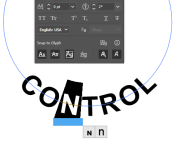
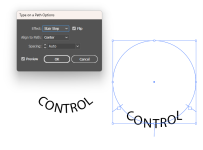
good method for curved text
With a point size that small, I’d avoid complex glyphs in general (ornamental serifs, staggered heights, exaggerated swashes, etc.) and stick to more geometric typefaces with thinner weights to avoid bunching. You may need to increase the kerning.

In the example you posted, the kerning is too tight all around. The diameter of the BLEND curve is too big. That BLEND knob is messing with stuff because it’s a smaller radius and it’s forcing a tight margin between the knobs and label text.

You can also experiment with having the text outside the path rather than inside. That will ease some of the kerning issues without adjusting it manually.
 
Kerning, if I am remembering correctly, is the space between each letter correct?
Yes
For sure. I just slammed that out to have everything in rough approximation on the surface. Definitely a work in progress.
It's something you'll have to contend with. I'm not sure it will work out for that control. It may be worth changing it to MIX or using icons rather than text there.
If I am understanding what you are saying correctly, that is what I did. For instance, when Corel "Fits Text to Path":


Initial:
View attachment 71616

Text "pulled" down to bottom:
View attachment 71617
Right. You should be able to adjust the start/end points of the text on the path. So the inside text can be on the bottom of the inside of the circle.

The original design was, of course, laid out by hand. Notice how the G in RANGE isn't rotated from a horizontal baseline.
 
Last edited:
You should also be able to adjust either line-height or distance from the path, and maybe even the amount that the letters face or rotate towards the center.
 
I’m all in on Corel Draw.

It took me a long time to learn how to use it as well as I do and I have a license for CD2020 so it mostly been an uphill battle to learn stuff that many people have more support on.

I’m going to play a little bit more tomorrow and try to figure out why the Kerning adjustment is grayed out.
I used to use Corel Draw, but my employer bought Adobe CS for me, and I pretty much have everything I need there. It's been years since I've used Corel Draw, so I doubt that I can be of much help to you there, but I am fairly knowledgable about graphics design software, so if there is anything I can do do to help. I'm definitely willing to help.
 
Last edited:
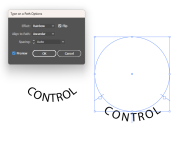
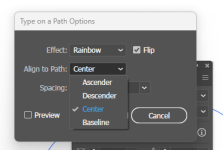
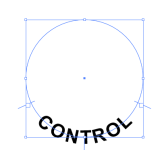
Illustrator has a few options for how to control the location of the type. You can also then go in and adjust each individual letter even further if you want.
I worked in geography/cartography for a long time and it's always striking to me how much overlap there is between map design and...normal? design. It makes sense when you think about it for two seconds, but this kind of text placement is probably 95% of the work that goes into designing a legible map and it's just kind of neat seeing the same ideas in a pedal forum. These days a lot of interactive map software renders text dynamically as you zoom, pan, rotate, etc. Makes text placement extra gnarly and probably explains why you don't see a lot of creative font choices from the usual map providers.

🤔 It would be fun to do an enclosure design in map software and see how it translates to UV print...

 
Cool thread!

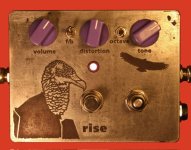
I do etching on my pedal enclosures. Had to find a typeface that could stand up to some loss of definition and still be readable/look decent. Fortunately the one I started with worked. Bonus points if you can ID it! ;)

Anyone else etch and have to do some trial and error to find fonts that work with the process?

IMG_0216.jpeg
 
I worked in geography/cartography for a long time and it's always striking to me how much overlap there is between map design and...normal? design. It makes sense when you think about it for two seconds, but this kind of text placement is probably 95% of the work that goes into designing a legible map and it's just kind of neat seeing the same ideas in a pedal forum. These days a lot of interactive map software renders text dynamically as you zoom, pan, rotate, etc. Makes text placement extra gnarly and probably explains why you don't see a lot of creative font choices from the usual map providers.

🤔 It would be fun to do an enclosure design in map software and see how it translates to UV print...
Do it! What do you use? I love maps and used to collect old ones of my town. I need to find them and get them displayed somewhere in the house.
 
Do it! What do you use? I love maps and used to collect old ones of my town. I need to find them and get them displayed somewhere in the house.
I’ve used most of the major desktop tools over the years when I was doing more print and static digital work (ArcGIS, QGIS, illustrator or similar for finishing work sometimes). More recently I spent a few years working for a mapping startup where I did mostly interactive stuff and my print/static skill atrophied pretty seriously, ha.
 
Years ago, when I was failing at art/graphic design and trying to work out a more practical career change, I took an “Intro to GIS” class with the local community college.

It was loads of fun, but I ultimately decided I needed to do an apprenticeship (so I could make money while I learned) and became an electrician instead. Though I do remember talking about ArcGIS to a friend and describing it as “if Illustrator a bunch of Excel tables had a map baby” ;)
 
Map typography, on top of being soo cool, has so many lessons for ‘traditional’ graphic design. I buy any cheap print atlas’ and maps I come across in used bookstore dollar bins for my reference library. Font and color combinations, text on curves, conveying a large range of visual hierarchy, readability at small point sizes, it’s all there! If I had to teach someone the basics of laying out and designing text for books, I’d probably reach for a printed map for the first or second example
 
Back
Top