
You are using an out of date browser. It may not display this or other websites correctly.
You should upgrade or use an alternative browser.
You should upgrade or use an alternative browser.
Inkscape is hard
- Thread starter MBFX
- Start date

Feral Feline
Well-known member
Every time I try to use Inkscape, ... hmm let's just say... no, let's not say... uhm...
YOU LEARNED THE BASICS IN ONE NIGHT!?!
YOU LEARNED THE BASICS IN ONE NIGHT!?!


Blooze
Well-known member
I like to use it for layouts. Place all the pots, switches, PCBs/turret boards, wiring, etc. and graphics to see how it all fits. Then I have accurate drill holes as well. The only graphics use for me is text and such as I’m not artistic enough to not just cop the main design from somewhere else.

I felt , and still feel, the same about illustrator. Keep plugging at it. It was a lot easier picking this stuff up when I was younger. Now, I just have short periods of time at the end of the day, for the most part, to invest in it. But after a yearish of working on it, I getting proficient though not yet as efficient. I don't think the what seems to be adult onset ADD has helped. (Should probably go get that figured out)
I decided to stick to honing my etching abilities so only working in black and white. I think that has helped me get processed down since I'm don't distracted by color matching and whatnot.
I would say, once you have it down enough, if it were me, is skip waterslide or just use it enough to prove to yourself that your layouts are correct. The Tayda side really isn't that bad. Especially if you can set your coordinates in inkscape to match the drill tool(no idea, it can be done in illustrator). Then it's just making sure you have all the correct options in your cart. It's a huge time saver over drilling, clear coating etc.
I decided to stick to honing my etching abilities so only working in black and white. I think that has helped me get processed down since I'm don't distracted by color matching and whatnot.
I would say, once you have it down enough, if it were me, is skip waterslide or just use it enough to prove to yourself that your layouts are correct. The Tayda side really isn't that bad. Especially if you can set your coordinates in inkscape to match the drill tool(no idea, it can be done in illustrator). Then it's just making sure you have all the correct options in your cart. It's a huge time saver over drilling, clear coating etc.

Paradox916
Well-known member
Inkscape in great for cutting your teeth on, one because it’s free. I definitely prefer Affinity although it doesn’t have the image vectorization feature, and managing layers can get squirrely if you don’t keep on top of it. I feel like it’s slightly more intuitive and the tutorials on YouTube are easier to follow for affinity than Inkscape… just something to think about before you invest too much time into a program that you might want to move on from later.


Stickman393
Well-known member
Inkscape is the sort of program that you really benefit from extended use.
For example: it took me ages to figure out that I could position objects by their center point simply by clicking on the horizontal or vertical center node on the outline.
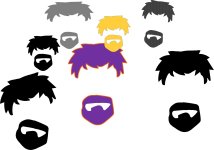
It's great for my style of art (that is, poorly drawn vector-based stuck figures).
Another great program that doesn't cost an arm and a leg, but that I found to be far more intuitive: Affinity Designer. That one might be a bit easier to wrap ones head around, and it's super reasonably priced.
For example: it took me ages to figure out that I could position objects by their center point simply by clicking on the horizontal or vertical center node on the outline.
It's great for my style of art (that is, poorly drawn vector-based stuck figures).
Another great program that doesn't cost an arm and a leg, but that I found to be far more intuitive: Affinity Designer. That one might be a bit easier to wrap ones head around, and it's super reasonably priced.
fontoponto
Well-known member
I use Inkscape for all prints or ordered faceplates.
The only things that bother me are the ridiculous clunky docking area that is always to wide to show the canvas or to narrow to show all options and the strange behavior that when I save a pedal the outlines of shapes are sometimes converted to have dual outlines which are then only filled between those two outlines instead of the whole shape when I want to fill the shape.
The only things that bother me are the ridiculous clunky docking area that is always to wide to show the canvas or to narrow to show all options and the strange behavior that when I save a pedal the outlines of shapes are sometimes converted to have dual outlines which are then only filled between those two outlines instead of the whole shape when I want to fill the shape.

RetiredUnit1
Well-known member
I use visio, you can find unused older versions for fairly low price on eBay. I uploaded inkscape just to see and realized it's a Coreldraw clone which as you say is not very intuitive.
Visio is far better, you can control placement of objects to 1/1000th of an inch.
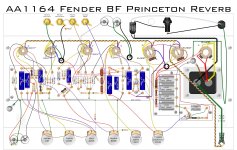
Some of the things I've drawn


Visio is far better, you can control placement of objects to 1/1000th of an inch.
Some of the things I've drawn





neiltheseal
Well-known member
It is hard. But start simple and work from there. Every time you use it you get a little bit better.
I started doing print templates, then hardware placement then basic design. Just make a design, even if you don't like it you willhave learned something doing it.
I started doing print templates, then hardware placement then basic design. Just make a design, even if you don't like it you willhave learned something doing it.

Harry Klippton
Not Interested
I use inkscape for everything. Take a look at my build reports. I spent a lot of time learning every option in every menu. It can be as powerful or precise as you want it to be

Passinwind
Well-known member
That's trivially easy in Inkscape, actually.I use visio, you can find unused older versions for fairly low price on eBay. I uploaded inkscape just to see and realized it's a Coreldraw clone which as you say is not very intuitive.
Visio is far better, you can control placement of objects to 1/1000th of an inch.

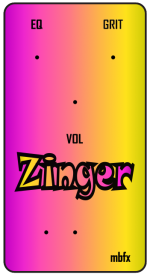
I've been using Inkscape for many years and it might be good to remember that it only hit version 1.0 in mid 2020. Sure, it's hard. And it's free and insanely powerful for those who get along with it and put in the time, but for me it's not even close to being a one stop solution. Along with Affinity Designer and Gimp I can usually get what I need though, at least.
fontoponto
Well-known member
I bet it will be great!
RetiredUnit1
Well-known member
Have you printed to normal paper first just to 'proof' how the colors will come out? Screen and printer don't always match. You wanna be sure to get it the color you want on cheap paper before using the expensive stuff.

MBFX
Well-known member
I have a crappy inkjet printer - this is going to be a practice run. If it goes relatively well, I'll figure out if there's a good color laserjet I can use at the local library/community college. I'm using cheap decal paper for now. I couldn't find any locally so I have some coming from Amazon.Have you printed to normal paper first just to 'proof' how the colors will come out? Screen and printer don't always match. You wanna be sure to get it the color you want on cheap paper before using the expensive stuff.