Inkscape is hard

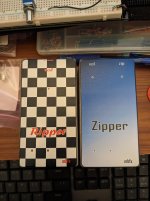
I'm quickly learning that an SVG file isn't foolproof, and it might display differently depending on how it is opened. I'm printing directly from Inkscape on a friend's color LaserJet, and I have my first two decals installed. Now that I've done it, I'm questioning the wisdom of using the decal to mark my drill holes and drilling through the decal, but we'll see what happens.
 

Attachments

  • PXL_20241121_022858442.jpg
    PXL_20241121_022858442.jpg
    326.2 KB · Views: 14
I'm quickly learning that an SVG file isn't foolproof, and it might display differently depending on how it is opened. I'm printing directly from Inkscape on a friend's color LaserJet, and I have my first two decals installed. Now that I've done it, I'm questioning the wisdom of using the decal to mark my drill holes and drilling through the decal, but we'll see what happens.
Inkscape is infamous for using their own SVG format, FWIW. That's caused me quite a few problems over the years actually. And many of the export functions in general have been notoriously buggy, IME,
 
Inkscape is infamous for using their own SVG format, FWIW. That's caused me quite a few problems over the years actually. And many of the export functions in general have been notoriously buggy, IME,

That free-99 price point is hard to beat, though. If I keep doing this and need to do more complex stuff, do you recommend biting the bullet and moving to Illustrator? It's so hard for me to justify the cost, since this is still just a hobby for me
 
That free-99 price point is hard to beat, though. If I keep doing this and need to do more complex stuff, do you recommend biting the bullet and moving to Illustrator? It's so hard for me to justify the cost, since this is still just a hobby for me
No, for pedal art I'd buy Affinity Designer at the current 50% off discount. No subscription, fairly frequent updates, and the learning curve has been tolerable at least. I still use Inkscape and GIMP quite a bit too, because yeah, free and gets many things done just fine. Inkscape is exceptionally good for font tweaking and vector node editing, for instance.

I've done a few free trials with Illustrator and got a lot of things done for future use over the course of the trial period, and it also helped me figure out workarounds with Designer. Might be worth a try.
 
I'm quickly learning that an SVG file isn't foolproof, and it might display differently depending on how it is opened. I'm printing directly from Inkscape on a friend's color LaserJet, and I have my first two decals installed. Now that I've done it, I'm questioning the wisdom of using the decal to mark my drill holes and drilling through the decal, but we'll see what happens.
You need to check your page settings in the print dialog window. Many applications default to "fit on page" which scales the printing factor. You want to be sure it is set to 100%. I print stuff all the time on my Brother color laser printer and it is dead nuts right on every time.

I even mocked up a ruler object and printed it, and compared to a *very* expensive drafting ruler and it was perfect. I use the ruler when I'm drawing to give me an idea of how tiny or large what I'm drawing is since "Zoom" can be really misleading. I don't like to use the rulers on Visio as they are too far away from the object, where I can just drag the ruler to where I'm drawing....
 
You need to check your page settings in the print dialog window. Many applications default to "fit on page" which scales the printing factor. You want to be sure it is set to 100%. I print stuff all the time on my Brother color laser printer and it is dead nuts right on every time.

I even mocked up a ruler object and printed it, and compared to a *very* expensive drafting ruler and it was perfect. I use the ruler when I'm drawing to give me an idea of how tiny or large what I'm drawing is since "Zoom" can be really misleading. I don't like to use the rulers on Visio as they are too far away from the object, where I can just drag the ruler to where I'm drawing....
My issue is that the SVG file doesn't display correctly on any computer but mine except in Inkscape, AND the errors are different and inconsistent. I'm sure I'm doing something wrong, but damned if I know what. I'm going to try what @Passinwind said to do and use the "Plain SVG" export, and see what happens.
 
PXL_20241126_052511104.PORTRAIT.ORIGINAL.jpg

After a few attempts and buying a better printer, I have made something I am proud of! It's basic, but it's way better than a bare enclosure. I used automotive enamel to seal the decals, and it was a good choice. Thin, glossy, durable, and dries quickly.

Now I get to teach myself REAL graphic design, and play with my decal technique! Still, I'm proud. I did everything myself - the circuits are on vero, and the art is my own.
 
I'm trying to finalise a page in Inkscape with my first waterslide decals. I have 6 decals prepped, exported the PDF and did a print on normal paper to check sizes, and the page gets cuton the left and on the lower side... is there some setting I'm missing to check?
I am probably being greedy in trying to fit 3 125b prints in a row in an A4 page...
 
Printers can't print as wide as the entire A4. Just being greedy there ;) You need to increase the margins top, bottom and sides. Double check A4/Letter format. Better safe than sorry (but still make sure that you don't rescale when printing).
 
Printers can't print as wide as the entire A4. Just being greedy there ;) You need to increase the margins top, bottom and sides. Double check A4/Letter format. Better safe than sorry (but still make sure that you don't rescale when printing).
I checked resizing and everything is correct at least 😅... I found a way to add page margins in Inkscape and I found my printers margins (not an easy information to find apparently)
 
Printers can't print as wide as the entire A4. Just being greedy there ;) You need to increase the margins top, bottom and sides. Double check A4/Letter format. Better safe than sorry (but still make sure that you don't rescale when printing).
In my case, I have everything set to US Letter. I'll check the margins!
 
I checked resizing and everything is correct at least 😅... I found a way to add page margins in Inkscape and I found my printers margins (not an easy information to find apparently)
So yeah, I added margins and made sure to stay inside, now the print is fine
On to try waterslide for the first time!

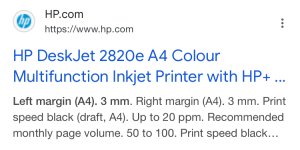
As a side note, why it seems like printers' page margins are a secret? I only found my printer's info (cheap HP 2820e) on the indian product page...
 
Back
Top