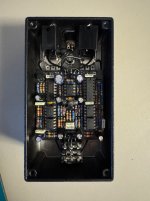
Ocelot - 0v to Pin 1 of IC5

j_m_earley

New member
Hey all. First time long time. Recently completed the Ocelot Octave, or so I thought. I get signal and a hint of octave from Oct 1, but that's really about it. From what I can tell, the issue is with IC5. I've tried troubleshooting it a million different ways, but nothing has worked. There are no shorts. The other pins are getting power. Swapping in a different IC produces the same result. I've re-soldered the socket. But that pin is causing a cascading effect where none of the other ICs are getting adequate power, so this octave pedal just isn't octave-ing. One thing to note: pin 8 was also not getting power, but a jumper wire from the DC jack addressed that. That's when my pin 1 issue started. It was reading 9.5v before, which is too high, but better than 0v? Any advice would be greatly appreciated!
 
Last edited:
Do you have continuity with IC5.1 and ground? If not, how many ohms between IC5.1 and ground? What about voltages at IC5.2 and IC5.3?
If IC5.1 is ~0V, then it is basically shorted to ground.

If you pull IC6 from the socket and measure the voltage, what do you get? (That helps to narrow down where the short is coming from)

Easiest possibility that I see is a short between pins 8 and 9 of IC6 (solder bridge on the solder side, or worse, a solder bridge
that's flowed underneath the socket). With IC6 out, you should measure continuity/ohms to ground around 8/9/10/11.
My guess is that things are shorted pretty hard which is pulling enough power to brown out the rest of your ICs.
Another test, if you don't find anything with the stuff I mentioned already - what's getting warm/hot when you have it plugged in?
 
This was pre jumper wire. I just shoved it in the closet after working on it for hours, but will add more photos when I pull it back out and tear it down. I wasn't noticing any shorts when I was poking around with the multimeter and IC5.2 and 3 were getting 9.5v
 

Attachments

  • IMG_1365.jpeg
    IMG_1365.jpeg
    321.7 KB · Views: 14
I could be wrong, and it's possibly the wrong part of the circuit to be causing
your problems, but I think D1 and D2 might be in backwards.
(Those russsian germaniums have their bands on backwards - measure to be sure)
A lot of the times in these circuits it doesn't matter since they're symmetric
clipping diodes so it doesn't matter which one is which way - but for this
circuit, it matters.
 
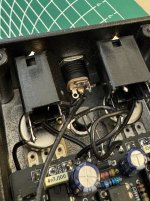
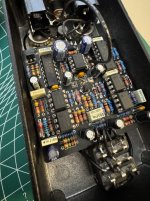
I know it was hard to see in that photo from last night, but the DC jack is indeed wired correctly. Included another shot of the board itself. A socket wasn't fitting around that big cap near IC6, so I had to solder it directly to the board. Also re-checked the orientation of the diodes and they're flowing in the correction direction.

I'm getting ~1.7ohms from IC5.1 to ground. As for voltages on the rest of the pins:
1: 0
2: 9.8
3: 9.5
4: 0
5: 9.5
6: 9.5
7: 9.2
8: 9.8
 

Attachments

  • IMG_1366.jpeg
    IMG_1366.jpeg
    449.1 KB · Views: 7
  • IMG_1367.jpeg
    IMG_1367.jpeg
    495.1 KB · Views: 7
Last edited:
Are you sure you've hacked up your IC5 correctly? It looks like you've connected your DC in to pin 5 and not pin 8.

They're numbered counterclockwise for some reason and not two rows starting from the top, so
1 8
2 7
3 6
4 5

You probably want to disconnect that and measure again to see what's going on.
The voltages really should look something like

1: ~4.5
2: ~4.5
3: ~4.5
4: 0
5: ~4.5
6: ~4.5
7: ~4.5
8: ~9
 
Ok. Back with more numbers. I de-soldered that jumper wire and that's what was causing the nonsense with IC5.1. It looks like my real issue is with IC5.7 (now that I know which pin that is). It's getting 0v.

1: 9.5
2: 5.1
3: 5.1
4: 0
5: 5.1
6: 5.1
7: 0
8: 9.5
 
Question - with the extra power thing desoldered, does it make noise again? If you measure it while
it's making noise, are the voltage readings different?

source: I have no idea what I'm doing but I stayed at a holiday inn express last night

Thinking about it a little more, I think that seeing 9.5 on pin1 while you see 0 volts on pin 7 is
totally expected and doesn't indicate anything wrong with the circuit.

The non-inverting side of one amp and the inverting side of the other amp are supplied by
the exact same voltage (the same net).

The opposing inverting and non-inverting sides of those amps are fed by the outputs of IC4.1 and IC4.7.

An op-amp works by amplifying the voltage difference between their inverting and
non-inverting inputs to try to make them equal. This is why op-amps usually have a
feedback mechanism, where you connect the output to one of the inputs - so it amplifies
the signal but then the amplified voltage feeds back in to the input and once the sides
are equal it doesn't have to amplify as hard any more.

Those op-amps don't have a feedback loop so they have effectively infinite gain. That's why
they're bumping against their respective rails (one all the way positive, one all the way
negative).

The outputs of IC4.1 and IC4.7 could differ by just millivolts (well within the 1% resistor
tolerances) to give enough of a difference to peg IC5's outputs to the rails 'at rest',
but as soon as there's a signal through IC4 the voltages should swing.

My (non-expert) reading of the circuit is that these op-amps are basically turning the audio input
into a square wave. IC4's two halves are hooked to IC5 through diodes pointed in different
directions so each is only passing either the positive or negative part of the signal. This is
then boosted all the way to the rail by IC5, which then feeds it to the CDxxxx chip
because that's effectively a digital (on or off) input.

The CDxxxxx takes the square wave and cuts it in half (OCTAVES!!!) and then feeds it to
the other CDxxxxx which cuts it in half again (EVEN LOWER OCTAVE). So with no input
the "square wave" it generates is just "one side is on all the time".

You might not be able to catch it on a multimeter very well, you could try measuring in
AC mode, or if you have an O-scope you'd be able to see it once you have a signal on there.

Anyway - if you have an audio probe, you should go through the schematic and find where
the audio signal goes to die. A good place to start is the input and output pins of the op-amps,
which can at least narrow it down to the block of the circuit you're looking at, from there
you can binary search or whatever you like to narrow it down further. If you don't have an
audio probe, build an audio probe, and then go through the schematic and find where the
audio signal goes to die. (Seriously, I reach for the audio probe before the multimeter)

 
Back
Top