Tayda UV Printing

Awesome! Thanks for the info!
The only tripping point I found was importing multiple layers from Inkscape. But then I realized that was stupid anyway.
So my workflow is:
1. Only save the color layer from Inkscape.
2. In Scribus, I open that single COLOR layer with the artwork.
3. I copy that layer twice to create WHITE and GLOSS layers. So at this point all 3 layers are identical.
4. Select all objects in the WHITE layer and change them to Roland spot white.
5. Select all objects in the GLOSS layer and change to spot gloss.

If you don't want white or gloss on every part of the print, you'd have to fiddle with it. But if you want the entire design over white with gloss on top, you can do the above 5 steps in just a couple of minutes.

I wasted a few evenings fighting with the inkscape layers, until I figure out they don't matter anyway. You only need the main COLOR layer from Inkscape, and then finish the manipulation in Scribus.
 
Yes. You load the swatch file. Then open the design (in my case from the inkscape file), then replace the inkscape colors with the swatch spot colors for white and gloss. Then tweak the rest of the RGB colors to CMYK.

I had issues with Scribus 1.4.x, sometimes the layers would not output correctly. But when using 1.5.x (whatever the latest "development build" is), I've had no issues. The colors, the size, and the layers are correct in the final PDF.
2 questions: How did you load the Roland swatch into Scribus? when I load the swatch PDF from tayda, it shows the colors as "black", "white", and "registration".

second, how do you change the colors from RGB to CMYK in Scribus? seems to be different from illustrator.
 
2 questions: How did you load the Roland swatch into Scribus? when I load the swatch PDF from tayda, it shows the colors as "black", "white", and "registration".

second, how do you change the colors from RGB to CMYK in Scribus? seems to be different from illustrator.
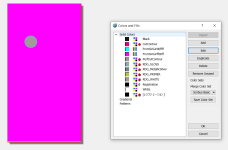
1. Under the Edit menu, select Colors and Fills.
2. Push the Import button and load the Roland swatch file (I stored mine in the scribus swatch folder: C:\Program Files (x86)\Scribus 1.4.8\share\swatches
3. Now you should see RDG_white and RDG_gloss in the list in the window, along with your RGB colors from your art file
4. If I want to change this pink background color to CMYK, I can select the pink color (4th on the list) and Edit it. Another window opens where you can select CMYK and fiddle with the color parameters.
5. Once the COLOR layer is done, select Layers from the Windows drop down menu. There is a button to duplicate the layers. I do that twice to make WHITE and GLOSS.
6. Then select all objects in the WHITE layer, right click on it and select Properties. In the color area, change the fill/stroke color to RDG_WHITE.
7. Then repeat for the Gloss layer.
8. To export, select export pdf. Select PDF 1.5 (1.4 does not support multiple layers). Click the checkbox for include layers. In the color tab, select output intended for PRINTER.

That should do it.

1651108825143.png
 
1. Under the Edit menu, select Colors and Fills.
2. Push the Import button and load the Roland swatch file (I stored mine in the scribus swatch folder: C:\Program Files (x86)\Scribus 1.4.8\share\swatches
3. Now you should see RDG_white and RDG_gloss in the list in the window, along with your RGB colors from your art file
4. If I want to change this pink background color to CMYK, I can select the pink color (4th on the list) and Edit it. Another window opens where you can select CMYK and fiddle with the color parameters.
5. Once the COLOR layer is done, select Layers from the Windows drop down menu. There is a button to duplicate the layers. I do that twice to make WHITE and GLOSS.
6. Then select all objects in the WHITE layer, right click on it and select Properties. In the color area, change the fill/stroke color to RDG_WHITE.
7. Then repeat for the Gloss layer.
8. To export, select export pdf. Select PDF 1.5 (1.4 does not support multiple layers). Click the checkbox for include layers. In the color tab, select output intended for PRINTER.

That should do it.

View attachment 25718
Ah thank you!
I’m on the MacOS version of the 1.5.8 build, so the UI is a bit different (and confusing lol). I’ll play around while I’m in my 8am class tomorrow to see if I can figure it all out. Otherwise I might just need to figure out a different way of getting this as a Uv-ready pdf, and figure out Scribus (or get an Adobe license— as a studio art major I really should probably have one) at a later point.
 
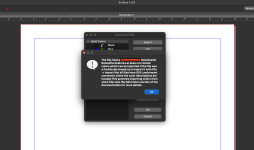
Converted the Roland swatch pdf to a .AI file since Scribus doesn't allow you to import PDFs. Anyone know why I'm getting this?
Screen Shot 2022-04-28 at 7.53.23 AM.png

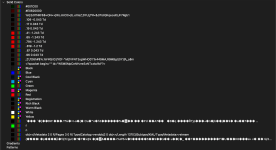
EDIT: I was able to get it by redownloading the swatch file from tayda (when you click the link, it saves as a pdf, but if you do "save as", it saves as the original .ai file. I guess conversions from ai to pdf and back to ai aren't too fun hahah), but this is what my color palette looks like now–– way more than what's supposed to be there, and all labeled weird. anyone know which spot colors are the white and gloss here?
Screen Shot 2022-04-28 at 8.01.35 AM.png
 
Last edited:
That's strange. When I import the colors, I see the RDG names.

Try opening scribus, but don't open your artwork file. Then import the swatch file. That should limit the color list to only the colors in the swatch file.

In scribus 1.4.8, I had to do it that way (import the swatch first, then open my artwork). But I haven't had that issue with 1.5.8 on a PC. If that doesn't work, I'm stumped.
 
That's strange. When I import the colors, I see the RDG names.

Try opening scribus, but don't open your artwork file. Then import the swatch file. That should limit the color list to only the colors in the swatch file.

In scribus 1.4.8, I had to do it that way (import the swatch first, then open my artwork). But I haven't had that issue with 1.5.8 on a PC. If that doesn't work, I'm stumped.
that is without the artwork file in. Must be a Mac issue? hmm... weird
 
Would anyone by any chance be willing to have me send them the SVG (its already separated into the correct layers) to apply the Roland white and gloss spot colors to the respective layers and save as a PDF? I remember it taking just a few seconds to do in illustrator, but apparently Scribus isn't as easy, and I won't have access to illustrator for another few weeks.
 
I have just submitted 4 files with Spencer at amplifyfun and wow what a difference. I’m not sure if it will be the same if he gets busy but we had a back and forth conversation for a few weeks while I ironed out some issues I had. He is happy to tell you if it will, or won’t look good and gives you time to change it before he continues.
We worked together and finally got something I think I will be happy with, and that he thinks will look good. All worked from Inkscape in .svg files. He will do the drilling too. And can work off coordinates or a drill template put in a layer of the graphic. So far so good. I’m looking forward to seeing the results!

Last week I took a shot at using Spencer thanks to the posts here. I had Lovemyswitches drop ship two Gorva S90s straight to Amplifyfun, which was an overnight proposition since they're both in Portland. Took a few days to get a workable digital proof using Affinity Designer, as Spencer caught some things that weren't obvious to me and I am still on the steep part of the learning curve for AD. Once we got a good proof from my one layer PDF it took two days to shipping, I may see the boxes this morning actually. I went for one with the "chameleon" color shifting finish, and then this black sparkle job that will probably end up in my luthier friend's NAMM booth next month:

BlackSparkle.JPG

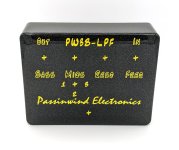
This is V2 of my open source filter preamp box, designed with bass in mind but really nice for acoustic instruments like guitar and mandolin as well. There's a very long thread on Talkbass with all the details: https://www.talkbass.com/threads/the-passinwind-open-source-preamp.1259692/#post-19535550

FWIW, I didn't need a white layer and Spencer only charged me six bucks apiece for printing these. The Gorvas didn't come all that cheap though.
 
Last edited:
Great looking enclosures!
How did you get the metallic looking colors in your 808?
Mind sharing the color codes?
Thanks! It’s actually not metallic looking in real life— it’s just that the print is over the textured sand black powder coat, so the printed colors pick up reflections from all angles a bit more dramatically than if it was printed on a gloss or matte enclosure
 
Last edited:
They look awesome @Bricksnbeatles
What's your verdict on double layering and gloss? Worth it?
Thanks!

Gloss is definitely worth it, but not necessary. It’s worth noting that I didn’t do a color print without a gloss or matte varnish layer, but the EQ which doesn’t have one looks perfectly good! The gloss definitely makes things pop a bit more and it adds a visual depth, but if your design doesn’t necessarily need that added depth then I think you’re fine to omit it- it seems durable enough without.

As for the matter of the double white, I can definitely tell a difference between the single and double, and I’d really just say that it’s down to what you’re doing— the double white for an all white graphic is probably worth it if you want a purer color, but if you’re just doing something where white is the base underneath colors, or if there are just s few white details, then it’s not gonna be a huge difference probably.

I’d be curious to get the same print on the same enclosure color both with and without the double white to eliminate other variables. Maybe I’ll try that with a print soon
 
Hey guys, I am slowly going through this thread so forgive me if this was already answered: can we put together a summary/tutorial on how-to Tayda UV print? Ideally if anybody was willing to share a couple templates (one for 125B and one for the 1590BB) that would be even better! I really want to dip my toes into UV printing but it's a bit daunting :)
 
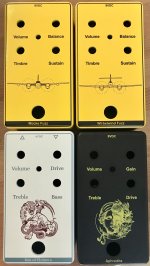
First prints came in. Pretty happy with it except for the fact that the Aphrodite is a 5 pot build and I missed the Savage pot during one redo and didn’t catch it. PEBCAK. I also need to bring in the border a few pixels. But works for now.

Big thanks to too many people involved in this learning curve.

Bonus points if you can work out what the yellow ones will be.. 0434E9A7-6F63-4755-BD8D-CBB701B956DF.jpeg
 
Back
Top