Tayda UV Printing

Ok, this is driving me crazy. Has anybody been able to create the layers in the PDF with Affinity Designer 2, and succeeded to make Tayda's system recognise them?

The thing is: I can do everything: the Roland spot colors, the layers in Designer, etc. I export the PDF without problems (for print, keeping the spots and the layers, unchecking the Advanced Features to maximise compatibility).
I open the PDF in Acrobat Reader, the layers are there, as expected.
But I asked a friend to open the PDF in Illustrator: no layers, everything clumped into one layer.

The thing with layers is that, apparently, each program has its own way of doing them. It's not part of the PDF standard.

Affinity Designer can read Illustrator layers from an Illustrator PDF, but not the other way around. So, technically, even though you can see the layers in Acrobat Reader, Illustrator can't, and Tayda's system must expect that, because there's no way that there's no layers in the PDF I'm uploading. These guys must be opening the file in Illustrator and printing from there, because there's no other explanation.

So, if anybody has any clue to make this work without using a third program (or using something open source), please, let me know.
In the meantime, I asked my friend to re-create the layers in the PDF from Illustrator, and I hope that works for Tayda.
Cheers.
 
Ok, this is driving me crazy. Has anybody been able to create the layers in the PDF with Affinity Designer 2, and succeeded to make Tayda's system recognise them?

The thing is: I can do everything: the Roland spot colors, the layers in Designer, etc. I export the PDF without problems (for print, keeping the spots and the layers, unchecking the Advanced Features to maximise compatibility).
I open the PDF in Acrobat Reader, the layers are there, as expected.
But I asked a friend to open the PDF in Illustrator: no layers, everything clumped into one layer.

The thing with layers is that, apparently, each program has its own way of doing them. It's not part of the PDF standard.

Affinity Designer can read Illustrator layers from an Illustrator PDF, but not the other way around. So, technically, even though you can see the layers in Acrobat Reader, Illustrator can't, and Tayda's system must expect that, because there's no way that there's no layers in the PDF I'm uploading. These guys must be opening the file in Illustrator and printing from there, because there's no other explanation.

So, if anybody has any clue to make this work without using a third program (or using something open source), please, let me know.
In the meantime, I asked my friend to re-create the layers in the PDF from Illustrator, and I hope that works for Tayda.
Cheers.
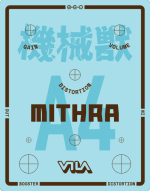
Care to share the file here? I can check it out for you.
 
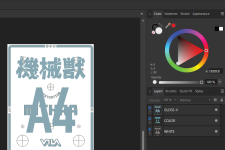
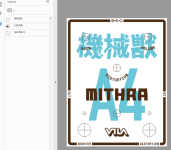
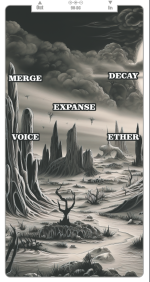
This is how it's supposed to look when applied:

mithra-a4.png

And now that I look at it, I just realised that I forgot the A > B and B > A labels for the toggle switch in the middle... (but, well, I have time to fix it if they reject my last file, right? XDDD)
 
This looks good like it should work

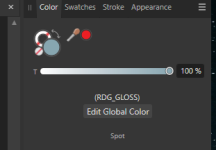
AD2:
View attachment 53104

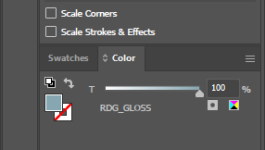
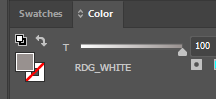
Right spot colors show in AI and AD:

View attachment 53102

View attachment 53103

View attachment 53105


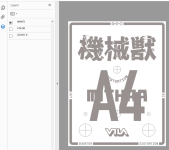
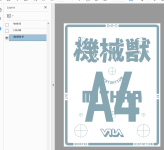
Layers are there in the PDF:

View attachment 53099

View attachment 53100

View attachment 53101
Well, let's see if it's good enough for Tayda. If not, I have the one my friend recreated the layers in the PDF in Illustrator, and I'll see if that's valid. But I'm seriously considering using a local printer. I have a supplier for the enclosures already, and I found a printer near me that can probably do the job (though they don't do singles, but I'm printing 5 enclosures with Tayda, so I don't care about that).
Thanks for you help!
 
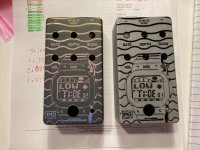
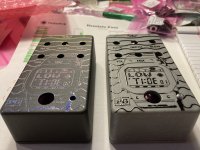
Just received my first ever UV prints from Tayda. Thanks to everyone in this thread sharing their work, I was able to figure out how to create something I am pretty proud of. Left: Matte grey sand powder coat, white under coat, sunset gradient (I used Illustrator), UV gloss. Right: Matte clear powder coat, NO white under coat, all black design, UV gloss.

Sadly I entered the wrong LED hole size as I wanted to use the 5mm bezel. Should I enlarge the hole or just leave it? They look so cool!

IMG_8327.JPG
IMG_8328.JPG
 
Can someone take a look at this pdf? No matter what I try, it looks very pale and gray as a pdf. It looks fine in Illustrator and if I export it as a png (png included as reference). Is this just one of those "CMYK pdf preview looks funky and it'll print fine" or will it look very pale as an end result? Anyone have experience with similar issues?

Edit: Also attached a snipping tool screenshot of what it looks like in browsers or Acrobat.
 

Attachments

  • Gravitation_final.png
    Gravitation_final.png
    1.4 MB · Views: 9
  • Gravitation_final.pdf
    Gravitation_final.pdf
    4.7 MB · Views: 6
  • Screenshot 2023-07-26 162524.png
    Screenshot 2023-07-26 162524.png
    948.6 KB · Views: 8
Anyone? I'll probably drop an order and hope for the best once they stock up on the 1590BB2's, but it would be nice if someone had had experience before and could tell me it's going to be fine 👀
 
This is how I see it in my machine (Mac mini):

Screenshot.png

Since it's a raster image, the difference could be in the color profile and color calibration of the PC. If your monitor is not calibrated, and you're using Windows, you may see something completely different to what I see.
 
This is how I see it in my machine (Mac mini):

View attachment 53222

Since it's a raster image, the difference could be in the color profile and color calibration of the PC. If your monitor is not calibrated, and you're using Windows, you may see something completely different to what I see.
Looks light gray, just like it looks on my computer. If you check my post, there's also a .png which is much darker - that's how it looks in Illustrator or if I export it as a PNG. But I suspect it's probably just some quirk and it'll print nicely, I'll do the order as soon as they get the 1590BB2's in stock. Was supposed to be yesterday, I think it will be any day now.

Edit:

I've used a step bit to enlarge holes with no problems. They're on the pricey side, but work well for the task.
FWIW I've enlarged holes manually with a small hand file (to go from a smaller DC jack into a larger one, that was a pain) as well as with just an old knife, since the aluminum is quite soft. It probably ruins the blade though, so I would only do it with an older, crappy knife. I haven't had any problems with the powder coats or prints, but you have to be careful not to accidentally poke the enclosure itself.
 
Looks light gray, just like it looks on my computer. If you check my post, there's also a .png which is much darker - that's how it looks in Illustrator or if I export it as a PNG. But I suspect it's probably just some quirk and it'll print nicely, I'll do the order as soon as they get the 1590BB2's in stock. Was supposed to be yesterday, I think it will be any day now.

Edit:


FWIW I've enlarged holes manually with a small hand file (to go from a smaller DC jack into a larger one, that was a pain) as well as with just an old knife, since the aluminum is quite soft. It probably ruins the blade though, so I would only do it with an older, crappy knife. I haven't had any problems with the powder coats or prints, but you have to be careful not to accidentally poke the enclosure itself.
I have had good luck both drilling and enlarging holes with a step drill bit – it may not be the nicest one in the world but I have a fairly inexpensive one from Amazon (maybe $10 – $15?) that has held up well, so long as you use WD-40 or some other cutting lubricant on it while drilling. I also bought a complete set of them with a case for maybe around $20 on Amazon but I don’t use them as much because I can accomplish most of what I need with a single step drill bit that runs from 2 mm to 12 mm.

But for enlarging existing holes by only a millimeter or two, I just find that a hand reamer tool (also maybe $10 on Amazon) works just great, and really allows you to enlarge the hole very precisely, rather than by whole millimeter increments as a step drill bit might require you to do.

Mike
 
FWIW I got tired of waiting for more 1590BB2's and picked one of the last orange ones in store (hopefully there actually is one) and submitted my order before more things from my cart go out of stock. I think I got the gray issue fixed, not sure what it was but it shows up correctly in a browser and Acrobat Reader now. It _might_ have been that I switched color mode to RGB, then did the rasterization and then switched to CMYK. Not sure.
 
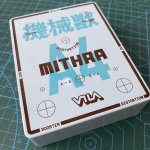
The enclosures arrived!

IMG_1836.jpeg

Overall, I’m happy with the results, considering all the problems with using Affinity Designer instead of Illustrator.

The base color is as expected (looks lighter in the picture, but it’s actually more saturated).

The print looks darker, overall. But is seems like the white layer is there.

The top parts fits exactly with the top pcb (effects, power and pots), though I’m re-making the pcb, to change the power jack (I chose the wrong part).

The bottom part, I somehow put the footswitches a couple millimeters more separated than in the pcb, so I’ll probably remake that pcb too.

But in general, I’m happy. Not bad for a first try. It’s really satisfying having the actual object in your hands, instead of looking at the design on the screen.

In any case, I think I won’t be using Tayda again. Not an enjoyable experience, in my opinion. I’ll make my numbers and see if I can switch to a local printer (I already contacted one).

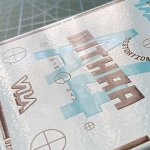
Here’s a detail of the embossed effect you get by stacking the white, color and varnish layers (and the powder coating texture):

IMG_1840.jpeg

P.S: I will be making a post detailing the exact steps I made to create the files for Tayda using Affinity Designer 2, for those who want to use it. Cheers!
 
The enclosures arrived!

View attachment 53622

Overall, I’m happy with the results, considering all the problems with using Affinity Designer instead of Illustrator.

The base color is as expected (looks lighter in the picture, but it’s actually more saturated).

The print looks darker, overall. But is seems like the white layer is there.

The top parts fits exactly with the top pcb (effects, power and pots), though I’m re-making the pcb, to change the power jack (I chose the wrong part).

The bottom part, I somehow put the footswitches a couple millimeters more separated than in the pcb, so I’ll probably remake that pcb too.

But in general, I’m happy. Not bad for a first try. It’s really satisfying having the actual object in your hands, instead of looking at the design on the screen.

In any case, I think I won’t be using Tayda again. Not an enjoyable experience, in my opinion. I’ll make my numbers and see if I can switch to a local printer (I already contacted one).

Here’s a detail of the embossed effect you get by stacking the white, color and varnish layers (and the powder coating texture):

View attachment 53623

P.S: I will be making a post detailing the exact steps I made to create the files for Tayda using Affinity Designer 2, for those who want to use it. Cheers!
Looks great. One tip for you- for the holes you’re going to drill, just put a small dot or crosshair. That would alleviate your problem of them being off. If you drill them where they need to be, the washers will most likely cover up the lines.
 
Looks great. One tip for you- for the holes you’re going to drill, just put a small dot or crosshair. That would alleviate your problem of them being off. If you drill them where they need to be, the washers will most likely cover up the lines.
He, he, the thing is, I’m a sucker for precision, so my idea is to drill exactly where the marks are (nothing should be left behind, and if any little line remains, as you said, washers will cover them, as the circles are the size of the hole, not the washers), and I will modify the pcb to fit exactly. The pots are exactly in place, but I may have miscalculated the switches by a millimeter, I think. I’ll show the enclosure with holes tomorrow.

Edit: bear in mind that everything is mounted on a pcb (switches, pots, jacks), so there’s little margin to move things. I hate cables, so there won’t be any in these pedals. But I need to be precise. And since pcbs are cheap, I don’t mind iterating them.
 
Last edited:
Back
Top