Cool!!Here they are:
Affinity will allow the multiple layers even if it does not open in Illustrator that way. These are all 3 layer designs. I will pay for the extra pass of white on black next time though.

You are using an out of date browser. It may not display this or other websites correctly.
You should upgrade or use an alternative browser.
You should upgrade or use an alternative browser.
Tayda UV Printing
- Thread starter dmnCrawler
- Start date

finebyfine
Well-known member
Posted a resource I made for my own convenience a while back: a list of tayda pedalpcb 125 enclosures organized by color with actual pictures of the colors: https://fine.rip/audio/tayda/painted-enclosures Also just sent my black on black design for printing knock on wood.
Some recent orders. Guv (vizier) arrives today I believe. No Hope is black on black


(l-r: guv, pyrocumulus, green russian muff, bellum mkii, foxy lady muff, superheterodyne receiver)
Some recent orders. Guv (vizier) arrives today I believe. No Hope is black on black
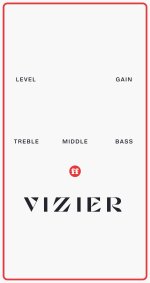

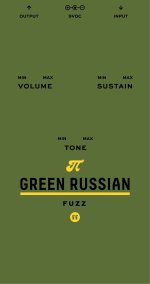


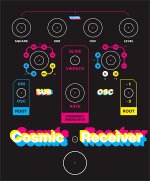
(l-r: guv, pyrocumulus, green russian muff, bellum mkii, foxy lady muff, superheterodyne receiver)
Last edited:

Many__Of__Horror
Active member
How do the UV enclosures hold up? Do they need a clear coat over them or good to go?

dmnCrawler
Well-known member
I find that you really need to get the emboss or gloss coats to protect them. The plain UV scratches way to easy without some type of clearcoat.How do the UV enclosures hold up? Do they need a clear coat over them or good to go?
Many__Of__Horror
Active member
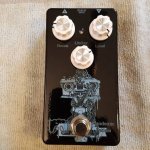
I see what you mean, when punching out the drill holes it easily scratched. Just put a layer of Satin clear coat on my black matt sand printed enclosure to see how it turns out.I find that you really need to get the emboss or gloss coats to protect them. The plain UV scratches way to easy without some type of clearcoat.
dmnCrawler
Well-known member
Yeah, I found that the 2 dollars is well worth the protection and the lack of hassle. When I get them in drill holes and put the circuit in. Pedal done.I see what you mean, when punching out the drill holes it easily scratched. Just put a layer of Satin clear coat on my black matt sand printed enclosure to see how it turns out.

SYLV9ST9R
Well-known member
That's what I'll do from now on (even though I only play in my basement, so they don't get stomped on vigorously!)Yeah, I found that the 2 dollars is well worth the protection and the lack of hassle. When I get them in drill holes and put the circuit in. Pedal done.

PapaBear
Well-known member
That's a handy file, thanks!Posted a resource I made for my own convenience a while back: a list of tayda pedalpcb 125 enclosures organized by color with actual pictures of the colors: https://fine.rip/audio/tayda/painted-enclosures Also just sent my black on black design for printing knock on wood.
Some recent orders. Guv (vizier) arrives today I believe. No Hope is black on black
View attachment 10609View attachment 10610View attachment 10611View attachment 10612View attachment 10608View attachment 10613
(l-r: guv, pyrocumulus, green russian muff, bellum mkii, foxy lady muff, superheterodyne receiver)
finebyfine
Well-known member
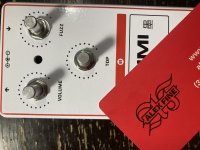

BurntFingers
Well-known member
@BurntFingers this red is pantone 485c btw. pretty close match to the same color printed on paper
View attachment 10657
Looks great. Do you have the cmyk values handy?
finebyfine
Well-known member
Looks great. Do you have the cmyk values handy?
CMYK: 0, 95, 100 0
dmnCrawler
Well-known member
Put it all together. I'll do more of these. Blackout... I still need to get the octave to work with this.

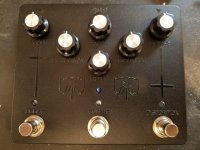
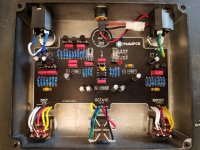
I'm happy with how this test turned out, I have to get the colors tuned in a little better, switch from RGB to CYMK wasn't too kind and theyu look washed out.
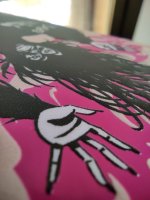
I'm hoping that adding a texture to the flat colors, specifically the black, will help hide the "inkjet" look the printing has, very noticeable on last pic.
Also my whites are kinda pink, should I add white to my color layer too? I only used the white layer background.
Gloss is emboss.

I'm hoping that adding a texture to the flat colors, specifically the black, will help hide the "inkjet" look the printing has, very noticeable on last pic.
Also my whites are kinda pink, should I add white to my color layer too? I only used the white layer background.
Gloss is emboss.

dmnCrawler
Well-known member
They are starting to do a second pass of the white. It may be a better option. I have not tried the white on the color layer yet. I think the inks have a different opacity on the color layer so it may not help as much as a second pass. I will be testing that soon.I'm happy with how this test turned out, I have to get the colors tuned in a little better, switch from RGB to CYMK wasn't too kind and theyu look washed out.
I'm hoping that adding a texture to the flat colors, specifically the black, will help hide the "inkjet" look the printing has, very noticeable on last pic.
Also my whites are kinda pink, should I add white to my color layer too? I only used the white layer background.
Gloss is emboss.
Many__Of__Horror
Active member
Is there a good resource for Exporting Layers correctly in Affinity Designer? The first design I did and exported to .PDF keep the layer heirachy, my second design however no matter which export profile I try keeps throwing the other two layer (Colour & Gloss-V) into the White Layer...Headscratching
Can I use gloss and emboss at the same time on my print? I want the letters to be indented so I'd make everything emboss except the letters that would be gloss.
If not I guess I could just cut the lettering out of the emboss but I'd worry the paint wouldn't hold due to not having any varnish.
If not I guess I could just cut the lettering out of the emboss but I'd worry the paint wouldn't hold due to not having any varnish.

Danbieranowski
Well-known member
Confirming from what we talked about in the past... if the RDG_White consolidates to the Color layer when exporting from Affinity, it ends up being printed more like the grey we are used to seeing as RDG_White and not straight white right?They are starting to do a second pass of the white. It may be a better option. I have not tried the white on the color layer yet. I think the inks have a different opacity on the color layer so it may not help as much as a second pass. I will be testing that soon.
dmnCrawler
Well-known member
Yeah I hate when it comes out gray.Confirming from what we talked about in the past... if the RDG_White consolidates to the Color layer when exporting from Affinity, it ends up being printed more like the grey we are used to seeing as RDG_White and not straight white right?
I have been wondering that myself. So fat I have only let the holes in the emboss go to the powdercoatCan I use gloss and emboss at the same time on my print? I want the letters to be indented so I'd make everything emboss except the letters that would be gloss.
If not I guess I could just cut the lettering out of the emboss but I'd worry the paint wouldn't hold due to not having any varnish.
I am still working on that. I need to make another order and then I will know for sure.Is there a good resource for Exporting Layers correctly in Affinity Designer? The first design I did and exported to .PDF keep the layer heirachy, my second design however no matter which export profile I try keeps throwing the other two layer (Colour & Gloss-V) into the White Layer...Headscratching
finebyfine
Well-known member
Does anyone have any tips / notes for Tayda's custom enclosure drilling for non standard pedalpcb templates? The drill design tool looks intuitive enough but wanna make sure it comes out right. I've been sitting on finished hyped fuzz and carcass fuzz boards procrastinating on figuring this out
SYLV9ST9R
Well-known member
I can send you my hyped fuzz coordinates, it came out great.Does anyone have any tips / notes for Tayda's custom enclosure drilling for non standard pedalpcb templates? The drill design tool looks intuitive enough but wanna make sure it comes out right. I've been sitting on finished hyped fuzz and carcass fuzz boards procrastinating on figuring this out